xCluster replication lets you stream data from one YugabyteDB universe to another for DR, migrations, or cross-region analytics.
YugabyteDB Anywhere (YBA) exposes a rich REST API to manage xCluster configs which means we can automate the entire setup with just curl, jq, and a few environment variables.
This YugabyteDB Tip walks through how to create, validate, and retrieve your xCluster config purely from the YBA API, without ever touching the UI.
The examples below are very close to those in the YugabyteDB Cross Cluster Replication APIs Python notebook, but shell-friendly.
What is xCluster?
xCluster replication allows you to replicate data between two or more YugabyteDB universes in near real-time.
It’s an asynchronous, cross-cluster replication mechanism that ensures data durability, business continuity, and geographic resilience, all without sacrificing performance.
For financial institutions, as an example, this matters immensely:
● 💳 High availability: A secondary region can take over if the primary region experiences downtime—without data loss for committed transactions.
● 🔒 Regulatory compliance: Many fintechs must maintain data locality (e.g., EU vs. US) while still ensuring continuous operations.
● ⚡ Zero-disruption migrations: Move workloads or upgrade clusters with live replication instead of risky, multi-hour cutovers.
In short… xCluster helps enterprises (like fintechs) treat resilience as an architectural primitive, not an afterthought.
⚙️ Step 1: Set your environment variables
					export YBA_HOST="yba.example.com:9000"
export YBA_PROTO="https"             # or http for local testing
export YBA="$YBA_PROTO://$YBA_HOST"
export YBA_TOKEN="<your_api_token>"
export CUUID="<your_customer_uuid>"
alias ycurl='curl -sS -H "X-AUTH-YW-API-TOKEN: $YBA_TOKEN" -H "Content-Type: application/json"'
🔑 You can find your Customer UUID and API Token on your Profile page inside YBA.
🌍 Step 2: List universes and capture their UUIDs
You’ll need both the source and target universe UUIDs.
ycurl "$YBA/api/v1/customers/$CUUID/universes" | jq -r '.[] | "\(.name)\t\(.universeUUID)"'
Example:
					[ec2-user ~]$ ycurl "$YBA/api/v1/customers/$CUUID/universes"   | jq -r '.[] | "\(.name)\t\(.universeUUID)"' | grep api-test | sort
jimk-api-test-source	e7706f1a-e043-46fb-8aa7-8d52a68241c1
jimk-api-test-target    a769ac98-066a-4353-afcf-d795ef53b458

[ec2-user ~]$ export SRC_UUUID="e7706f1a-e043-46fb-8aa7-8d52a68241c1"
[ec2-user ~]$ export TGT_UUUID="a769ac98-066a-4353-afcf-d795ef53b458"
🗃️ Step 3: Create a database and a table to replicate
					[ec2-user ~]$ PGPASSWORD=Yugabyte123! ysqlsh -h 172.161.21.222 -U yugabyte -c "CREATE DATABASE api_test;"
CREATE DATABASE

[ec2-user ~]$ PGPASSWORD=Yugabyte123! ysqlsh -h 172.161.21.222 -U yugabyte -d api_test -c "CREATE TABLE api_test(id INT PRIMARY KEY, c1 TEXT);"
CREATE TABLE

[ec2-user ~]$ PGPASSWORD=Yugabyte123! ysqlsh -h 172.161.21.222 -U yugabyte -d api_test -c "INSERT INTO api_test SELECT g, md5(random()::TEXT) FROM generate_series(1, 10000) g;"
INSERT 0 10000
Add an enviroment variable to track the database to be replicated:
export DB_NAME="api_test"
🗂️ Step 4: Discover Table UUIDs for api_test
					TABLES_URL="$YBA/api/v1/customers/$CUUID/universes/$SRC_UUUID/tables?includeTableDetails=true"

# Compact (no dashes) table IDs for replication
TABLES_COMPACT_JSON=$(
  ycurl "$TABLES_URL" | jq --arg db "$DB_NAME" '
    [ .[]
      | select(
          (.keySpace == $db)
          and (.tableType == "PGSQL_TABLE_TYPE" or .tableType == "YSQL")
          and ((.relationType|tostring) == "USER_TABLE_RELATION")
          and ((.isIndexTable // false) | not)
        )
      | .tableID
    ]'
)

# Dashed UUIDs for completeness
TABLES_DASHED_JSON=$(
  ycurl "$TABLES_URL" | jq --arg db "$DB_NAME" '
    [ .[]
      | select(
          (.keySpace == $db)
          and (.tableType == "PGSQL_TABLE_TYPE" or .tableType == "YSQL")
          and ((.relationType|tostring) == "USER_TABLE_RELATION")
          and ((.isIndexTable // false) | not)
        )
      | .tableUUID
    ]'
)

echo "$TABLES_COMPACT_JSON" | jq .
echo "$TABLES_DASHED_JSON"  | jq .
Example output:
					[
  "00004000000030008000000000004000"
]
[
  "00004000-0000-3000-8000-000000004000"
]
🧰 Step 5: (Optional) Specify storage for bootstrap
If YBA needs to bootstrap replication by backing up and restoring the source DB, we’re going to need the storage config UUID.
This command lists all backup configs available:
ycurl "$YBA/api/v1/customers/$CUUID/configs" | jq -r '.[] | "\(.configName)\t\(.configUUID)"' | sort
Once you have the storage UUID, store it in an environment variable:
export SCUUID="<storage_config_uuid>" # leave blank if target already has data
🧩 Step 6: Build the JSON payload dynamically with jq
					PAYLOAD=$(jq -n \
  --arg name  "xc-demo" \
  --arg src   "$SRC_UUUID" \
  --arg tgt   "$TGT_UUUID" \
  --arg sc    "$SCUUID" \
  --argjson tables_compact "$TABLES_COMPACT_JSON" \
  --argjson tables_dashed  "$TABLES_DASHED_JSON" '
{
  name: $name,
  sourceUniverseUUID: $src,
  targetUniverseUUID: $tgt,
  configType: "Basic",
  dryRun: false,

  tables:     $tables_compact,
  tableUuids: $tables_dashed,

  bootstrapParams: {
    allowBootstrap: true,
    backupRequestParams: {
      parallelism: 0,
      storageConfigUUID: $sc
    },
    tables:     $tables_compact,
    tableUuids: $tables_dashed
  }
}')

echo "$PAYLOAD" | jq .
You should see output like:
					{
  "name": "xc-demo",
  "sourceUniverseUUID": "e7706f1a-e043-46fb-8aa7-8d52a68241c1",
  "targetUniverseUUID": "a769ac98-066a-4353-afcf-d795ef53b458",
  "configType": "Basic",
  "dryRun": false,
  "tables": [
    "00004000000030008000000000004000"
  ],
  "tableUuids": [
    "00004000-0000-3000-8000-000000004000"
  ],
  "bootstrapParams": {
    "allowBootstrap": true,
    "backupRequestParams": {
      "parallelism": 0,
      "storageConfigUUID": "6304c87c-fa3b-4c57-b4c9-e685213f3517"
    },
    "tables": [
      "00004000000030008000000000004000"
    ],
    "tableUuids": [
      "00004000-0000-3000-8000-000000004000"
    ]
  }
}
🧪 Step 7: Validate with a Dry Run
					DRY_PAYLOAD=$(echo "$PAYLOAD" | jq '.dryRun=true')
ycurl -X POST "$YBA/api/v1/customers/$CUUID/xcluster_configs" \
  --data "$DRY_PAYLOAD" | jq .
Look for:
					{
  "success": true,
  "message": "The pre-checks are successful"
}
🔗 Step 8: Create the xCluster configuration (Real Run!)
					CREATE_JSON=$(ycurl -X POST \
  "$YBA/api/v1/customers/$CUUID/xcluster_configs" \
  --data "$PAYLOAD")

echo "$CREATE_JSON" | jq .
Track the async task:
					TASK_ID=$(echo "$CREATE_JSON" | jq -r '.taskUUID // .taskId // .taskUuid // empty')
until ycurl "$YBA/api/v1/customers/$CUUID/tasks/$TASK_ID" \
  | jq -e 'select(.status|test("Success|Completed|Failure|Failed"))' >/dev/null; do
  sleep 5
done

ycurl "$YBA/api/v1/customers/$CUUID/tasks/$TASK_ID" | jq .
Expected output:
					{
  "title": "Created XClusterConfig : xc-demo",
  "createTime": "Mon Oct 13 13:28:43 UTC 2025",
  "completionTime": "Mon Oct 13 13:29:46 UTC 2025",
  "target": "xc-demo",
  "targetUUID": "e7706f1a-e043-46fb-8aa7-8d52a68241c1",
  "type": "Create",
  "status": "Success",
  "percent": 100.0,
  "correlationId": "70bf2749-547a-4613-8f41-4568c9e360ff",
  "userEmail": "jknicely@yugabyte.com",
  "details": {
    "taskDetails": [
      {
        "title": "Configuring the universe",
        "description": "Creating and populating the universe config, waiting for the various machines to discover one another.",
        "state": "Success",
        "extraDetails": []
      },
      {
        "title": "Validating configurations",
        "description": "Validating configurations before proceeding",
        "state": "Success",
        "extraDetails": []
      },
      {
        "title": "Preflight Checks",
        "description": "Perform preflight checks to determine if the task target is healthy.",
        "state": "Success",
        "extraDetails": []
      },
      {
        "title": "Bootstrapping Source Universe",
        "description": "Creating a checkpoint on the source universe.",
        "state": "Success",
        "extraDetails": []
      },
      {
        "title": "Creating Backup",
        "description": "Creating backup for either a keyspace or a set of tables.",
        "state": "Success",
        "extraDetails": []
      },
      {
        "title": "Restoring Backup",
        "description": "Restoring from a backup.",
        "state": "Success",
        "extraDetails": []
      }
    ]
  },
  "abortable": false,
  "retryable": false,
  "canRollback": false
}
☑️ Step 9: Verify xCluster Configuration
					# 1️⃣ Extract the first (or only) xCluster config UUID from the source universe
XC_UUID=$(ycurl "$YBA/api/v1/customers/$CUUID/universes/$SRC_UUUID" \
  | jq -r '.universeDetails.sourceXClusterConfigs[0] // empty')

# 2️⃣ Show it for verification
echo "XC_UUID=${XC_UUID:-<not found>}"

# 3️⃣ If found, pull the xCluster config details from YBA
if [ -n "$XC_UUID" ]; then
  ycurl "$YBA/api/v1/customers/$CUUID/xcluster_configs/$XC_UUID" | jq .
else
  echo "No xCluster config UUID found for this universe."
fi
What that does:
● Reads the universe details for
$SRC_UUUID.● Extracts the first UUID in the
sourceXClusterConfigsarray.● Uses that UUID to query the
GET /xcluster_configs/{uuid}endpoint — the same one used in the Python notebook examples you referenced.
You should see the full xCluster config object returned… including its name, source/target universes, replication status, tables, and bootstrap info.
					{
  "lag": {
    "tserver_async_replication_lag_micros": {
      "queryKey": "tserver_async_replication_lag_micros",
      "layout": {
        "title": "Async Replication Lag",
        "xaxis": {
          "type": "date",
          "alias": {}
        },
        "yaxis": {
          "alias": {
            "async_replication_sent_lag_micros": "Sent Lag",
            "async_replication_committed_lag_micros": "Committed Lag"
          },
          "ticksuffix": " ms"
        }
      },
      "directURLs": [
        "https://10.9.3.89:9090/graph?g0.expr=avg%28max+by+%28exported_instance%2C+saved_name%29%28%7Bnode_prefix%3D%22yb-15-jimk-api-test-source%22%2C+saved_name%3D%7E%22async_replication_sent_lag_micros%7Casync_replication_committed_lag_micros%22%2C+stream_id%3D%22456287e0dd6a89963c4e696ce9d766de%22%7D%29%29+by+%28exported_instance%2C+saved_name%29+%2F+1000&g0.tab=0&g0.range_input=3600s&g0.end_input=&g0.step_input=30"
      ],
      "metricsLinkUseBrowserFqdn": true,
      "data": [
        {
          "name": "Sent Lag",
          "metricName": "",
          "instanceName": "yb-15-jimk-api-test-source-n1",
          "type": "scatter",
          "x": [
            1760367128000
          ],
          "y": [
            "0.001"
          ]
        },
        {
          "name": "Committed Lag",
          "metricName": "",
          "instanceName": "yb-15-jimk-api-test-source-n1",
          "type": "scatter",
          "x": [
            1760367128000
          ],
          "y": [
            "0.001"
          ]
        }
      ]
    }
  },
  "uuid": "ece9d69b-c8ac-4535-a7e3-39042b16b412",
  "name": "xc-demo",
  "sourceUniverseUUID": "e7706f1a-e043-46fb-8aa7-8d52a68241c1",
  "targetUniverseUUID": "a769ac98-066a-4353-afcf-d795ef53b458",
  "status": "Running",
  "sourceUniverseState": "Unconfigured for DR",
  "targetUniverseState": "Unconfigured for DR",
  "tableType": "YSQL",
  "paused": false,
  "imported": false,
  "createTime": "2025-10-13T13:28:43Z",
  "modifyTime": "2025-10-13T13:29:46Z",
  "namespaces": [],
  "replicationGroupName": "e7706f1a-e043-46fb-8aa7-8d52a68241c1_xc-demo",
  "type": "Basic",
  "sourceActive": true,
  "targetActive": true,
  "secondary": false,
  "pitrConfigs": [],
  "usedForDr": false,
  "tables": [
    "00004000000030008000000000004000"
  ],
  "dbs": [],
  "tableDetails": [
    {
      "tableId": "00004000000030008000000000004000",
      "streamId": "456287e0dd6a89963c4e696ce9d766de",
      "replicationSetupDone": true,
      "needBootstrap": false,
      "bootstrapCreateTime": "2025-10-13T13:28:47Z",
      "restoreTime": "2025-10-13T13:29:43Z",
      "indexTable": false,
      "status": "Running",
      "sourceTableInfo": {
        "tableID": "00004000000030008000000000004000",
        "tableUUID": "00004000-0000-3000-8000-000000004000",
        "keySpace": "api_test",
        "tableType": "PGSQL_TABLE_TYPE",
        "tableName": "api_test",
        "relationType": "USER_TABLE_RELATION",
        "sizeBytes": 607559.0,
        "walSizeBytes": 1048576.0,
        "isIndexTable": false,
        "pgSchemaName": "public",
        "colocated": false
      },
      "targetTableInfo": {
        "tableID": "00004000000030008000000000004000",
        "tableUUID": "00004000-0000-3000-8000-000000004000",
        "keySpace": "api_test",
        "tableType": "PGSQL_TABLE_TYPE",
        "tableName": "api_test",
        "relationType": "USER_TABLE_RELATION",
        "sizeBytes": 607559.0,
        "walSizeBytes": 0.0,
        "isIndexTable": false,
        "pgSchemaName": "public",
        "colocated": false
      },
      "replicationStatusErrors": [],
      "backupUuid": "9a7c05ce-6c9d-4571-a60a-08a84a1a7971",
      "restoreUuid": "789658aa-a5de-4efa-9cce-78e6324aece1"
    }
  ],
  "namespaceDetails": []
}
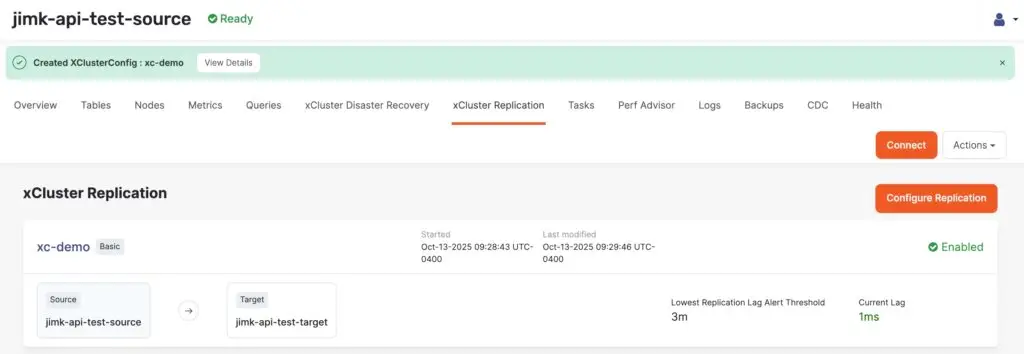
☑️ Step 10: Verify xCluster Configuration in YBA
Once you’ve created the xCluster config using the YBA API, you’ll be able to view the config in YBA itself!
☑️ Step 11: Verify xCluster Configuration with more data
					[ec2-user@ip-10-9-3-89 ~]$ # Source DB
[ec2-user@ip-10-9-3-89 ~]$ PGPASSWORD=Yugabyte123! ysqlsh -h 172.161.21.222 -U yugabyte -d api_test -c "SELECT COUNT(*) FROM api_test;"
 count
-------
 10000
(1 row)

[ec2-user@ip-10-9-3-89 ~]$ # Target DB
[ec2-user@ip-10-9-3-89 ~]$ PGPASSWORD=Yugabyte123! ysqlsh -h 172.150.20.61 -U yugabyte -d api_test -c "SELECT COUNT(*) FROM api_test;"
 count
-------
 10000
(1 row)

[ec2-user@ip-10-9-3-89 ~]$ # Source DB (Add more data)
[ec2-user@ip-10-9-3-89 ~]$ PGPASSWORD=Yugabyte123! ysqlsh -h 172.161.21.222 -U yugabyte -d api_test -c "INSERT INTO api_test SELECT g, md5(random()::TEXT) FROM generate_series(10001, 50000) g;;"
INSERT 0 40000

[ec2-user@ip-10-9-3-89 ~]$ PGPASSWORD=Yugabyte123! ysqlsh -h 172.161.21.222 -U yugabyte -d api_test -c "SELECT COUNT(*) FROM api_test;"
 count
-------
 50000
(1 row)

[ec2-user@ip-10-9-3-89 ~]$ # Target DB (Data replicated)
[ec2-user@ip-10-9-3-89 ~]$ PGPASSWORD=Yugabyte123! ysqlsh -h 172.150.20.61 -U yugabyte -d api_test -c "SELECT COUNT(*) FROM api_test;"
 count
-------
 50000
(1 row)
🎯 Conclusion
This workflow shows how powerful the YBA API has become for automation.
In just a few commands, you can now:
● Discover table IDs dynamically
● Generate robust payloads that pass validation across builds
● Run a non-destructive dry-run check
● Query the universe itself for its xCluster relationships
● Retrieve config details for deeper introspection or monitoring
Whether you’re scripting xCluster deployment in CI/CD or building self-service DR orchestration, these API calls give you fine-grained control … no UI clicks required.
Have Fun!