Beyond Synonyms: More Options in YugabyteDB

In a previous YugabyteDB Tip, Simulate Synonyms in YSQL, we showed how changing the search_path lets you query objects in different schemas without specifying the schema name. That approach can mimic Oracle’s synonyms in the simplest sense, giving you unqualified access to objects across schemas.

But in real-world migrations, search_path alone isn’t always enough. Names can collide, permissions get messy, and sometimes you need synonyms that point to views or even remote databases. Today’s tip extends the idea with additional, more flexible patterns.

1. Use the search_path (the simple mimic)

This is what we covered before:

				
					CREATE SCHEMA crm;
CREATE TABLE crm.customer (
  id   bigint PRIMARY KEY,
  name text
);

CREATE ROLE appuser LOGIN PASSWORD 'secret';
ALTER ROLE appuser SET search_path = crm, public;


Now:

				
					SELECT * FROM customer;


…resolves to crm.customer.

✅ Works when you have a single schema and no naming conflicts.
⚠️ Collisions and ambiguity can appear in larger systems.

2. Create a “synonym schema” of views

Instead of relying on search_path, create a schema explicitly for synonyms:

				
					CREATE SCHEMA syn;

CREATE OR REPLACE VIEW syn.customer AS
  SELECT * FROM crm.customer;


Applications can now always call syn.customer… the closest Oracle-like feel.

Views of views?

Yes, if your base object is already a view, you’ll just create a “view of a view.” That’s safe: PostgreSQL/YugabyteDB inlines views at plan time, so there’s no runtime penalty.

3. Restrict apps to synonyms with GRANT/REVOKE

Want apps to only see synonyms? Lock down the base schema:

				
					REVOKE USAGE ON SCHEMA crm FROM appuser;
REVOKE ALL ON ALL TABLES IN SCHEMA crm FROM appuser;

GRANT USAGE ON SCHEMA syn TO appuser;
GRANT SELECT, INSERT, UPDATE, DELETE ON ALL TABLES IN SCHEMA syn TO appuser;


This way, apps only see your synonym schema.

4. Add SECURITY DEFINER wrappers

When synonyms hide cross-schema ownership or special permissions, functions help:

				
					CREATE OR REPLACE FUNCTION syn.upsert_customer(p_id bigint, p_name text)
RETURNS void
LANGUAGE plpgsql
SECURITY DEFINER
AS $$
BEGIN
  INSERT INTO crm.customer (id, name)
  VALUES (p_id, p_name)
  ON CONFLICT (id) DO UPDATE SET name = excluded.name;
END;
$$;
				
			
5. Cross-database synonyms with FDWs

To replicate synonyms pointing across DB links:

				
					DO $$
DECLARE
  r record;
BEGIN
  FOR r IN
    SELECT table_schema, table_name
    FROM information_schema.tables
    WHERE table_schema = 'crm'
  LOOP
    EXECUTE format(
      'CREATE OR REPLACE VIEW syn.%I AS SELECT * FROM %I.%I;',
      r.table_name, r.table_schema, r.table_name
    );
  END LOOP;
END$$;
				
			
6. Automating synonyms

A quick generator for creating synonym views:

				
					DO $$
DECLARE
  r record;
BEGIN
  FOR r IN
    SELECT table_schema, table_name
    FROM information_schema.tables
    WHERE table_schema = 'crm'
  LOOP
    EXECUTE format(
      'CREATE OR REPLACE VIEW syn.%I AS SELECT * FROM %I.%I;',
      r.table_name, r.table_schema, r.table_name
    );
  END LOOP;
END$$;
				
			
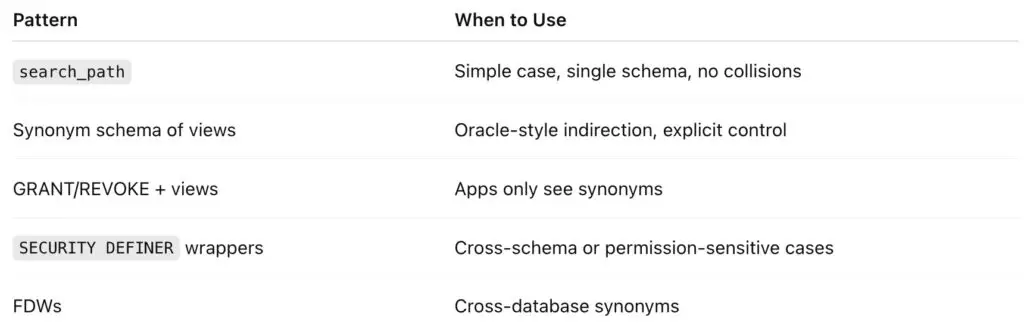
Which pattern to use?
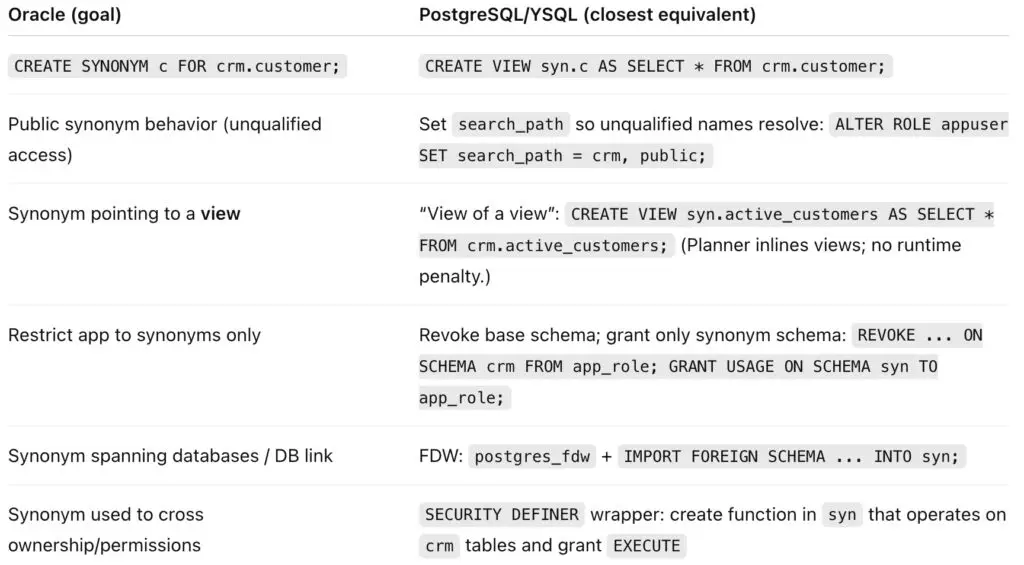
Quick Oracle → PostgreSQL/YSQL Cheat Sheet
Wrapping up

The search_path trick from the earlier post is great for quick wins. When projects grow, switch to synonym schemas (views), enforce visibility with GRANT/REVOKE, add SECURITY DEFINER where permissions differ, and reach other databases with FDWs.

You’ll cover every Oracle-synonym use case with more clarity and control.

Have Fun!

Holiday displays are already up at the local Sam’s Club... did Santa move his arrival to November?