DuckDB is incredible for high-speed, local OLAP analytics.
It is lightweight, fast, embeddable, and designed for analytical queries. It also includes a PostgreSQL extension that can read directly from a running PostgreSQL-compatible database without first copying the data into DuckDB.
That makes it a very interesting companion for YugabyteDB.
YugabyteDB is built for distributed SQL, horizontal scale, and resilient transactional workloads. DuckDB is built for fast local analytics.
Put them together, and you get a powerful pattern:
Use YugabyteDB as the distributed system of record, and use DuckDB as a fast analytical query engine sitting on top of it.
Key Insight: DuckDB is not replacing YugabyteDB. It is complementing it. YugabyteDB continues to own the distributed transactional data, while DuckDB can be used for fast analytical exploration and aggregation.
The Catch: CTID
The standard DuckDB PostgreSQL scanner was originally designed around PostgreSQL internals.
One of those internals is ctid, a PostgreSQL system column that identifies the physical location of a tuple inside a table.
But YugabyteDB does not use PostgreSQL heap storage. Under the covers, YugabyteDB stores data in DocDB, a distributed LSM-tree based storage layer. Because of that, YugabyteDB does not support the standard PostgreSQL ctid system column.
So if DuckDB tries to use CTID-based scanning against YugabyteDB, you may see an error like this:
ERROR: System column "ctid" is not supported yet.
That does not mean DuckDB and YugabyteDB cannot work together.
This fork cleanly bypasses the CTID dependency and enables DuckDB to query YugabyteDB directly.
Shoutout: Huge credit to the Brinqa team for building and sharing this extension. This is a perfect example of the open source ecosystem stepping in to unlock powerful integrations.
Option 2 (Experimental): Disable CTID Scans in DuckDB
Newer versions of DuckDB include a setting to disable CTID-based scans.
However, and this is critical, this must be executed inside DuckDB, not YugabyteDB.
SET pg_use_ctid_scan = false;
Important: This is a DuckDB setting. It does NOT exist in PostgreSQL or YugabyteDB. Running it in ysqlsh will fail with “unrecognized configuration parameter”.
Reality Check: The Brinqa fork is currently the most reliable approach. The CTID toggle depends on DuckDB version and may not work consistently across environments.
For this tip, we will walk through the Brinqa fork approach.
Demo
Prerequisites
Make sure you have the following installed:
● git
● make
● cmake
● C++ compiler
● Docker
You will also need enough local CPU and memory to build DuckDB and the extension from source.
Step 1: Start YugabyteDB
Start a single-node YugabyteDB cluster using Docker:
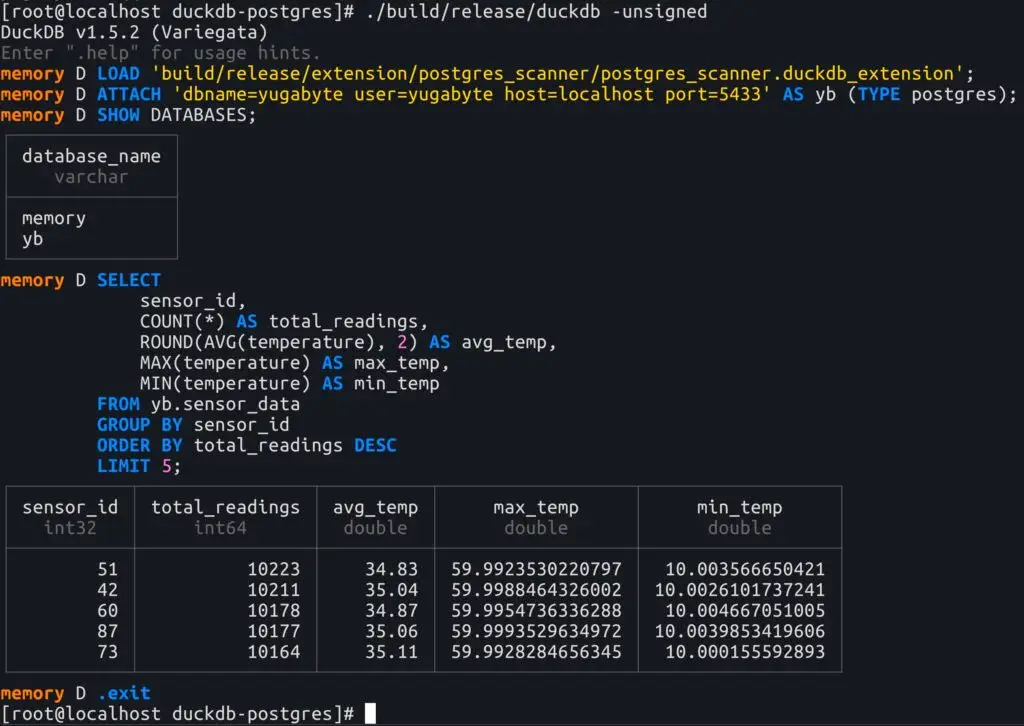
ATTACH 'dbname=yugabyte user=yugabyte host=localhost port=5433' AS yb (TYPE postgres);
Verify the connection:
SHOW DATABASES;
You should see your attached YugabyteDB database listed as yb.
Step 7: Run an Analytical Query
Now run an aggregation from DuckDB against the YugabyteDB table:
					SELECT
    sensor_id,
    COUNT(*) AS total_readings,
    ROUND(AVG(temperature), 2) AS avg_temp,
    MAX(temperature) AS max_temp,
    MIN(temperature) AS min_temp
FROM yb.sensor_data
GROUP BY sensor_id
ORDER BY total_readings DESC
LIMIT 5;
At this point, DuckDB is querying data from YugabyteDB and using its analytical execution engine to process the aggregation.
Here’s an exmple:
That is pretty cool.
Why This Matters: Heavy analytical queries can be expensive for transactional databases. DuckDB gives you a lightweight way to experiment with OLAP-style queries while keeping YugabyteDB as the distributed system of record.
When Should You Use This?
Use this pattern when you want to:
● Run ad hoc analytics
● Explore large datasets quickly
● Avoid building a full ETL pipeline
● Prototype OLAP queries on operational data
When Should You Not?
This is not a replacement for a full analytics platform.
Avoid this pattern for:
● Large-scale production BI workloads
● Repeated heavy scans on production clusters
● Strict SLAs where query isolation is required
Warning: DuckDB still reads from YugabyteDB. Large scans can impact your cluster. Use read replicas, staging environments, or limit query scope.
In this tip, we queried YugabyteDB live from DuckDB. But if you need full isolation, offline analytics, or repeatable workloads, copying the data into DuckDB is often the better approach.
Because YugabyteDB uses LSM-based indexes (not B-tree), DuckDB does not recognize the native index definitions. That tip walks through how to safely transform the schema and load the data into DuckDB for a fully portable analytics environment.
Final Takeaway
DuckDB and YugabyteDB make a powerful combination.
YugabyteDB handles distributed transactions and scale.
DuckDB delivers fast, local analytical execution.
The only real hurdle is avoiding CTID-based scans… and thanks to the work from Brinqa, that hurdle is already solved.
Final Thought: Think of DuckDB as your analytical sidecar for YugabyteDB… lightweight, fast, and incredibly effective for OLAP-style exploration.
Have Fun!
As I was putting together this YugabyteDB Tip, it reminded me of a recent toy we picked up for our daughter’s dog!