Build a Multi-Tenant Fraud Investigation Assistant with YugabyteDB pg_dist_rag

In Part 1 of this series, we introduced Retrieval-Augmented Generation (RAG) and looked at why YugabyteDB takes a distributed approach with pg_dist_rag.

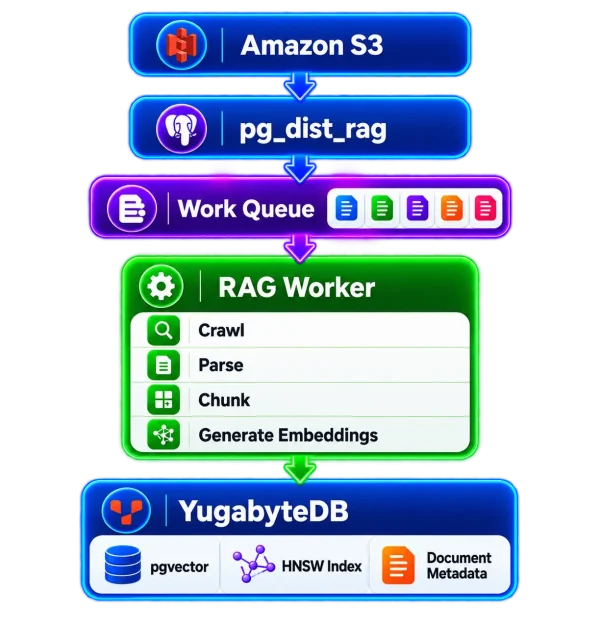
In Part 2, we built an end-to-end distributed RAG preprocessing pipeline:

RAG-Pipeline2

Now let’s make that pipeline useful for a real-world enterprise scenario.

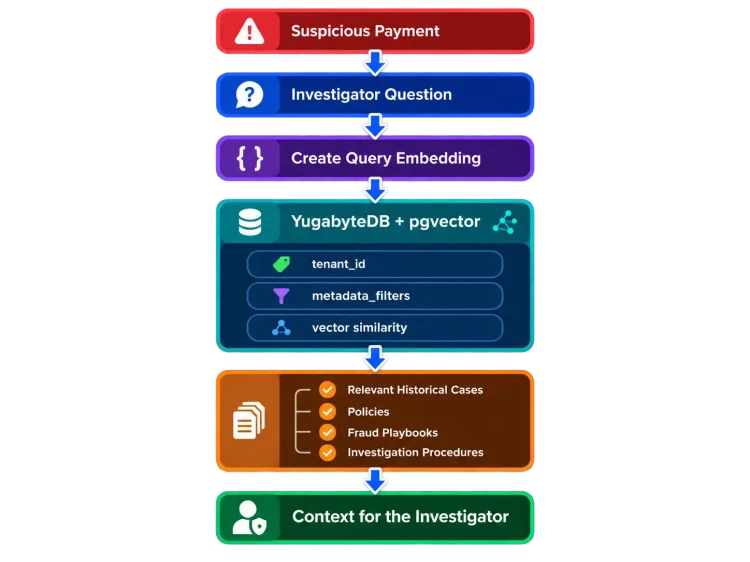
In this tip, we will build a multi-tenant fraud investigation assistant for a fictional financial-services platform.

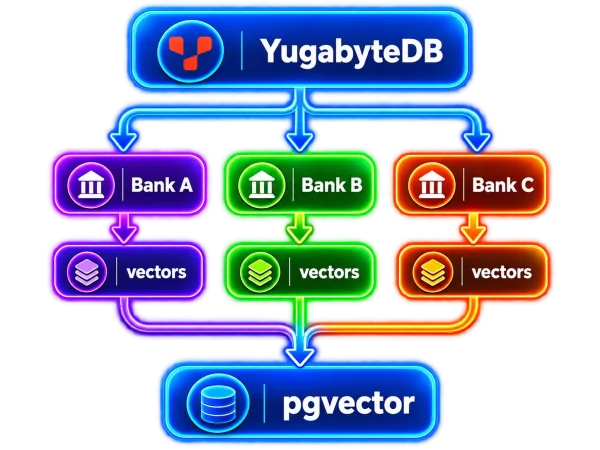
The application will support multiple financial institutions using the same RAG infrastructure while ensuring that retrieval is scoped to the institution performing the investigation.

Conceptually:

Fraud-App-RAG-Pipeline

pg_dist_rag makes this particularly interesting because a source can be registered with an optional tenant_id, and that tenant identifier is carried into the generated pgvector-backed rows along with metadata_filters.

RAG Is Not the Fraud Detection Engine

This example assumes that an existing fraud detection system has already identified a suspicious payment. RAG is not deciding whether the transaction is fraudulent. Its job is to retrieve relevant historical cases, policies, playbooks, and procedures that can help an investigator understand and research the alert.

The Scenario

We will create a fictional platform supporting two financial institutions:

Tenant Tenant ID Knowledge
Bank A 11111111-1111-4111-8111-111111111111 Historical cases, fraud playbooks, and policies
Bank B 22222222-2222-4222-8222-222222222222 Historical cases, fraud playbooks, and policies

The UUIDs are intentionally fixed so the demo is easy to reproduce.

All institutions, payment activity, procedures, thresholds, and fraud cases used in this tip are fictional.

Why This Example Is Interesting

Both institutions will use the same:
  • ● YugabyteDB cluster
  • ● RAG workers
  • pg_dist_rag pipeline
  • ● pgvector table
  • ● HNSW index
But their knowledge remains distinguishable using:
  • tenant_id
We will also classify knowledge using:
  • metadata_filters

For example:

				
					{
  "institution": "Bank A",
  "knowledge_type": "historical_case"
}


or:

				
					{
  "institution": "Bank A",
  "knowledge_type": "policy"
}


The resulting SQL can combine:

  • Semantic similarity + Tenant filtering + Relational metadata filtering

That combination is one of the key advantages of storing RAG vectors in a SQL database rather than treating the vector store as an isolated system.

Prerequisites

This tip assumes that you completed the environment setup from Part 2.

You should already have:

  • ● YugabyteDB v2026.1.1+
  • pgvector
  • pg_dist_rag
  • ● Python RAG worker
  • ● OpenAI API key
  • ● Amazon S3 access

The current dedicated setup documentation lists YugabyteDB v2026.1.1 or later, pgvector, an OpenAI API key, and S3 access as prerequisites for the current pg_dist_rag implementation.

Verify the extensions:

				
					SELECT
    extname,
    extversion
FROM pg_extension
WHERE extname IN ('vector', 'pg_dist_rag')
ORDER BY extname;


And make sure at least one TEXT RAG worker is running.

Step 1: Create the Fraud Knowledge Base Documents

Create a directory:

				
					mkdir -p fraud-demo/bank-a/{cases,playbooks,policies}
mkdir -p fraud-demo/bank-b/{cases,playbooks,policies}

cd fraud-demo


Bank A

Bank A Historical Case
				
					cat > bank-a/cases/ach_account_takeover.md <<'EOF'
# Historical Fraud Case: ACH Account Takeover

A long-standing customer initiated a $31,200 ACH payment to a recipient that had never previously received funds from the account.

The payment originated from a mobile device that had not previously been associated with the customer.

Three outgoing payments were initiated within twelve minutes between 2:00 AM and 2:20 AM.

The customer later confirmed that the activity was unauthorized.

The investigation concluded that the customer's online banking credentials had been compromised and the case was classified as account takeover.

Important indicators included:

- new recipient
- new device
- unusual transaction time
- unusually high payment amount
- rapid transaction velocity
EOF
				
			
Bank A Fraud Playbook
				
					cat > bank-a/playbooks/ach_account_takeover.md <<'EOF'
# ACH Account Takeover Investigation Playbook

When investigating a suspected ACH account takeover:

1. Determine whether the device has previously been associated with the customer.
2. Determine whether the recipient is new.
3. Review recent payment velocity.
4. Compare the payment amount with historical customer behavior.
5. Review recent authentication or credential changes.
6. Contact the customer using a previously verified communication channel when required.
7. Follow the institution's escalation policy before releasing a high-risk payment.

Multiple indicators occurring together should receive additional scrutiny.
EOF
				
			
Bank A Escalation Policy
				
					cat > bank-a/policies/high_value_escalation.md <<'EOF'
# High-Value Fraud Alert Escalation Policy

Fraud alerts involving payments greater than $25,000 require review by a senior fraud analyst before the transaction can be released.

The investigator should document the relevant risk indicators and the reason for the final disposition.
EOF


Now create similar information for Bank B.

Bank B

Bank B Historical Case
				
					console.log( 'Code is Poetry' );cat > bank-b/cases/ach_account_takeover.md <<'EOF'
# Historical Fraud Case: ACH Credential Compromise

A business customer initiated an $18,600 ACH payment to a newly created beneficiary.

The payment occurred shortly after an online banking password reset.

The originating browser had not previously been observed for the customer.

The customer subsequently reported that the password reset and payment were unauthorized.

The investigation classified the incident as credential compromise.

Important indicators included:

- recent credential reset
- new beneficiary
- previously unseen browser
- unusual payment amount
EOF
				
			
Bank B Fraud Playbook
				
					cat > bank-b/playbooks/ach_account_takeover.md <<'EOF'
# ACH Credential Compromise Investigation Playbook

When investigating suspected credential compromise:

1. Review recent password resets and authentication changes.
2. Determine whether the beneficiary is new.
3. Review known devices and browsers associated with the customer.
4. Compare the transaction with historical payment behavior.
5. Perform customer verification using the institution's approved callback procedure.
6. Document all evidence before disposition of the alert.
EOF
				
			
Bank B Escalation Policy
				
					cat > bank-b/policies/high_value_escalation.md <<'EOF'
# High-Value Fraud Alert Escalation Policy

Fraud alerts involving payments greater than $10,000 require review by two fraud analysts.

Payments greater than $25,000 additionally require manager approval before release.

All approvals must be documented with the fraud investigation.
EOF


Notice something important.

The two institutions intentionally have different policies.

That will let us prove that tenant-aware retrieval is doing more than merely finding similar text.

Step 2: Upload the Documents to S3

Set the bucket:

				
					export RAG_BUCKET=<your-s3-bucket>


Upload the demo:

				
					aws s3 sync ./ s3://${RAG_BUCKET}/fraud-demo/


Verify:

				
					aws s3 ls s3://${RAG_BUCKET}/fraud-demo/ --recursive


The structure should look similar to:

				
					fraud-demo/
|
+-- bank-a/
|   +-- cases/
|   +-- playbooks/
|   +-- policies/
|
+-- bank-b/
    +-- cases/
    +-- playbooks/
    +-- policies/


Step 3: Register Tenant-Aware Sources

Here’s where this demo differs from the demo in Part 2.

dist_rag.create_source() accepts both:
  • r_metadata
  • r_tenant_id

The tenant identifier subsequently appears in the generated vector records.

Let’s register Bank A’s sources.

Bank A Cases
				
					SELECT dist_rag.create_source(
    r_source_uri :=
        's3://<your-s3-bucket>/fraud-demo/bank-a/cases/',
    r_metadata := '{
        "institution": "Bank A",
        "knowledge_type": "historical_case"
    }'::jsonb,
    r_tenant_id :=
        '11111111-1111-4111-8111-111111111111'::uuid
) AS bank_a_cases_source_id \gset
				
			
Bank A Playbooks
				
					SELECT dist_rag.create_source(
    r_source_uri :=
        's3://<your-s3-bucket>/fraud-demo/bank-a/playbooks/',
    r_metadata := '{
        "institution": "Bank A",
        "knowledge_type": "playbook"
    }'::jsonb,
    r_tenant_id :=
        '11111111-1111-4111-8111-111111111111'::uuid
) AS bank_a_playbooks_source_id \gset
				
			
Bank A Policies
				
					SELECT dist_rag.create_source(
    r_source_uri :=
        's3://<your-s3-bucket>/fraud-demo/bank-a/policies/',
    r_metadata := '{
        "institution": "Bank A",
        "knowledge_type": "policy"
    }'::jsonb,
    r_tenant_id :=
        '11111111-1111-4111-8111-111111111111'::uuid
) AS bank_a_policies_source_id \gset


Now Bank B.

Bank B Cases
				
					SELECT dist_rag.create_source(
    r_source_uri :=
        's3://<your-s3-bucket>/fraud-demo/bank-b/cases/',
    r_metadata := '{
        "institution": "Bank B",
        "knowledge_type": "historical_case"
    }'::jsonb,
    r_tenant_id :=
        '22222222-2222-4222-8222-222222222222'::uuid
) AS bank_b_cases_source_id \gset
				
			
Bank B Playbooks
				
					SELECT dist_rag.create_source(
    r_source_uri :=
        's3://<your-s3-bucket>/fraud-demo/bank-b/playbooks/',
    r_metadata := '{
        "institution": "Bank B",
        "knowledge_type": "playbook"
    }'::jsonb,
    r_tenant_id :=
        '22222222-2222-4222-8222-222222222222'::uuid
) AS bank_b_playbooks_source_id \gset
				
			
Bank B Policies
				
					SELECT dist_rag.create_source(
    r_source_uri :=
        's3://<your-s3-bucket>/fraud-demo/bank-b/policies/',
    r_metadata := '{
        "institution": "Bank B",
        "knowledge_type": "policy"
    }'::jsonb,
    r_tenant_id :=
        '22222222-2222-4222-8222-222222222222'::uuid
) AS bank_b_policies_source_id \gset


Each call queues a CREATE_SOURCE task. RAG workers discover the corresponding documents asynchronously.

Step 4: Verify the Sources

Take a look at:

				
					SELECT *
FROM dist_rag.sources
ORDER BY created_at;


And:

				
					SELECT *
FROM dist_rag.documents
ORDER BY created_at;


Wait until all six documents have been discovered.

One Shared Knowledge Base

We are intentionally going to place documents from both tenants into one pgvector-backed index. This lets us demonstrate how semantic search can be combined with tenant_id and JSONB metadata filtering.

Step 5: Create the Shared Fraud Vector Index

Create the index using all six sources:

				
					SELECT dist_rag.init_vector_index(
    r_index_name := 'fraud_kb',
    r_sources := ARRAY[
        :'bank_a_cases_source_id'::uuid,
        :'bank_a_playbooks_source_id'::uuid,
        :'bank_a_policies_source_id'::uuid,
        :'bank_b_cases_source_id'::uuid,
        :'bank_b_playbooks_source_id'::uuid,
        :'bank_b_policies_source_id'::uuid
    ],
    r_ai_provider := 'OPENAI',
    r_embedding_model_params := '{
        "dimensions": 1536,
        "model": "text-embedding-3-small"
    }'::jsonb
);


init_vector_index() creates the pgvector-backed table and an HNSW vector index. The current API requires an embedding dimension and supports HNSW configuration including cosine, L2, or inner-product distance metrics.

Verify:

				
					\d public.fraud_kb


And:

				
					SELECT
    indexname,
    indexdef
FROM pg_indexes
WHERE schemaname = 'public'
  AND tablename = 'fraud_kb';


Step 6: Build the Knowledge Base

Queue preprocessing:

				
					SELECT dist_rag.build_index(
    r_index_name := 'fraud_kb'
);


Each document receives a PREPROCESS task, and available workers can process those documents independently in parallel.

Monitor progress:

				
					SELECT
    index_name,
    document_name,
    pipeline_status,
    chunks_processed,
    embeddings_persisted,
    current_step,
    last_error_message
FROM dist_rag.vector_index_pipeline_details
WHERE index_name = 'fraud_kb'
ORDER BY document_name;


Wait until each document reaches:

  • COMPLETED

Step 7: Inspect the Tenant Data

Now look directly at the generated vector rows:

				
					SELECT
    tenant_id,
    metadata_filters,
    LEFT(chunk_text, 100) AS chunk_preview
FROM public.fraud_kb
ORDER BY tenant_id
LIMIT 20;


Each row includes the document chunk, embedding, document reference, tenant identifier, and JSONB metadata available for relational filtering.

Summarize it:

				
					SELECT
    tenant_id,
    metadata_filters->>'institution' AS institution,
    metadata_filters->>'knowledge_type' AS knowledge_type,
    count(*) AS chunks
FROM public.fraud_kb
GROUP BY
    tenant_id,
    metadata_filters->>'institution',
    metadata_filters->>'knowledge_type'
ORDER BY
    institution,
    knowledge_type;


Conceptually, the table now contains:

				
					                    public.fraud_kb

             Same pgvector-backed table

+-----------------------+------------------------+
| Bank A                | Bank B                 |
|                       |                        |
| Historical Cases      | Historical Cases       |
| Playbooks             | Playbooks              |
| Policies              | Policies               |
|                       |                        |
| tenant_id = A         | tenant_id = B          |
+-----------------------+------------------------+


Step 8: The Suspicious Payment

Assume an existing fraud system has raised this alert:

				
					Payment Type:      ACH
Amount:            $27,850
Customer Tenure:   8 years
Recipient:         New
Device:            New
Time:              2:13 AM
Velocity:          3 payments in 11 minutes


The investigator asks:

  • Have we seen similar fraud patterns before, and what procedures should I follow?

That question needs to be converted into an embedding using the same embedding model used to build the index.

Use the Same Embedding Model

Query embeddings must be compatible with the vectors already stored in the index. Use the same embedding model and vector dimensions for ingestion and query-time retrieval.

Step 9: Build a Tiny Tenant-Aware Search Application

Install:

				
					pip install openai "psycopg[binary]"


Set:

				
					export OPENAI_API_KEY="<your-openai-api-key>"

export YUGABYTEDB_CONNECTION_STRING="postgresql://yugabyte:<password>@<host>:5433/yugabyte"


Create:

fraud_search.py
				
					#!/usr/bin/env python3

import json
import os
import sys

import psycopg
from openai import OpenAI


TENANTS = {
    "bank-a": "11111111-1111-4111-8111-111111111111",
    "bank-b": "22222222-2222-4222-8222-222222222222",
}


if len(sys.argv) < 3:
    print(
        "Usage: python fraud_search.py "
        "<bank-a|bank-b> <question>"
    )
    sys.exit(1)


tenant_name = sys.argv[1].lower()
question = " ".join(sys.argv[2:])


if tenant_name not in TENANTS:
    raise ValueError(f"Unknown tenant: {tenant_name}")


tenant_id = TENANTS[tenant_name]

embedding_model = os.getenv(
    "EMBEDDING_MODEL",
    "text-embedding-3-small",
)

client = OpenAI()


response = client.embeddings.create(
    model=embedding_model,
    input=question,
)

embedding = response.data[0].embedding

vector_literal = (
    "["
    + ",".join(str(value) for value in embedding)
    + "]"
)


sql = """
SELECT
    chunk_text,
    metadata_filters,
    embeddings <=> %s::vector AS distance
FROM public.fraud_kb
WHERE tenant_id = %s::uuid
ORDER BY embeddings <=> %s::vector
LIMIT 5
"""


with psycopg.connect(
    os.environ["YUGABYTEDB_CONNECTION_STRING"]
) as conn:

    with conn.cursor() as cur:

        cur.execute(
            sql,
            (
                vector_literal,
                tenant_id,
                vector_literal,
            ),
        )

        rows = cur.fetchall()


print()
print(f"Tenant:   {tenant_name}")
print(f"Question: {question}")
print()


for number, row in enumerate(rows, start=1):

    chunk_text = row[0]
    metadata = row[1]
    distance = row[2]

    print(f"--- Result {number} ---")
    print(f"Distance: {distance}")
    print(
        "Type:     "
        f"{metadata.get('knowledge_type')}"
    )
    print(chunk_text)
    print()


The current OpenAI API supports text-embedding-3-small through the embeddings endpoint.

Run:

				
					python fraud_search.py bank-a \
  "A long-term customer initiated a $27,850 ACH payment \
to a new recipient from a new device at 2:13 AM, followed \
by multiple payments within minutes. Have we seen similar \
fraud patterns before and what procedures should I follow?"


The important SQL is:

				
					WHERE tenant_id = %s::uuid


The vector search still ranks chunks based on semantic similarity:

				
					ORDER BY embeddings <=> %s::vector


But only rows belonging to the authorized tenant participate.

Step 10: Run the Same Question as Bank B

Now change only the tenant:

				
					python fraud_search.py bank-b \
  "A long-term customer initiated a $27,850 ACH payment \
to a new recipient from a new device at 2:13 AM, followed \
by multiple payments within minutes. Have we seen similar \
fraud patterns before and what procedures should I follow?"


Same question.

Same vector index.

Same YugabyteDB cluster.

Different tenant.

The application should now retrieve only:

  • Bank B knowledge

and not Bank A knowledge.

That becomes particularly noticeable when the appropriate escalation policy is retrieved.

Bank A’s fictional policy says:

  • Payments greater than $25,000 require senior fraud analyst review.

Bank B’s fictional policy says:

  • Payments greater than $10,000 require two fraud analysts.
  • Payments greater than $25,000 additionally require manager approval.

That is exactly why tenant-aware RAG matters.

Step 11: Combine Tenant and Metadata Filtering

We can make the search even more precise.

Suppose the investigator specifically wants the institution’s policy.

The query becomes:

				
					SELECT
    chunk_text,
    metadata_filters,
    embeddings <=> :query_embedding AS distance
FROM public.fraud_kb
WHERE tenant_id =
      '11111111-1111-4111-8111-111111111111'
  AND metadata_filters @>
      '{"knowledge_type":"policy"}'::jsonb
ORDER BY embeddings <=> :query_embedding
LIMIT 5;
				
			
Now we are combining:
  • tenant_id + JSONB metadata + vector similarity

YugabyteDB explicitly documents combining metadata_filters with pgvector similarity queries in this manner.

This is much more powerful than:

  • Find text similar to my question.

Instead, we can ask:

  • Find information semantically relevant to my question for THIS tenant from THIS category of information.

Step 12: Add the Retrieved Context to the LLM

Once the application has retrieved the appropriate chunks, they can be included with the investigator’s question.

Conceptually:

				
					INVESTIGATOR QUESTION

A long-term customer initiated a $27,850 ACH
payment to a new recipient from a new device
at 2:13 AM...

------------------------------------------------

RETRIEVED CONTEXT

Historical Fraud Case:
...

Fraud Playbook:
...

High-Value Escalation Policy:
...

------------------------------------------------

INSTRUCTIONS

Use only the supplied context.

Summarize similarities with previous cases.

Identify relevant investigation procedures.

Identify applicable escalation requirements.

Do not independently approve, decline, block,
or release the transaction.


The result might provide an investigator with:

				
					Similar historical indicators:

- new payment recipient
- previously unseen device
- unusual transaction time
- high transaction amount
- rapid transaction velocity

Relevant investigation steps:

- review device history
- verify the recipient
- review recent payment velocity
- contact the customer through an approved channel

Applicable policy:

The payment exceeds the institution's
high-value escalation threshold.


Notice what the assistant did not say:

  • DECLINE TRANSACTION

The RAG system is supplying relevant context.

The existing fraud workflow and authorized personnel remain responsible for the disposition.

A Very Important Security Point

The presence of:
  • tenant_id

does not magically authenticate the user.

Your application still needs to determine:

  • ● Who is the user?
  • ● Which tenant are they authorized to access?
  • ● What knowledge are they allowed to retrieve?

Only after that authorization decision should the application construct the tenant-scoped vector query.

Tenant ID Is Not Authentication

Treat tenant_id as part of the data-access design, not as a replacement for application authentication and authorization. The application must determine the authorized tenant and ensure that every retrieval is properly scoped.

This is particularly important because one missed predicate such as:

				
					WHERE tenant_id = ...


We’ll revisit stronger isolation patterns in Part 4.

Why This Architecture Is Interesting

Traditional RAG architectures frequently introduce another specialized data platform:

Transactional Database
+
Vector Database
+
Document Pipeline
+
Queue
+
Metadata Database

With the architecture we’ve built in this series:

YugabyteDB

Structured Application Data
+
pgvector
+
pg_dist_rag
+
tenant_id
+
metadata_filters

YugabyteDB can store vectors alongside relational and transactional data and query them using normal SQL. Its AI documentation explicitly positions pgvector and distributed RAG as ways to combine vector search with YugabyteDB’s distributed SQL capabilities.

That opens up some interesting future possibilities.

Imagine joining retrieved fraud knowledge with:

  • ● Customer profile
  • ● Account information
  • ● Payment history
  • ● Merchant information
  • ● Case metadata
  • ● Investigator assignments

using SQL!

The vector search does not have to live in a separate data silo.

Multi-Tenancy Becomes a Consolidation Story

Now imagine the demo growing from 2 financial institutions to 20, 200, 2,000 or more.

You probably do not want 2,000 independent RAG stacks.

if shared infrastructure can safely and appropriately support the workload.

Instead:

MultiTenant-RAG-Vectors

And that becomes an interesting workload-consolidation discussion.

YugabyteDB 2026.1 also introduced Resource Governor for database-level multitenancy as an Early Access feature, aimed at preventing one consolidated database workload from monopolizing CPU during contention. That is separate from pg_dist_rag, but it points toward a broader consolidation story that we’ll explore in the final tip.

Final Takeaway

pg_dist_rag‘s multi-tenant support may initially look like a small feature: r_tenant_id

But it enables a much more interesting architecture.

Documents can be ingested into a shared RAG platform while generated vector records retain the tenant identity associated with their source.

At query time, YugabyteDB can combine:

Vector similarity
+
Tenant identity
+
JSONB metadata
+
SQL filtering

In our fraud investigation example, that means two institutions can ask the exact same question against the same vector table while retrieving different institutional knowledge.

The fraud detection engine identifies the suspicious activity.

The RAG pipeline provides the investigator with relevant institutional context.

And YugabyteDB provides the distributed SQL and vector platform underneath both the retrieval data and potentially the surrounding application data.

That is a much more interesting enterprise RAG story than simply:

  • Chat with a PDF

Coming Next

Part 4: Scale a Multi-Tenant RAG Platform with YugabyteDB

In the final tip, we’ll move beyond two fictional tenants and look at architecture decisions for a larger consolidated RAG platform, including:

  • ● Shared vs. separate vector indexes
  • ● Tenant isolation
  • ● Metadata design
  • ● Authorization boundaries
  • ● Worker scaling
  • ● Work queue behavior
  • ● Failure handling
  • ● Resource isolation
  • ● Geo-distribution
  • ● Data residency
  • ● Workload consolidation

And we’ll ask the bigger architectural question:

  • How would you design pg_dist_rag when the goal is not one AI application, but an enterprise platform supporting many applications and tenants?

References

Have Fun!