Managing distributed databases can seem complex, but YugabyteDB’s xCluster replication, powered by YugabyteDB Anywhere (YBA) and the new YBA CLI, makes automation surprisingly straightforward. Here, we’ll walk through the concepts, architecture, and concrete command-line examples to help you adopt automated xCluster workflows efficiently.
What Is YugabyteDB Anywhere (YBA)?
YugabyteDB Anywhere (YBA) is a full-featured, self-managed database-as-a-service platform for operating YugabyteDB at scale. It allows you to:
● Deploy and manage universes (clusters of YugabyteDB nodes)
● Install in various environments, including on-premises VMs, public cloud (AWS, GCP, Azure), or Kubernetes
● Configure high availability, backups, and disaster recovery
● Operate xCluster Replication for cross-region or cross-data-center asynchronous replication
Understanding xCluster Replication
xCluster is YugabyteDB’s asynchronous replication feature, enabling data replication between two independent universes:
● Unidirectional (master → follower): Typically for disaster recovery or read-only replicas
● Bidirectional (multi-master / active-active): Both universes accept writes, replicating in both directions
You can replicate YSQL or YCQL workloads. For YSQL, there’s an option for transactional atomicity or non-transactional. YCQL only supports non-transactional replication
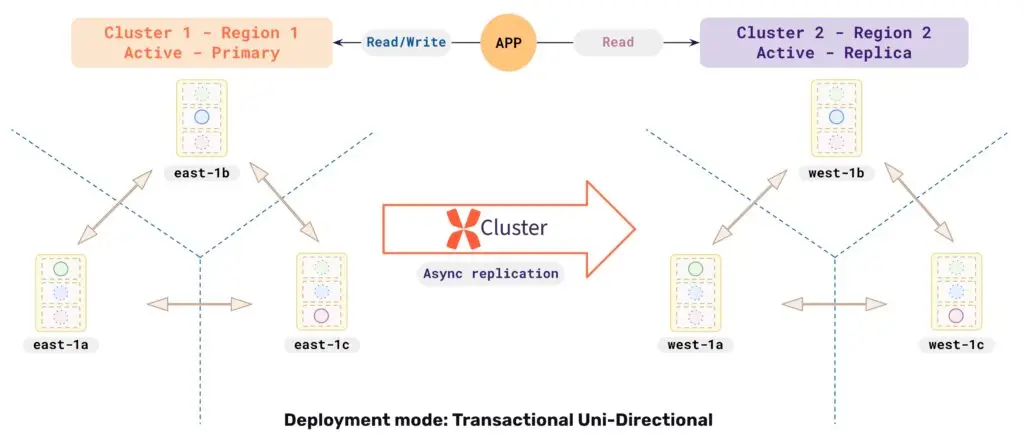
Setup workflow key points:
● For initial setup, YBA can automatically perform a full copy from source to target.
● It’s recommended to add tables/databases early, before writes begin, to avoid full copy overhead.
● Monitoring and alerts (e.g., replication lag) are available natively within YBA
Introducing the YBA CLI (yba)
While the YBA UI is powerful, the YBA CLI (“yba”) brings automation to another level:
● It’s installed alongside YBA, and you can copy the appropriate binary to your local machine (supports Linux/macOS, AMD64/ARM64).
● Authentication is simple: use
yba auth, environment variables (e.g.export YBA_APITOKEN=…), or CLI flags (--apiToken).● Commands follow this structure:
yba <resource> <command> [flags]
Examples:
					yba universe list
yba universe list --apiToken "YOUR_TOKEN"
yba universe list -h
yba --version
● Global flags:
--apiToken,--config(e.g.,$HOME/.yba-cli.yaml),--logLevel,--output,--wait,--timeout, etc.● Autocompletion support is available for bash, zsh, fish, and PowerShell.
xCluster with YBA CLI: Automating the Workflow
Let’s walk through how you can automate xCluster setup using the yba CLI. These examples mirror the manual steps, but in scriptable form.
1. Authenticate
					# Interactively authenticate (saves token to config)
yba auth

# Or set environment variable
export YBA_APITOKEN="YOUR_API_TOKEN"
export YBA_HOST="YOUR_YBA_HOST"
2. Create (or verify) source and target universes
					# List existing universes
yba universe list --insecure

# (Optional) Create a new universe
yba universe create \
  --name my-source-universe \
  --provider onprem \
  --provider-name onprem-test-provider-us-east
  --insecure
(Repeat for the target universe.)
3. Set up xCluster Replication
					# Show available commands for xCluster create
yba xcluster create -h

# Example: create new xCluster configuration
yba xcluster create --name just-a-test \
   --source-universe-name test-yba-cli-u1 \
   --target-universe-name test-yba-cli-u2 \
   --config-type basic
   --table-uuids 000034cb-0000-3000-8000-000000004000 \
   --storage-config-name dev-backup \
   --insecure
What’s happening here:
● You name the replication configuration
● Specify source & target universe names
● Chose mode (basic (default), transactional or database)
● Select which table(s) to replicate
● Define storage settings for the initial full copy
● Use insecure mode (it’s a demo 😉)
					# View status of a particular config
yba xcluster-config get \
  --source-universe-name test-yba-cli-u1 \
  --target-universe-name test-yba-cli-u2 \
  --insecure
This allows automated monitoring and integration in CI/alerting pipelines.
Example Automation Script
					#!/usr/bin/env bash
set -euo pipefail

# --- Config (edit these for your environment) ---
export YBA_APITOKEN="YOUR_API_TOKEN"
SRC_UNI="test-yba-cli-u1"
TGT_UNI="test-yba-cli-u2"
CONFIG_NAME="just-a-test"
TABLE_UUIDS="000034cb-0000-3000-8000-000000004000"   # From: yba universe table list --xcluster-supported-only
STORAGE_CONFIG="dev-backup"

# Optional: if your YBA uses a self-signed cert in a demo/lab:
INSECURE_FLAG="--insecure"

echo "==> Verifying universes exist"
yba universe list $INSECURE_FLAG | grep -E "$SRC_UNI|$TGT_UNI" || {
  echo "One or both universes not found: $SRC_UNI, $TGT_UNI"
  exit 1
}

echo "==> Creating xCluster config \"$CONFIG_NAME\" (progress will display automatically)"
yba xcluster create \
  --name "$CONFIG_NAME" \
  --source-universe-name "$SRC_UNI" \
  --target-universe-name "$TGT_UNI" \
  --table-uuids "$TABLE_UUIDS" \
  --config-type basic \
  --storage-config-name "$STORAGE_CONFIG" \
  $INSECURE_FLAG \
  --wait

echo "==> Listing xCluster configs for confirmation"
yba xcluster list \
  --source-universe-name "$SRC_UNI" \
  --target-universe-name "$TGT_UNI" \
  $INSECURE_FLAG

# Optionally, capture the UUID for later pause/resume/describe calls:
XC_UUID=$(yba xcluster list \
  --source-universe-name "$SRC_UNI" \
  --target-universe-name "$TGT_UNI" \
  $INSECURE_FLAG | awk -v name="$CONFIG_NAME" '$1==name {print $2}')

echo "==> Created xCluster UUID: ${XC_UUID:-unknown}"
Quick Demo
1) List Universes:
					[yugabyte]$ ./yba universe list --insecure | head -n1 && ./yba universe list --insecure | grep test-yba-cli | sort

Name                               Provider Code   UUID                                   Number of nodes   Replication Factor   YugabyteDB Version     State
test-yba-cli-u1                    aws             b179c919-fbd7-4a3d-be5e-63ee7cebbb6c   1                 1                    2025.1.1.0-b103        Ready
test-yba-cli-u2                    aws             15975668-833a-4afd-9277-22d818b2591d   1                 1                    2025.1.1.0-b103        Ready
2) Create a Sample Table on Universe 1 (Source):
					yugabyte=# CREATE TABLE test(c1 INT PRIMARY KEY, c2 TEXT);
CREATE TABLE

yugabyte=# INSERT INTO test SELECT g, md5(random()::TEXT) FROM generate_series(1, 10000) g;
INSERT 0 10000
3) List Tables Eligible for Replication:
					[yugabyte ~]$ yba universe table list --name test-yba-cli-u1 --xcluster-supported-only --insecure
Table Name   Table UUID                             Table Type         SST size     WAL Size      KeySpace   PG Schema Name
test         000034cb-0000-3000-8000-000000004000   PGSQL_TABLE_TYPE   0.00 bytes   0.00, bytes   yugabyte   public
4) Create a Replication Config:
					[yugabyte ~]$ yba xcluster create --name just-a-test \
>   --source-universe-name test-yba-cli-u1 \
>   --target-universe-name test-yba-cli-u2 \
>   --table-uuids 000034cb-0000-3000-8000-000000004000 \
>   --config-type basic
>   --storage-config-name dev-backup \
>   --insecure
Waiting for xcluster just-a-test to be created
[==============>     ] The xcluster config just-a-test between source universe test-yba-cli-u1 (b179c919-fbd7-4a3d-be5e-63ee7cebbb6c) and target universe test-yba-cli-u2 (15975668-833a-4afd-9277-22d818b2591d) is being created: Running [Task "Creating XClusterConfig : just-a-test" completion percentage: 44%]

...

The xcluster config just-a-test between source universe test-yba-cli-u1 (b179c919-fbd7-4a3d-be5e-63ee7cebbb6c) and target universe test-yba-cli-u2 (15975668-833a-4afd-9277-22d818b2591d) has been created
Name          UUID                                   Source Universe                                           Target Universe                                           Status
just-a-test   bf81c464-92e0-4869-b931-36c6f271e4ec   test-yba-cli-u1(b179c919-fbd7-4a3d-be5e-63ee7cebbb6c)     test-yba-cli-u2(15975668-833a-4afd-9277-22d818b2591d)     Running
5) List xCluster config:
					[yugabyte ~]$ yba xcluster list --source-universe-name test-yba-cli-u1 \
>   --target-universe-name test-yba-cli-u2 \
>   --insecure
Name          UUID                                   Source Universe                                           Target Universe                                           Status
just-a-test   bf81c464-92e0-4869-b931-36c6f271e4ec   test-yba-cli-u1(b179c919-fbd7-4a3d-be5e-63ee7cebbb6c)     test-yba-cli-u2(15975668-833a-4afd-9277-22d818b2591d)     Running
6) Did the Table and Data Replicate?
					[yugabyte ~]$ ysqlsh -h 172.161.16.18 -c "SELECT COUNT(*) FROM test;" # Universe 1 (Source)
 count
-------
 10000
(1 row)

[yugabyte ~]$ ysqlsh -h 172.161.25.193 -c "SELECT COUNT(*) FROM test;" # Universe 2 (Target)
 count
-------
 10000
(1 row)
The table and data was successfully replicated!
7) Check the Replication Lag:
					[yugabyte ~]$ yba xcluster describe --uuid bf81c464-92e0-4869-b931-36c6f271e4ec --insecure | awk '/^Lag Metric Data/{f=1;next} /^Databases/{f=0} f&&/"name":[[:space:]]*"/{name=$0; sub(/.*"name":[[:space:]]*"/,"",name); sub(/".*/,"",name); next} f&&/^[[:space:]]*"y":[[:space:]]*\[/{in_y=1;ybuf=$0;next} in_y{ybuf=ybuf ORS $0;if($0~/\]/){val="";s=ybuf;while(match(s,/"([0-9.]+)"/,a)){val=a[1];s=substr(s,RSTART+RLENGTH)}if(name!=""&&val!="")printf "%s: %s\n",name,val;name="";in_y=0;ybuf=""}}'

Sent Lag: 0.001
Committed Lag: 0.001
describe command prints out A-LOT of detail, but we’re only interested in the replication lag metrics… A “Committed Lag” that low (e.g. 0.001) means replication has completed and is not active…
Note: Replication Lag is displayed in a nice graph in the YBA UI.
8) Pause xCluster Replication
					[yugabyte ~]$ yba xcluster pause --uuid bf81c464-92e0-4869-b931-36c6f271e4ec -f --insecure
Waiting for xcluster bf81c464-92e0-4869-b931-36c6f271e4ec to be paused
The xcluster bf81c464-92e0-4869-b931-36c6f271e4ec has been paused
Name          UUID                                   Source Universe                                           Target Universe                                           Status
just-a-test   bf81c464-92e0-4869-b931-36c6f271e4ec   test-yba-cli-u1(b179c919-fbd7-4a3d-be5e-63ee7cebbb6c)     test-yba-cli-u2(15975668-833a-4afd-9277-22d818b2591d)     Paused
9) Insert More Data on the Universe 1 (Source)
					[yugabyte ~]$ ysqlsh -h 172.161.16.18 -c "INSERT INTO test SELECT g, md5(random()::TEXT) FROM generate_series(10001, 1000000) g;" # Universe 1 (Source)
INSERT 0 990000

[yugabyte ~]$ ysqlsh -h 172.161.16.18 -c "SELECT COUNT(*) FROM test;" # Universe 1 (Source)
  count
---------
 1000000
(1 row)

[yugabyte ~]$ ysqlsh -h 172.161.25.193 -c "SELECT COUNT(*) FROM test;" # Universe 2 (Target)
 count
-------
 10000
(1 row)
Since Replication is currently paused, no data is copied to the target.
10) Resume xCluster Replication
					[yugabyte ~]$ yba xcluster resume --uuid bf81c464-92e0-4869-b931-36c6f271e4ec -f --insecure
Waiting for xcluster bf81c464-92e0-4869-b931-36c6f271e4ec to be resumed
The xcluster bf81c464-92e0-4869-b931-36c6f271e4ec has been resumeed
Name          UUID                                   Source Universe                                           Target Universe                                           Status
just-a-test   bf81c464-92e0-4869-b931-36c6f271e4ec   test-yba-cli-u1(b179c919-fbd7-4a3d-be5e-63ee7cebbb6c)     test-yba-cli-u2(15975668-833a-4afd-9277-22d818b2591d)     Running
11) Check the Replication Lag:
					[yugabyte ~]$ yba xcluster describe --uuid bf81c464-92e0-4869-b931-36c6f271e4ec --insecure | awk '/^Lag Metric Data/{f=1;next} /^Databases/{f=0} f&&/"name":[[:space:]]*"/{name=$0; sub(/.*"name":[[:space:]]*"/,"",name); sub(/".*/,"",name); next} f&&/^[[:space:]]*"y":[[:space:]]*\[/{in_y=1;ybuf=$0;next} in_y{ybuf=ybuf ORS $0;if($0~/\]/){val="";s=ybuf;while(match(s,/"([0-9.]+)"/,a)){val=a[1];s=substr(s,RSTART+RLENGTH)}if(name!=""&&val!="")printf "%s: %s\n",name,val;name="";in_y=0;ybuf=""}}'
Sent Lag: 0
Committed Lag: 24.898
Shouldn’t take too long to replicate…
					[yugabyte ~]$ yba xcluster describe --uuid bf81c464-92e0-4869-b931-36c6f271e4ec --insecure | awk '/^Lag Metric Data/{f=1;next} /^Databases/{f=0} f&&/"name":[[:space:]]*"/{name=$0; sub(/.*"name":[[:space:]]*"/,"",name); sub(/".*/,"",name); next} f&&/^[[:space:]]*"y":[[:space:]]*\[/{in_y=1;ybuf=$0;next} in_y{ybuf=ybuf ORS $0;if($0~/\]/){val="";s=ybuf;while(match(s,/"([0-9.]+)"/,a)){val=a[1];s=substr(s,RSTART+RLENGTH)}if(name!=""&&val!="")printf "%s: %s\n",name,val;name="";in_y=0;ybuf=""}}'
Sent Lag: 0.001
Committed Lag: 0.001
Done!
12) Did the Table and Data Replicate?
					[yugabyte ~]$ ysqlsh -h 172.161.16.18 -c "SELECT COUNT(*) FROM test;" # Universe 1 (Source)
  count
---------
 1000000
(1 row)

[yugabyte ~]$ ysqlsh -h 172.161.25.193 -c "SELECT COUNT(*) FROM test;" # Universe 2 (Target)
  count
---------
 1000000
(1 row)
The was successfully replicated!
13) Delete xCluster Replication
					[yugabyte ~]$ yba xcluster delete --uuid bf81c464-92e0-4869-b931-36c6f271e4ec -f --insecure
Waiting for xcluster bf81c464-92e0-4869-b931-36c6f271e4ec to be deleted
The xcluster bf81c464-92e0-4869-b931-36c6f271e4ec has been deleted
Why Automate xCluster with YBA CLI?
● Repeatability: Embed everything in scripts or CI/CD pipelines for consistent, tracked deployments.
● Speed: No manual clicks… setup and updates happen quickly via commands.
● Auditability: Everything is captured in version control or YAML configs.
● Alerts & Monitoring: Combine CLI operations with automated checks and alerting systems.
Wrapping-Up
YugabyteDB’s xCluster, when paired with YBA and the CLI, offers a powerful, automation-friendly platform for unsynchronized cross-universe replication, disaster recovery, and geographically distributed deployments.
You can:
● Set up unidirectional or bidirectional replication
● Automate the full-copy setup process
● Add databases/tables incrementally
● Manage alerts, status, and updates programmatically
Have Fun!