When you’re managing distributed databases at scale, every second matters. YugabyteDB Anywhere (YBA) is already designed to make it easier to deploy, observe, and operate your clusters, but did you know it also comes with built-in keyboard shortcuts to speed up common tasks?
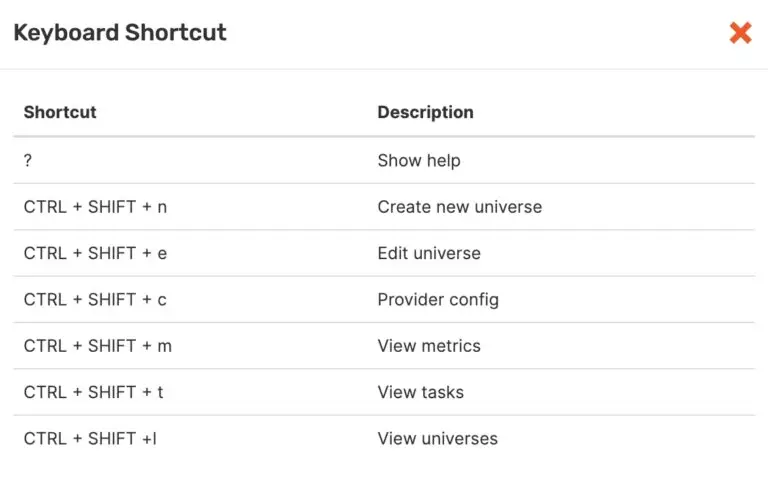
If you press ? anywhere inside YBA, a help window will pop up showing all available shortcuts. It’s a simple but powerful way to cut down on clicks and get to the screen you need instantly.
YBA brings together the core operations you need for running a distributed database:
● Creating and editing universes
● Managing provider configurations
● Viewing live metrics and dashboards
● Tracking background tasks
● Switching between multiple universes
These are things you do all the time. Normally that means a lot of clicking through menus, which can slow down your workflow. With shortcuts, you can jump straight there in a single keystroke combination.
Available Shortcuts in YBA 🎹
Here’s what you’ll see when you hit ? inside YBA:
A Few Examples in Action
● Spinning up a new test cluster? Instead of hunting for the “Create Universe” button, just hit CTRL + SHIFT + n.
● Want to monitor performance while troubleshooting? CTRL + SHIFT + m takes you right to metrics.
● Need to review recent operations? CTRL + SHIFT + t shows you running and completed tasks instantly.
Small time-savers like these add up, especially if you’re managing multiple environments or switching back and forth between tasks.
Final Thoughts
YBA already simplifies complex operations like multi-region deployments, monitoring, and configuration management. The keyboard shortcuts feature is one more way it helps you work faster and stay in the flow.
Next time you’re in YBA, press ? and give these shortcuts a try… you might be surprised at how much smoother your workflow becomes. 🚀
Have Fun!
My wife and I picked the "easy" trail to Emerald Lake at the Rocky Mountain National Park… turns out the sign forgot to mention it was sponsored by StairMaster. 🥾😂🌲💦