Visualizing Tablet Distribution with Real Row Counts in YugabyteDB

TL;DR

This tip introduces yb-topology-viewer, a lightweight demo application that helps you visualize how data is actually distributed across a YugabyteDB cluster by showing per-tablet and per-node row counts. It builds directly on a previous YugabyteDB Tip and reuses the yb_tablet_placement_details function to turn tablet metadata into something concrete, visual, and easy to reason about.

This is a learning and demo tool, not something intended for production workloads or very large tables.

What You’ll Learn

By the end of this tip, you’ll be able to:

  • ● Understand how YugabyteDB hash-sharded tablets map to nodes

  • ● See how rows are distributed per tablet and per node

  • ● Identify uneven data distribution and potential hot shards

  • ● Observe the effects of:

    • ○ Tablet count

    • ○ Cluster size

    • ○ Data ingestion patterns

    • ○ Leader placement and tablespaces

  • ● Safely experiment with tablet distribution using yugabyted

This tip is especially useful for demos, workshops, onboarding, and explaining YugabyteDB internals to teams coming from single-node PostgreSQL.

Background: Building on a Previous Tip

This tip builds directly on the earlier YugabyteDB Tip:

That post introduced the yb_tablet_placement_details(schema, table, leaders_only) function, which exposes:

  • ● Tablet IDs

  • ● Hash ranges

  • ● Leader placement

  • ● Node, region, and zone information

This new tip extends that foundation by pairing tablet placement metadata with actual row counts, allowing you to see how evenly (or unevenly) data is spread across your cluster.

What This Tip Is (and Isn’t)
What this tip is…
  • ● A learning tool for understanding YugabyteDB tablet distribution
  • ● A demo aid for workshops and customer conversations
  • ● A way to visualize:
    • ○ Per-tablet row counts
    • ○ Per-node data skew
    • ○ The impact of cluster and table design choices
What this tip is not…
  • ● Not designed for tables with billions of rows
  • ● Not recommended for production clusters
  • ● Not a replacement for observability or monitoring systems
YugabyteDB Version Used
The behavior and examples in this tip were validated using YugabyteDB 2025.2 (2025.2.0.0). Configuration defaults and behavior may differ in earlier releases.
Why Row Counts Matter

Tablet metadata alone tells you where tablets live, but not how much data each tablet holds.

By adding row counts, you can:

  • ● Validate hash distribution assumptions

  • ● Detect uneven data growth

  • ● Explain why certain nodes experience more load

  • ● Make abstract concepts like “tablet skew” visible and intuitive

This is where yb-topology-viewer shines… it trades efficiency for clarity and insight.

Recommended Learning Setup: yugabyted

At a conceptual level, the app:

  • 1. Calls yb_tablet_placement_details to map tablets to nodes

  • 2. Maps rows into tablet hash ranges

  • 3. Computes row counts per tablet

  • 4. Aggregates results per node

  • 5. Displays the data in a topology-oriented view that makes skew obvious

This approach intentionally prioritizes education and visibility over raw efficiency.

Download the Application

Last update: 02/11/2026

Running the Application

The project includes a single run script that handles startup and execution.

run.sh (Application Startup)

The application is started using:

				
					./run.sh
				
			
Key characteristics:
  • ● Runs the FastAPI app using uvicorn

  • ● Binds to port 8080

  • ● Always runs from the project root

  • ● Activates a Python virtual environment

  • ● Fails fast if required prerequisites are missing

Once running, the app is accessible on:

				
					http://<host>:8080
				
			
Environment Variables

The application relies on environment variables for database connectivity.

Required:

  • YB_USER

  • YB_PASSWORD

Optional (with defaults):

  • YB_HOST (default: 127.0.0.1)

  • YB_PORT (default: 5433)

  • YB_SSLMODE (default: prefer)

  • YB_CONNECT_TIMEOUT

  • YB_STATEMENT_TIMEOUT_MS

These must be set before running run.sh.

Prerequisite Validation Script

Before starting the app, a helper script verifies your environment:

				
					./check_prereqs.sh


This script:

  • ● Detects OS family

  • ● Verifies Python 3.9+

  • ● Confirms pip, venv, gcc, and curl

  • ● Creates or reuses a virtual environment

  • ● Installs Python dependencies

  • ● Validates required environment variables

The script will stop and clearly report what’s missing, making setup predictable and repeatable.

Quick Demo
Setup:

Create a simple local three node YugabyteDB cluster:

				
					# Launch a 3 Node YB Universe
yugabyted start --advertise_address=127.0.0.1 --cloud_location=aws.us-east-1.us-east-1a --base_dir=~/yb01 > start1.log
sleep 4
yugabyted start --advertise_address=127.0.0.2 --cloud_location=aws.us-east-2.us-east-2a --join=127.0.0.1 --base_dir=~/yb02 > start2.log
yugabyted start --advertise_address=127.0.0.3 --cloud_location=aws.us-west-2.us-west-2a --join=127.0.0.1 --base_dir=~/yb03 > start3.log

# Configure FT, RF and Data Placement
yugabyted configure data_placement --fault_tolerance=region --constraint_value=aws.us-east-1.us-east-1a:1,aws.us-east-2.us-east-2a:2,aws.us-west-2.us-west-2a:3 --rf=3 --base_dir=~/yb01


Sample output from the configure data_placement command:

				
					+------------------------------------------------------------------------------------------------+
|                                           yugabyted                                            |
+------------------------------------------------------------------------------------------------+
| Status                  : Configuration successful. Primary data placement is geo-redundant.   |
| Fault Tolerance         : Primary Cluster can survive at most any 1 region failure.            |
| Zone Preferences        : Successful in setting preference for zones.                          |
|                         : Following are the preferences for zones                              |
|                         : aws.us-east-1.us-east-1a : 1                                         |
|                         : aws.us-east-2.us-east-2a : 2                                         |
|                         : aws.us-west-2.us-west-2a : 3                                         |
+------------------------------------------------------------------------------------------------+


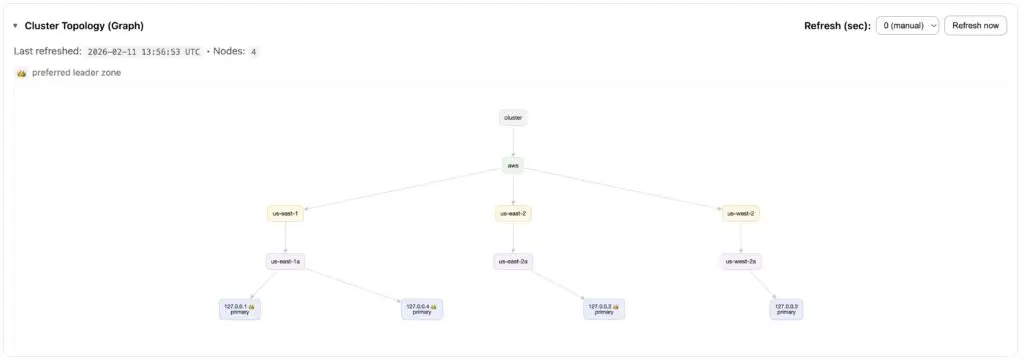
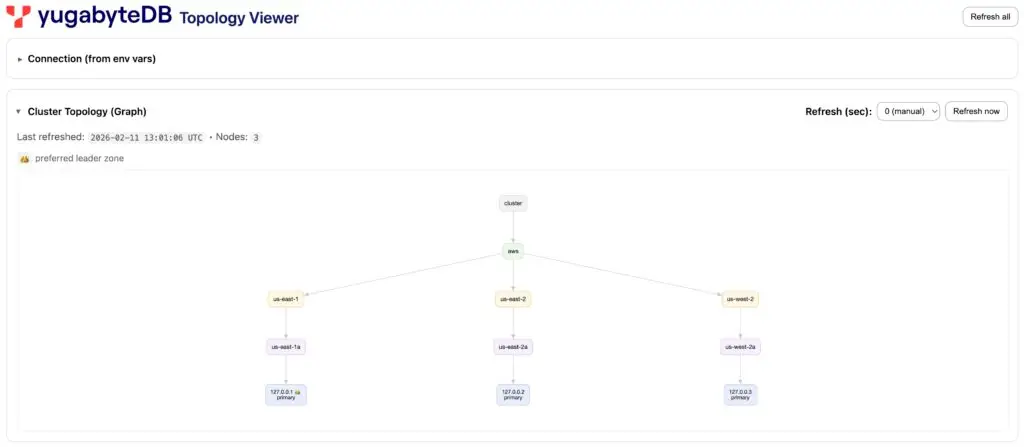
We can see that the us-east-1 region is preferred.

Once the cluster is up, connect and create a sample table with some data…

				
					CREATE TABLE test (id INT PRIMARY KEY, c1 TEXT) SPLIT INTO 3 TABLETS;
CREATE INDEX test_c1_idx ON test(c1) SPLIT INTO 3 TABLETS;
INSERT INTO test SELECT g, 'A' FROM generate_series(1, 100000) g;


Make sure to create the yb_tablet_placement_details function in your new database. The Topology Viewer app relies on it.

The DDL for the function is avaiable in the YugabyteDB Tip Exploring Tablet Distribution and Leader Placement in YugabyteDB.

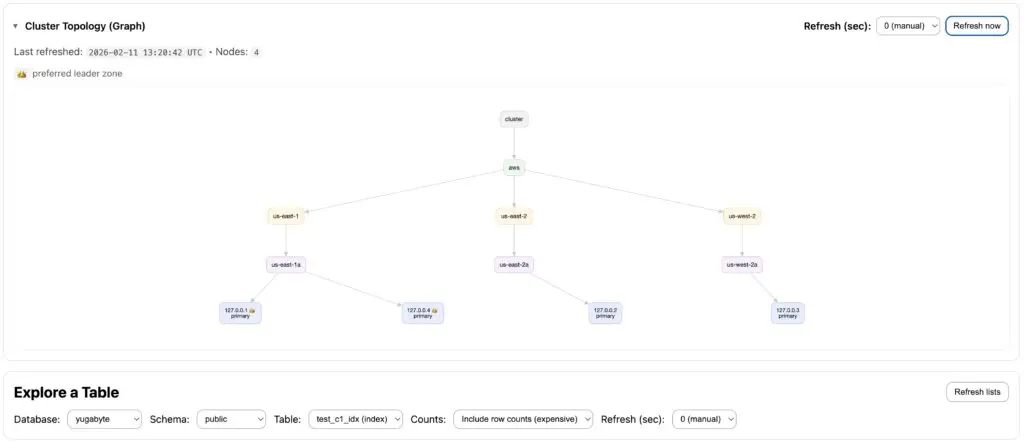
Cluster topology graph

From the Topology Viewer app, your new YugabyteDB cluster can be visualized as a diagram in the Cluster Topology section.

Tablet Placement for the Table

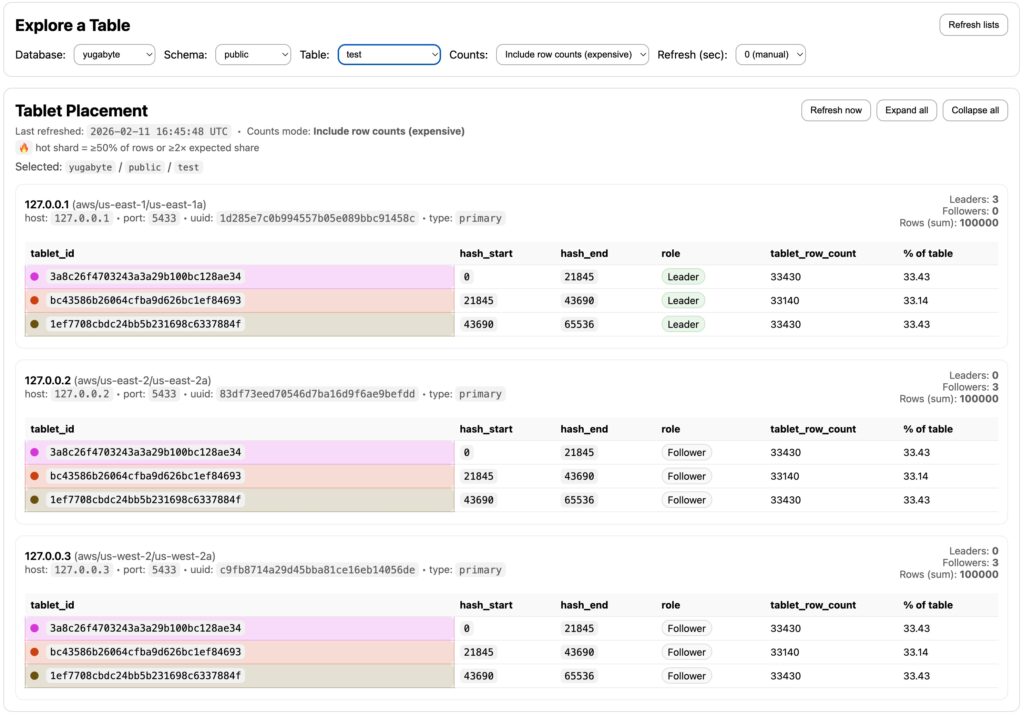
After selecting the table created earlier, its tablet placement details are shown:

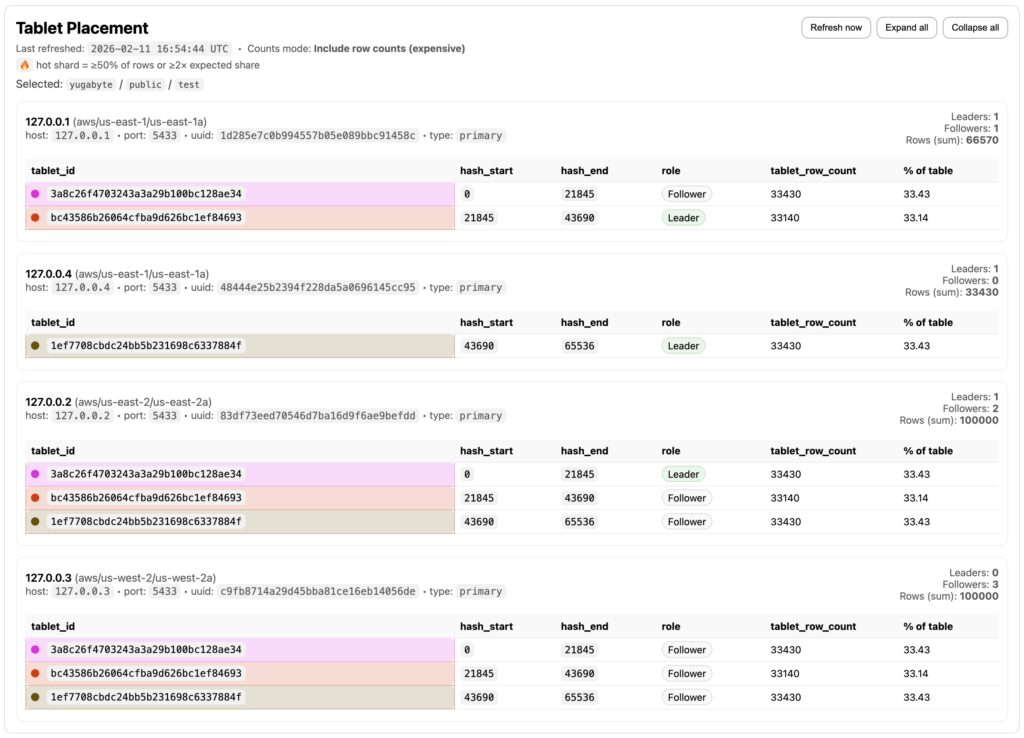
Notice there are three tablets (each with a distinct tablet ID) because the table was pre-split into three tablets at creation time. Also, observe that all tablet leaders are currently placed in a single region… the preferred region.

Tablet Placement for the Index

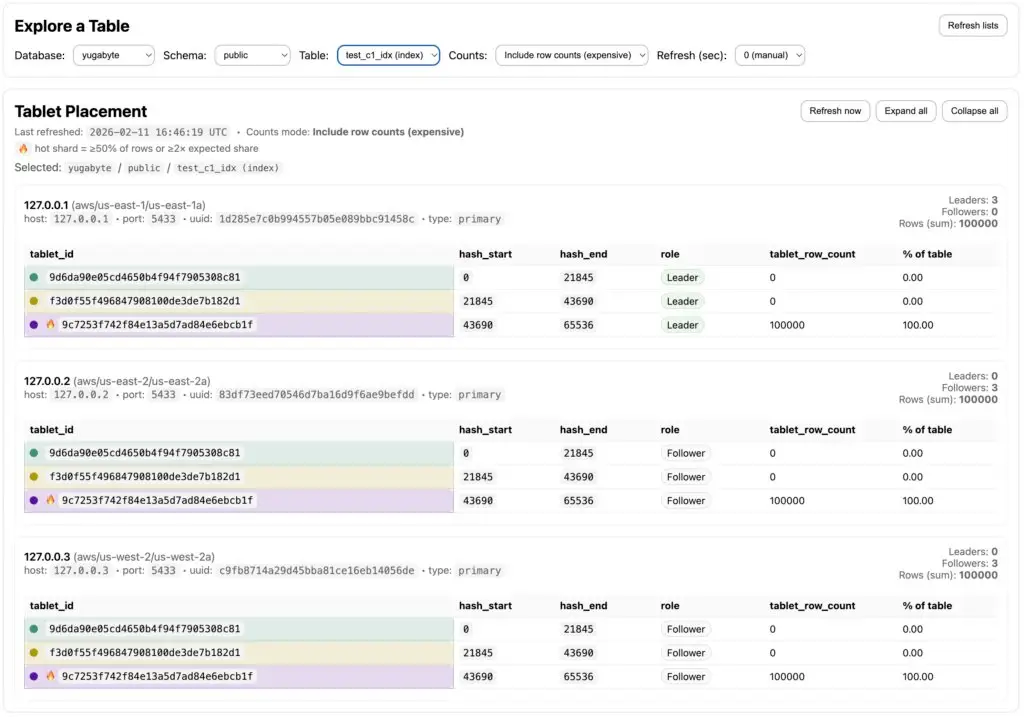
You can also select the table’s index to view the placement of its tablets.

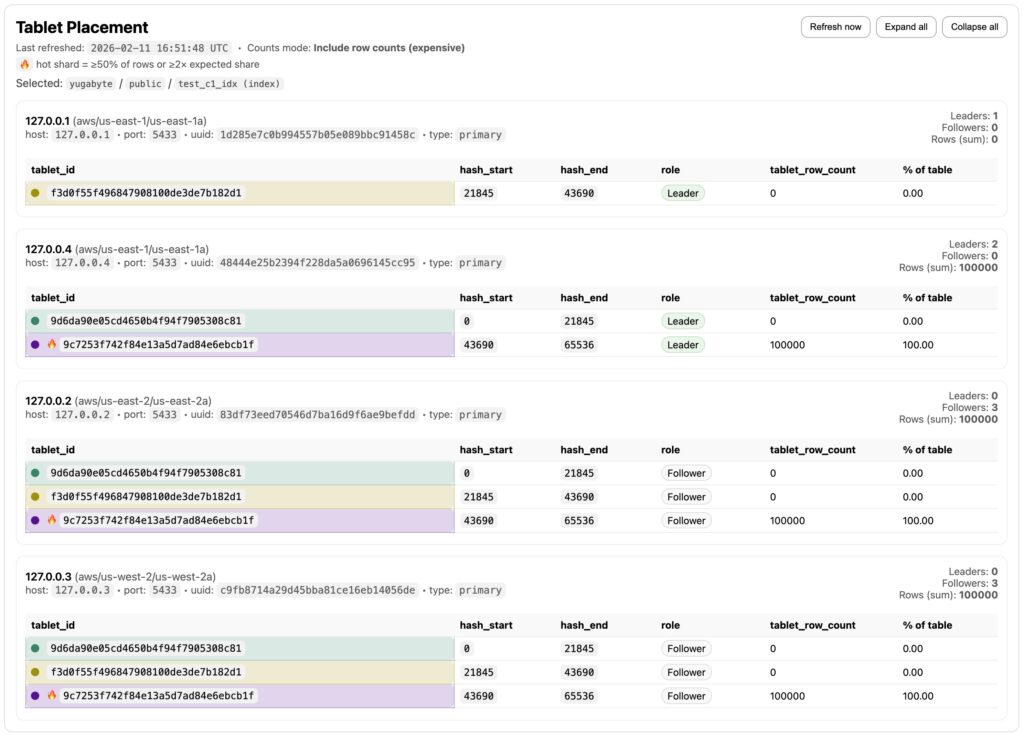
Remember, in YugabyteDB an index is implemented as its own table. It is divided into tablets, and those tablets are replicated according to the configured replication factor (RF), just like any regular table.

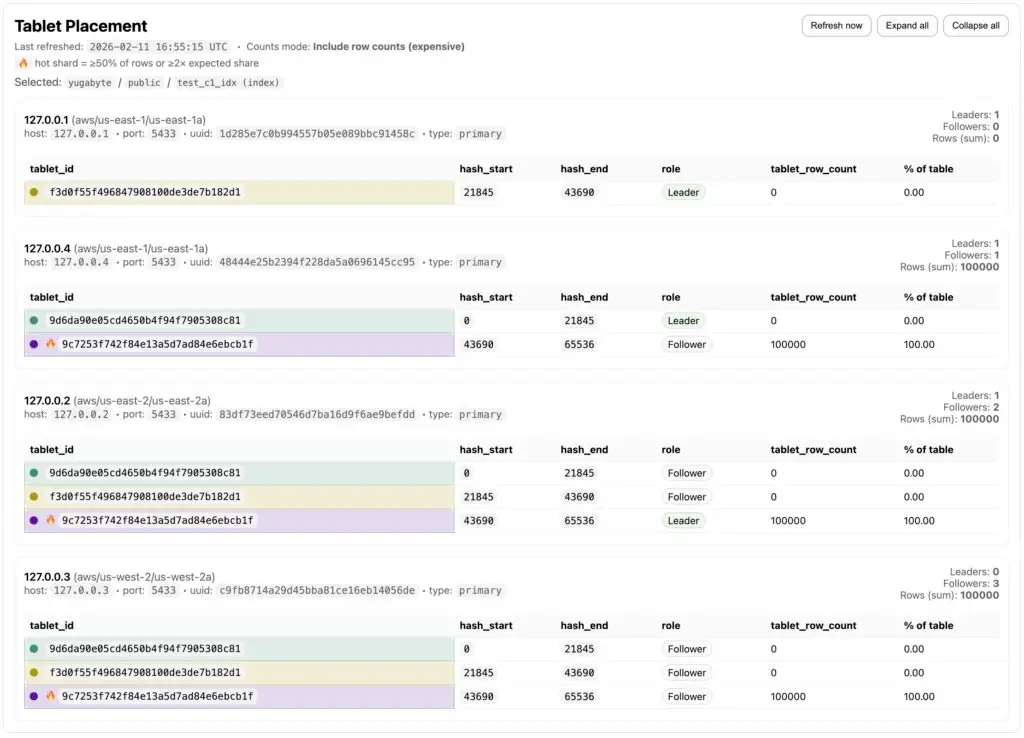
Notice in the case of the index, one of the tablets is a hot shard, meaning that it contains all of the data. Hot shards happen when too many rows land in a small subset of tablets. That subset becomes a bottleneck while other tablets sit idle (See: Detecting Hot Shards in YSQL with SQL).

Let’s add a node to the cluster and see how Tablet placement changes…

				
					yugabyted start --advertise_address=127.0.0.4 --cloud_location=aws.us-east-1.us-east-1a --join=127.0.0.1 --base_dir=~/yb04 > start4.log
				
			
Cluster topology graph (refreshed)

Note that the new node was added to the us-east-1 region.

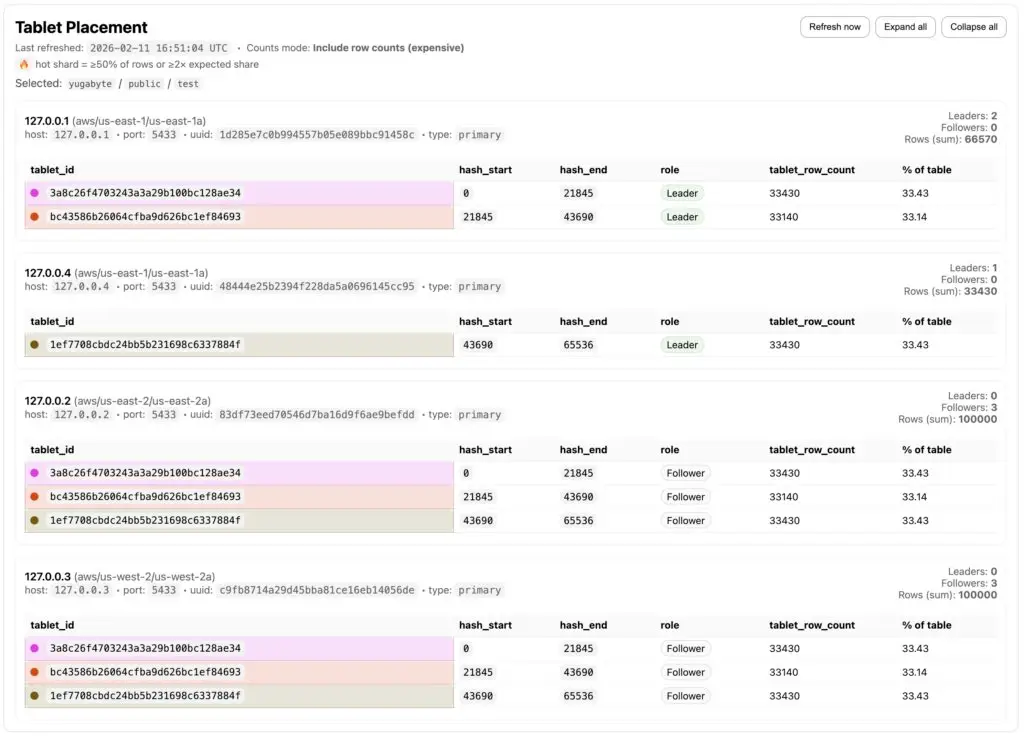
Tablet Placement for the Table (Refreshed)
After the cluster rebalance, one of the tablets was moved from node 127.0.0.1 to the new node at 127.0.0.4. Notice, however, that all tablet leaders remain located in the us-east-1 region.
Tablet Placement for the Index (Refreshed)
For the index, the cluster rebalance moved two tablets from node 127.0.0.1 to node 127.0.0.4. Once again, all tablet leaders remained in the us-east-1 region. We can also see that the hot shard is still concentrated on a single node, even though the cluster now consists of four nodes.
Modify the Data Placement
Now let’s see what happens if we make both the us-east-1 and the us-east-2 regions preferred.
				
					yugabyted configure data_placement --fault_tolerance=region --constraint_value=aws.us-east-1.us-east-1a:1,aws.us-east-2.us-east-2a:1,aws.us-west-2.us-west-2a:2 --rf=3 --base_dir=~/yb01
				
			
Cluster topology graph (refreshed) (Again)

Notice that nodes in both the us-east-1 and us-east-2 regions are now marked as preferred.

Tablet Placement for the Table (Refreshed) (Again)
This time, there was no data movement… only a Raft leader re-election to better distribute tablet leaders across nodes in the us-east-1 and us-east-2 regions.
Tablet Placement for the Index (Refreshed) (Again)

Again, no data movement for the index tablets, but after the leader election, the leader replica for the hot shard is now on node 127.0.0.2.

Final Takeaway

Tablet distribution is one of YugabyteDB’s most powerful features… but it’s usually invisible.

By combining tablet placement metadata with real row counts, yb-topology-viewer helps turn internal mechanics into intuition. Use it to learn, teach, and experiment, safely and intentionally.

Have Fun!

Apparently this is the best seat in the park... Heisler Park, Laguna Beach 🐋🐦