Intro
You know that feeling… you’re sure you opened every required port, only to hit an install error later because of one you missed? It happens all the time. Networking issues are one of the most common blockers during YugabyteDB and YBA deployment, whether it’s a firewall, a cloud security group, or host-level rules silently dropping traffic.
Today’s YugabyteDB tip is all about avoiding that headache. Below are two lightweight shell scripts you can run before deployment to verify all required ports are listening and reachable. They’ll give you a clean pass/fail on YSQL/YCQL, Master/TServer RPC & UIs, Node Agent, exporters, APIs, and more, so you can confirm your environment is truly ready before you go live.
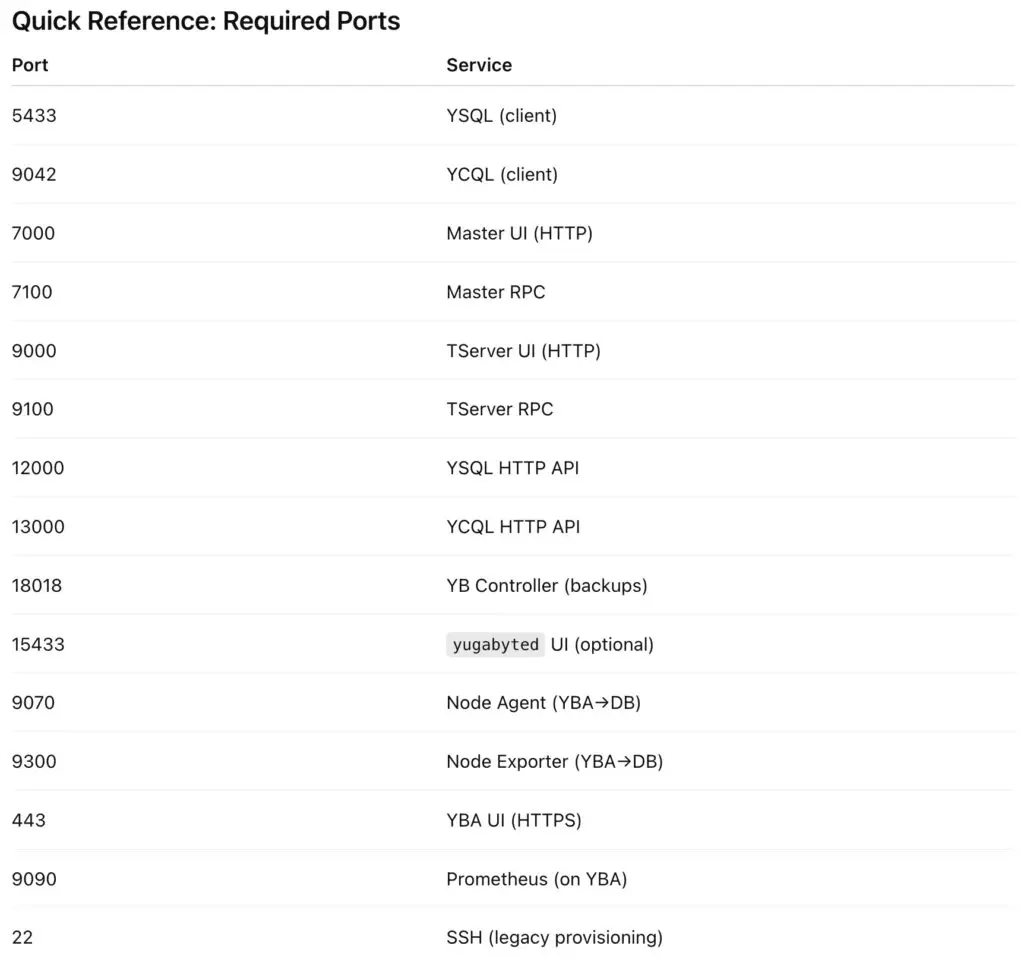
Quick Reference: Required Ports
Note
If you’ve enabled YugabyteDB’s built-in connection pooling (--builtin_connection_pooling=true) or configured it via YugabyteDB Anywhere → Connection Manager, make sure port 6433 is open for client connections.
This port acts as a lightweight PostgreSQL-compatible proxy that multiplexes YSQL sessions, reducing connection overhead.
If Connection Manager isn’t enabled, port 6433 does not need to be open.
Prerequisites
- ● Linux node(s) with Bash 4+,
nc, andss.- ○ RHEL/Alma/Rocky:
sudo dnf install -y nmap-ncat iproute
- ○ Ubuntu/Debian:
sudo apt-get install -y netcat-openbsd iproute2
- ● IPs/hostnames of peer DB nodes and (optionally) the YBA node.
Script 1: Run on each DB node
Checks local listeners and (optionally) reachability to peers and YBA.
Save as check_db_ports.sh.
					#!/usr/bin/env bash
# check_db_ports.sh (minimal, robust)
# Usage:
#   ./check_db_ports.sh [--peers "IP1 IP2 ..."] [--yba IP] [--skip-conn-pool]
# Options:
#   TCP_TIMEOUT=1 ./check_db_ports.sh ...   # per-connection timeout (default 1s)
#   DEBUG=1                                 # set for bash -x tracing
# ----- safety & debug -----
[ "${DEBUG:-0}" = "1" ] && set -x
set -eu

PEERS=""
YBA_IP=""
TCP_TIMEOUT="${TCP_TIMEOUT:-1}"
SKIP_CONN_POOL=0   # NEW: default is to include 6433; --skip-conn-pool will disable it

# ----- args -----
while [[ $# -gt 0 ]]; do
  case "$1" in
    --peers) PEERS="$2"; shift 2;;
    --yba)   YBA_IP="$2"; shift 2;;
    --skip-conn-pool) SKIP_CONN_POOL=1; shift 1;;  # NEW
    *) echo "Unknown arg: $1" >&2; exit 1;;
  esac
done

# ----- deps -----
command -v ss >/dev/null 2>&1 || { echo "ERROR: ss not found (iproute2)"; exit 2; }
# ----- colors -----
G="$(printf '\033[0;32m')" ; R="$(printf '\033[0;31m')" ; Y="$(printf '\033[1;33m')" ; N="$(printf '\033[0m')"
# ----- service name helper (pure case; no assoc arrays) -----
svc_name() {
  case "$1" in
    5433)  echo "YSQL (client)";;
    9042)  echo "YCQL (client)";;
    7000)  echo "Master UI (HTTP)";;
    7100)  echo "Master RPC";;
    9000)  echo "TServer UI (HTTP)";;
    9100)  echo "TServer RPC";;
    18018) echo "YB Controller (backups)";;
    12000) echo "YSQL HTTP API";;
    13000) echo "YCQL HTTP API";;
    15433) echo "yugabyted UI (optional)";;
    6433)  echo "YSQL Built-in Connection Pooling";;  # NEW
    443)   echo "YBA UI (HTTPS)";;
    9090)  echo "Prometheus (on YBA)";;
    *)     echo "unknown";;
  esac
}
# ----- local listeners to check on a DB node -----
DB_LOCAL_PORTS=(5433 9042 7000 9000 7100 9100 18018 12000 13000 15433)
if [[ $SKIP_CONN_POOL -eq 0 ]]; then
  DB_LOCAL_PORTS=(6433 "${DB_LOCAL_PORTS[@]}")  # NEW
fi

# ----- DB <-> DB peer connectivity ports -----
PEER_PORTS=(7000 7100 9000 9100 18018 5433 9042 12000 13000)
if [[ $SKIP_CONN_POOL -eq 0 ]]; then
  PEER_PORTS=(6433 "${PEER_PORTS[@]}")  # NEW
fi

# ----- optional DB -> YBA checks -----
YBA_PORTS=(443 9090)

# ----- helpers -----
is_listening() {
  local p="$1"
  ss -lnt "( sport = :$p )" 2>/dev/null | grep -q ":$p"
}
tcp_check() {
  local host="$1" p="$2"
  if command -v nc >/dev/null 2>&1; then
    nc -z -w"$TCP_TIMEOUT" "$host" "$p" >/dev/null 2>&1
  elif command -v timeout >/dev/null 2>&1; then
    timeout "${TCP_TIMEOUT}s" bash -c ">/dev/tcp/$host/$p" >/dev/null 2>&1
  else
    bash -c ">/dev/tcp/$host/$p" >/dev/null 2>&1
  fi
}

# ----- run checks -----
listen_ok=0; listen_fail=0; ok_count=0; fail_count=0
echo "== Local LISTEN checks (this DB node) =="
for p in "${DB_LOCAL_PORTS[@]}"; do
  if is_listening "$p"; then
    echo -e "  ${G}LISTEN${N} $(svc_name "$p") :$p"
    listen_ok=$((listen_ok+1))
  else
    echo -e "  ${R}NOT LISTENING${N} $(svc_name "$p") :$p"
    listen_fail=$((listen_fail+1))
  fi
done
if [[ -n "$PEERS" ]]; then
  echo "== Outbound connectivity from THIS DB node to peer DB nodes =="
  for host in $PEERS; do
    for p in "${PEER_PORTS[@]}"; do
      if tcp_check "$host" "$p"; then
        echo -e "  ${G}OK${N}  $host $(svc_name "$p") :$p"
        ok_count=$((ok_count+1))
      else
        echo -e "  ${R}FAIL${N} $host $(svc_name "$p") :$p"
        fail_count=$((fail_count+1))
      fi
    done
  done
else
  echo -e "${Y}Skip peer tests (no --peers provided).${N}"
fi
if [[ -n "$YBA_IP" ]]; then
  echo "== Outbound connectivity from THIS DB node to YBA ($YBA_IP) =="
  for p in "${YBA_PORTS[@]}"; do
    if tcp_check "$YBA_IP" "$p"; then
      echo -e "  ${G}OK${N}  $YBA_IP $(svc_name "$p") :$p"
      ok_count=$((ok_count+1))
    else
      echo -e "  ${R}FAIL${N} $YBA_IP $(svc_name "$p") :$p"
      fail_count=$((fail_count+1))
    fi
  done
fi
echo ""
echo "== Summary =="
echo "  LISTEN OK:    $listen_ok"
echo "  LISTEN FAIL:  $listen_fail"
echo "  CONNECT OK:   $ok_count"
echo "  CONNECT FAIL: $fail_count"
Usage examples
					chmod +x check_db_ports.sh
./check_db_ports.sh
./check_db_ports.sh --peers "10.0.1.11 10.0.1.12"
./check_db_ports.sh --peers "10.0.1.11 10.0.1.12" --yba 10.0.0.50
Actual Example
					[yugabyte@ip-172-161-27-158 ~]$ ./check_db_ports.sh --peers "172.150.28.137 172.150.28.137" --yba 10.9.3.89== Local LISTEN checks (this DB node) ==
  NOT LISTENING YSQL Built-in Connection Pooling :6433
  LISTEN YSQL (client) :5433
  LISTEN YCQL (client) :9042
  LISTEN Master UI (HTTP) :7000
  LISTEN TServer UI (HTTP) :9000
  LISTEN Master RPC :7100
  LISTEN TServer RPC :9100
  LISTEN YB Controller (backups) :18018
  LISTEN YSQL HTTP API :12000
  LISTEN YCQL HTTP API :13000
  NOT LISTENING yugabyted UI (optional) :15433
== Outbound connectivity from THIS DB node to peer DB nodes ==
  FAIL 172.150.28.137 YSQL Built-in Connection Pooling :6433
  OK  172.150.28.137 Master UI (HTTP) :7000
  OK  172.150.28.137 Master RPC :7100
  OK  172.150.28.137 TServer UI (HTTP) :9000
  OK  172.150.28.137 TServer RPC :9100
  OK  172.150.28.137 YB Controller (backups) :18018
  OK  172.150.28.137 YSQL (client) :5433
  OK  172.150.28.137 YCQL (client) :9042
  OK  172.150.28.137 YSQL HTTP API :12000
  OK  172.150.28.137 YCQL HTTP API :13000
  FAIL 172.150.28.137 YSQL Built-in Connection Pooling :6433
  OK  172.150.28.137 Master UI (HTTP) :7000
  OK  172.150.28.137 Master RPC :7100
  OK  172.150.28.137 TServer UI (HTTP) :9000
  OK  172.150.28.137 TServer RPC :9100
  OK  172.150.28.137 YB Controller (backups) :18018
  OK  172.150.28.137 YSQL (client) :5433
  OK  172.150.28.137 YCQL (client) :9042
  OK  172.150.28.137 YSQL HTTP API :12000
  OK  172.150.28.137 YCQL HTTP API :13000
== Outbound connectivity from THIS DB node to YBA (10.9.3.89) ==
  OK  10.9.3.89 YBA UI (HTTPS) :443
  OK  10.9.3.89 Prometheus (on YBA) :9090

== Summary ==
  LISTEN OK:    9
  LISTEN FAIL:  2
  CONNECT OK:   20
  CONNECT FAIL: 2
Script 2: Run on the YBA node
Confirms YBA local listeners and outbound reachability to every DB node.
Save as check_yba_ports.sh.
					#!/usr/bin/env bash
# check_yba_ports.sh (minimal, robust)
# Usage:
#   ./check_yba_ports.sh --db-nodes "IP1 IP2 ..." [--legacy-ssh]
# Options:
#   TCP_TIMEOUT=1 ./check_yba_ports.sh --db-nodes "..."   # per-connection timeout (default 1s)
#   DEBUG=1            # set for bash -x tracing

# ----- safety & debug -----
[ "${DEBUG:-0}" = "1" ] && set -x
set -eu

DB_NODES=""
LEGACY_SSH=0
TCP_TIMEOUT="${TCP_TIMEOUT:-1}"

# ----- args -----
while [[ $# -gt 0 ]]; do
  case "$1" in
    --db-nodes) DB_NODES="$2"; shift 2;;
    --legacy-ssh) LEGACY_SSH=1; shift 1;;
    *) echo "Unknown arg: $1" >&2; exit 1;;
  esac
done
if [[ -z "$DB_NODES" ]]; then
  echo "ERROR: --db-nodes \"IP1 IP2 ...\" is required" >&2
  exit 2
fi

# ----- deps -----
command -v ss >/dev/null 2>&1 || { echo "ERROR: ss not found (iproute2)"; exit 2; }

# ----- colors -----
G="$(printf '\033[0;32m')" ; R="$(printf '\033[0;31m')" ; Y="$(printf '\033[1;33m')" ; N="$(printf '\033[0m')"

# ----- service name helper (no assoc array, pure case) -----
svc_name() {
  case "$1" in
    22) echo "SSH (legacy provisioning)";;
    443) echo "YBA UI (HTTPS)";;
    9090) echo "Prometheus (on YBA)";;
    5433) echo "YSQL (client)";;
    9042) echo "YCQL (client)";;
    7000) echo "Master UI (HTTP)";;
    7100) echo "Master RPC";;
    9000) echo "TServer UI (HTTP)";;
    9100) echo "TServer RPC";;
    9070) echo "Node Agent";;
    9300) echo "Node Exporter";;
    12000) echo "YSQL HTTP API";;
    13000) echo "YCQL HTTP API";;
    18018) echo "YB Controller (backups)";;
    *) echo "unknown";;
  esac
}

# ----- local listeners (YBA host) -----
YBA_LOCAL=(443 9090)

# ----- ports to check on DB nodes -----
DB_TARGET_PORTS=(5433 9042 7000 7100 9000 9100 9070 9300 12000 13000 18018)
if [[ $LEGACY_SSH -eq 1 ]]; then
  DB_TARGET_PORTS=(22 "${DB_TARGET_PORTS[@]}")
fi

# ----- helpers -----
is_listening() {
  local p="$1"
  # exact pattern you confirmed works on this host:
  ss -lnt "( sport = :$p )" 2>/dev/null | grep -q ":$p"
}

tcp_check() {
  local host="$1" p="$2"
  if command -v nc >/dev/null 2>&1; then
    nc -z -w"$TCP_TIMEOUT" "$host" "$p" >/dev/null 2>&1
  elif command -v timeout >/dev/null 2>&1; then
    timeout "${TCP_TIMEOUT}s" bash -c ">/dev/tcp/$host/$p" >/dev/null 2>&1
  else
    bash -c ">/dev/tcp/$host/$p" >/dev/null 2>&1
  fi
}

# ----- run checks -----
listen_ok=0; listen_fail=0; ok_count=0; fail_count=0

echo "== Local LISTEN checks on YBA node =="
for p in "${YBA_LOCAL[@]}"; do
  if is_listening "$p"; then
    echo -e "  ${G}LISTEN${N} $(svc_name "$p") :$p"
    listen_ok=$((listen_ok+1))
  else
    echo -e "  ${R}NOT LISTENING${N} $(svc_name "$p") :$p"
    listen_fail=$((listen_fail+1))
  fi
done

echo "== Outbound connectivity from YBA to DB nodes =="
for host in $DB_NODES; do
  for p in "${DB_TARGET_PORTS[@]}"; do
    if tcp_check "$host" "$p"; then
      echo -e "  ${G}OK${N}  $host $(svc_name "$p") :$p"
      ok_count=$((ok_count+1))
    else
      echo -e "  ${R}FAIL${N} $host $(svc_name "$p") :$p"
      fail_count=$((fail_count+1))
    fi
  done
done

echo ""
echo "== Summary =="
echo "  LISTEN OK:    $listen_ok"
echo "  LISTEN FAIL:  $listen_fail"
echo "  CONNECT OK:   $ok_count"
echo "  CONNECT FAIL: $fail_count"
Usage examples
					chmod +x check_yba_ports.sh
./check_yba_ports.sh --db-nodes "10.0.1.10 10.0.1.11 10.0.1.12"

# If your environment uses legacy SSH-based provisioning:
./check_yba_ports.sh --db-nodes "10.0.1.10 10.0.1.11 10.0.1.12" --legacy-ssh
Note: The –legacy-ssh flag is for
Actual Example
					[ec2-user@ip-10-9-3-89 ~]$ ./check_yba_ports.sh --db-nodes "172.161.25.17 172.161.20.189 172.161.29.232"
== Local LISTEN checks on YBA node ==
  LISTEN YBA UI (HTTPS) :443
  LISTEN Prometheus (on YBA) :9090
== Outbound connectivity from YBA to DB nodes ==
  OK  172.161.25.17 YSQL (client) :5433
  OK  172.161.25.17 YCQL (client) :9042
  OK  172.161.25.17 Master UI (HTTP) :7000
  OK  172.161.25.17 Master RPC :7100
  OK  172.161.25.17 TServer UI (HTTP) :9000
  OK  172.161.25.17 TServer RPC :9100
  OK  172.161.25.17 Node Agent :9070
  OK  172.161.25.17 Node Exporter :9300
  OK  172.161.25.17 YSQL HTTP API :12000
  OK  172.161.25.17 YCQL HTTP API :13000
  OK  172.161.25.17 YB Controller (backups) :18018
  OK  172.161.20.189 YSQL (client) :5433
  OK  172.161.20.189 YCQL (client) :9042
  OK  172.161.20.189 Master UI (HTTP) :7000
  OK  172.161.20.189 Master RPC :7100
  OK  172.161.20.189 TServer UI (HTTP) :9000
  OK  172.161.20.189 TServer RPC :9100
  OK  172.161.20.189 Node Agent :9070
  OK  172.161.20.189 Node Exporter :9300
  OK  172.161.20.189 YSQL HTTP API :12000
  OK  172.161.20.189 YCQL HTTP API :13000
  OK  172.161.20.189 YB Controller (backups) :18018
  OK  172.161.29.232 YSQL (client) :5433
  OK  172.161.29.232 YCQL (client) :9042
  OK  172.161.29.232 Master UI (HTTP) :7000
  OK  172.161.29.232 Master RPC :7100
  OK  172.161.29.232 TServer UI (HTTP) :9000
  OK  172.161.29.232 TServer RPC :9100
  OK  172.161.29.232 Node Agent :9070
  OK  172.161.29.232 Node Exporter :9300
  OK  172.161.29.232 YSQL HTTP API :12000
  OK  172.161.29.232 YCQL HTTP API :13000
  OK  172.161.29.232 YB Controller (backups) :18018

== Summary ==
  LISTEN OK:    2
  LISTEN FAIL:  0
  CONNECT OK:   33
  CONNECT FAIL: 0
Interpreting results
● LISTEN → a service on this host is bound to that port.
● OK → this host can establish a TCP connection to that
<host:port>.● FAIL → connection refused/timed out; check:
○ local service status (
systemctl status yb-master.service,yb-tserver.service, Node Agent, etc.) (If YBA/YBDB is already installed)○ firewalld/security groups/ACLs
○ IP/hostname and routing
○ whether a given component (e.g., YB Controller) is actually enabled (If YBA/YBDB is already installed)
Related Docs
With these scripts (and their handy summaries), you won’t get caught by a sneaky closed port during deployment, you’ll know ahead of time that your environment is ready.
Have Fun!