Dynamically Reload YSQL PostgreSQL Settings and Identity Maps Without Restarting YB-TServers

YugabyteDB exposes several YSQL configuration files through YB-TServer flags.

Two particularly useful examples are:

  • ● ysql_pg_conf_csv: controls PostgreSQL server configuration parameters normally associated with postgresql.conf.
  • ● ysql_ident_conf_csv: controls PostgreSQL-style user identity mappings.

In YugabyteDB 2026.1.0.1, both can be changed on a running YB-TServer and dynamically reflected by YSQL without restarting the YB-TServer or its PostgreSQL process, as demonstrated in the tests below. The test results showed a live work_mem change and a new identity mapping becoming visible immediately.

This provides another useful zero-downtime configuration capability for YSQL administrators.

πŸ“˜ Previous YugabyteDB Tip: This tip builds on Dynamically Change YSQL HBA Rules Without Restarting YB-TServers, which demonstrates the same concept for ysql_hba_conf_csv. Here we’ll extend the experiment to PostgreSQL configuration parameters and identity mappings.

The Three YSQL Configuration Flags

Together, these flags cover three different areas of PostgreSQL/YSQL configuration:

YB-TServer Flag Configuration Area Useful Verification
ysql_hba_conf_csv Client authentication rules pg_hba_file_rules
ysql_pg_conf_csv PostgreSQL server configuration parameters SHOW or pg_settings
ysql_ident_conf_csv User identity mappings pg_ident_file_mappings

YugabyteDB documents ysql_pg_conf_csv as the flag used to supply PostgreSQL server configuration parameters. It also uses ysql_ident_conf_csv to populate the identity-map configuration used to translate external identities into PostgreSQL roles.

What Happens During a Dynamic Change?

The interesting part isn’t simply that the gFlag value changes.

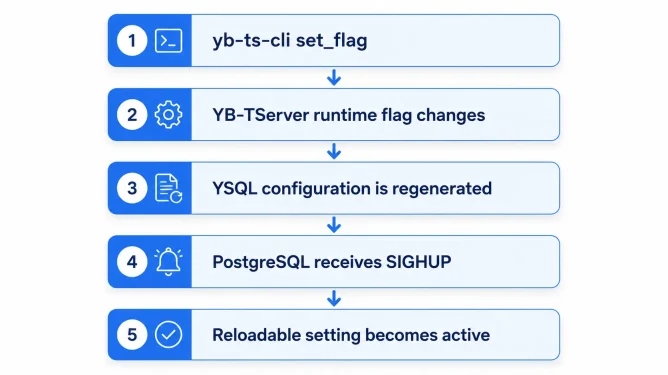
YugabyteDB’s PostgreSQL-wrapper infrastructure supports updating PostgreSQL configuration and signaling the PostgreSQL process to reload the resulting configuration. The source material used for this test shows the configuration being rewritten followed by a SIGHUP of the PostgreSQL process.

Conceptually, the workflow looks like this:

FlagChangeWorkFlow

No YB-TServer process restart is involved in the tested workflow.

Demo 1: Dynamically Change PostgreSQL Settings

Let’s start with ysql_pg_conf_csv.

We’ll dynamically modify two familiar PostgreSQL parameters:

  • ● work_mem
  • ● log_min_duration_statement

Step 1: Check the Initial Values

Connect to YSQL:

				
					./bin/ysqlsh


Then check the current settings:

				
					SHOW work_mem;

SHOW log_min_duration_statement;


In the test environment, the starting values were:

				
					 work_mem
----------
 4MB
(1 row)

 log_min_duration_statement
----------------------------
 -1
(1 row)


These are the values we’ll attempt to change without restarting the YB-TServer.

Step 2: Change ysql_pg_conf_csv

From another terminal, connect yb-ts-cli to the YB-TServer RPC port, which defaults to 9100:

				
					./bin/yb-ts-cli \
  --server_address=127.0.0.1:9100 \
  set_flag ysql_pg_conf_csv \
  "work_mem='16MB',log_min_duration_statement=100"


yb-ts-cli set_flag operates on an individual YB-TServer, and the official command syntax supports setting runtime flags through the server’s RPC endpoint.

Step 3: Verify the Change

Return to ysqlsh:

				
					SHOW work_mem;

SHOW log_min_duration_statement;


The test returned:

				
					 work_mem
----------
 16MB
(1 row)

 log_min_duration_statement
----------------------------
 100ms
(1 row)


No YB-TServer restart occurred between the before and after checks.

What About a Three-Node Cluster?

This is an important consideration.

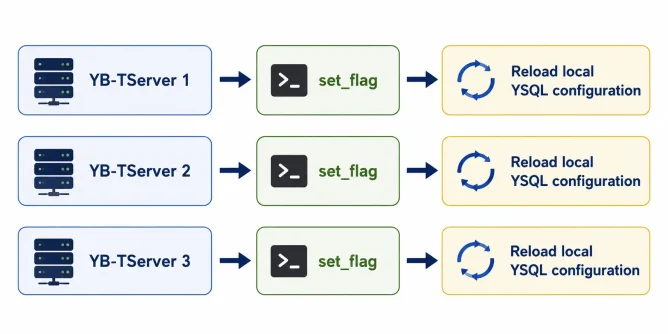
If the cluster has three YB-TServers and you use yb-ts-cli, the command must be sent to each YB-TServer individually because yb-ts-cli targets a specific server.

For example:

				
					./bin/yb-ts-cli \
  --server_address=10.0.0.10:9100 \
  set_flag ysql_pg_conf_csv \
  "work_mem='16MB',log_min_duration_statement=100"

./bin/yb-ts-cli \
  --server_address=10.0.0.11:9100 \
  set_flag ysql_pg_conf_csv \
  "work_mem='16MB',log_min_duration_statement=100"

./bin/yb-ts-cli \
  --server_address=10.0.0.12:9100 \
  set_flag ysql_pg_conf_csv \
  "work_mem='16MB',log_min_duration_statement=100"


Conceptually:

Change3Nodes
πŸ§ͺ Lab versus production: yb-ts-cli set_flag is a convenient way to demonstrate runtime behavior on a node. For a multi-node universe managed by YugabyteDB Anywhere, use YBA Edit Flags instead of manually running the command against every YB-TServer.

Not Every PostgreSQL Setting Can Be Reloaded Dynamically

There is an important limitation to keep in mind when using ysql_pg_conf_csv.

Changing ysql_pg_conf_csv dynamically allows YugabyteDB to regenerate the PostgreSQL configuration and send a SIGHUP to the local YSQL process. However, PostgreSQL still determines whether an individual configuration parameter can actually take effect without a restart.

For example, consider shared_buffers.

First, check the current value:

				
					./ysqlsh -c "SHOW shared_buffers;"


Output:

				
					.shared_buffers
----------------
 128MB
(1 row)


Now dynamically update ysql_pg_conf_csv:

				
					yb-ts-cli \
  --server_address=10.38.4.49:9100 \
  set_flag ysql_pg_conf_csv \
  "shared_buffers='256MB'"


The set_flag command completes, but checking the active PostgreSQL value again shows:

				
					./ysqlsh -c "SHOW shared_buffers;"


					.shared_buffers
----------------
 128MB
(1 row)
				
			
Why didn’t it change?

Because shared_buffers is a PostgreSQL startup-only parameter. PostgreSQL classifies settings like this with a postmaster context, meaning a new value cannot become active until the server is restarted.

You can see this directly:

				
					SELECT
    name,
    context,
    pending_restart
FROM pg_settings
WHERE name = 'shared_buffers';


The important value is:

				
					.context
---------
postmaster


A postmaster setting requires a PostgreSQL server restart. By comparison, settings with contexts such as sighup can be applied by reloading the configuration. PostgreSQL exposes this distinction through pg_settings.context and also provides pending_restart to indicate when a configuration-file change is waiting for a restart.

Trying to change shared_buffers directly with SQL confirms the same restriction:

				
					./ysqlsh -h 10.38.4.49 \
  -c "SET shared_buffers='256MB';" \
  -c "SHOW shared_buffers;"


Output:

				
					ERROR:  parameter "shared_buffers" cannot be changed without restarting the server

 shared_buffers
----------------
 128MB
(1 row)
				
			
πŸ’‘ Two levels of runtime behavior: A dynamic change to ysql_pg_conf_csv means YugabyteDB can update and reload the PostgreSQL configuration without restarting the YB-TServer. It does not override PostgreSQL’s own rules for individual GUC parameters. Reloadable settings such as work_mem can take effect dynamically, while startup-only settings such as shared_buffers still require a restart.
Check Before You Change a Parameter

Before relying on a dynamic ysql_pg_conf_csv change, check the PostgreSQL parameter’s context:

				
					SELECT
    name,
    setting,
    unit,
    context,
    pending_restart
FROM pg_settings
WHERE name = 'shared_buffers';


A useful rule of thumb is:

pg_settings Context Runtime Behavior Restart?
sighup Can be applied when PostgreSQL reloads its configuration No
postmaster Only becomes active when PostgreSQL starts Yes

PostgreSQL documents postmaster settings as requiring a server restart, while sighup settings can be applied when the configuration is re-read.

Demo 2: Dynamically Change Identity Mappings

Now let’s test ysql_ident_conf_csv.

Step 1: Check the Current Identity Mappings

Run:

				
					SELECT
    line_number,
    map_name,
    sys_name,
    pg_username,
    error
FROM pg_ident_file_mappings;


Initially:

				
					.line_number | map_name | sys_name | pg_username | error
-------------+----------+----------+-------------+-------
(0 rows)


Step 2: Add an Identity Mapping

For the single-node lab:

				
					./bin/yb-ts-cli \
  --server_address=127.0.0.1:9100 \
  set_flag ysql_ident_conf_csv \
  "admin_map sysadmin yugabyte"


This creates an identity map named:

				
					admin_map


mapping:

				
					sysadmin


to the YSQL role:

				
					yugabyte


Step 3: Verify the Mapping

Run:

				
					SELECT
    line_number,
    map_name,
    sys_name,
    pg_username,
    error
FROM pg_ident_file_mappings;


The test returned:

				
					.line_number | map_name  | sys_name | pg_username | error
-------------+-----------+----------+-------------+-------
           3 | admin_map | sysadmin | yugabyte    |
(1 row)


Using YugabyteDB Anywhere

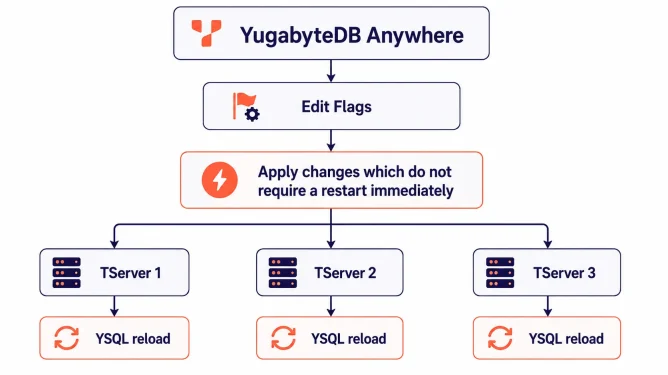
For a universe managed by YugabyteDB Anywhere, this is where the workflow becomes considerably easier.

Rather than running yb-ts-cli separately against every YB-TServer, edit the flag at the universe level in YBA.

Navigate to:

				
					Universe
   |
   +--> Actions
          |
          +--> Edit Flags


Add or modify the desired YB-TServer flag, such as:

				
					ysql_pg_conf_csv


or:

				
					ysql_ident_conf_csv


YBA provides several strategies for applying gFlag changes, including rolling restart, concurrent restart, and immediately applying settings that do not require a restart while deferring the rest.

Choose the Non-Restart Option

For runtime-capable flags, select:

  • Apply all changes which do not require a restart immediately; apply remaining changes the next time the database is restarted

This tells YBA to immediately apply changes it identifies as not requiring a restart, while preserving any restart-required changes until a future database restart.

Conceptually:

YBAFlagReload
πŸ’‘ Preferred YBA workflow: In a YugabyteDB Anywhere-managed universe, use Actions > Edit Flags and select β€œApply all changes which do not require a restart immediately; apply remaining changes the next time the database is restarted.” This avoids manually running yb-ts-cli against every YB-TServer and keeps the desired universe configuration managed by YBA.

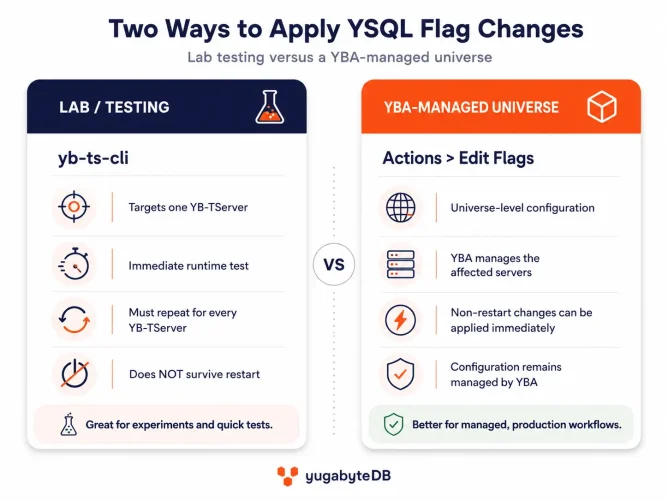
Runtime Versus Persistent Configuration

There is another important difference between yb-ts-cli and YBA.

The YugabyteDB documentation explicitly states that:

				
					yb-ts-cli set_flag


changes the in-memory value for the specified running YB-TServer and the change does not persist across restarts.

That makes yb-ts-cli excellent for:

  • ● Lab testing.
  • ● Demonstrating runtime behavior.
  • ● Temporarily experimenting with a setting.
  • ● Confirming whether a value can be changed dynamically.

But it should not be confused with persistent configuration management.

For example:

				
					./bin/yb-ts-cli \
  --server_address=10.0.0.10:9100 \
  set_flag ysql_pg_conf_csv \
  "work_mem='16MB'"


changes the running process on 10.0.0.10.

If that YB-TServer restarts, the runtime-only setting is lost unless the startup configuration has also been updated.

YBA’s Edit Flags workflow is therefore much better suited to managing the desired configuration of a production universe.

⚠️ Don’t confuse dynamic with temporary: A flag can be capable of changing dynamically while still needing to be recorded in persistent configuration. A direct yb-ts-cli set_flag change is temporary. Using YBA Edit Flags gives you a managed universe-level configuration rather than an ad hoc runtime override.

A Better Way to Think About the Two Methods

2-Ways-Apply-Flags

Final Takeaway

The previous tip demonstrated that supported YugabyteDB versions can dynamically update YSQL HBA configuration.

The same runtime configuration mechanism can extend to other PostgreSQL-facing YSQL settings.

Testing on YugabyteDB 2026.1.0.1 demonstrated that:

  • ● ysql_pg_conf_csv could dynamically change reloadable PostgreSQL settings such as work_mem and log_min_duration_statement.
  • ● ysql_ident_conf_csv could dynamically update PostgreSQL identity mappings.
  • ● PostgreSQL did not need to be restarted for the tested changes.
  • ● A separate SELECT pg_reload_conf(); was not required.
  • ● yb-ts-cli targets only one YB-TServer, so a three-node cluster requires three separate set_flag operations when testing manually.
  • ● Direct yb-ts-cli set_flag changes are runtime-only and do not persist across a restart.
  • ● For a YBA-managed universe, Actions > Edit Flags is the better operational workflow.
  • ● YBA’s β€œApply all changes which do not require a restart immediately; apply remaining changes the next time the database is restarted” option provides a particularly useful way to take advantage of runtime-capable configuration changes without unnecessarily restarting YB-TServers.

For a one-node lab, yb-ts-cli makes the behavior easy to demonstrate. For a real multi-node YBA-managed universe, Edit Flags is the workflow to use.

Have Fun!