
Each YugabyteDB release page includes platform-specific wget commands for downloading the release tarball. The filename contains both the YugabyteDB version and a release-specific build number, such as b62, b2, or b1.
For example, the official release pages currently list these builds:
| YugabyteDB Version | Build | Example Linux Package |
2024.2.10.0 | b62 | yugabyte-2024.2.10.0-b62-linux-x86_64.tar.gz |
2025.2.3.1 | b2 | yugabyte-2025.2.3.1-b2-linux-x86_64.tar.gz |
2026.1.0.1 | b1 | yugabyte-2026.1.0.1-b1-linux-x86_64.tar.gz |
The build numbers and package names above come directly from their corresponding YugabyteDB release pages.
The version is easy to remember, but the build number is not always predictable. That makes it difficult to construct a download URL using only a version such as 2025.2.3.1.
This YugabyteDB Tip creates a reusable shell script that:
- ● Accepts a YugabyteDB version.
- ● Detects the local operating system and processor architecture.
- ● Finds the release series page automatically.
- ● Extracts the exact tarball URL and build number.
- ● Prints the corresponding
wgetcommand. - ● Optionally downloads the tarball.
- ● Verifies the published checksum.
- ● Optionally extracts and prepares the installation.
The Complete Script
Save the following script as get_ybdb.sh:
					#!/usr/bin/env bash

set -Eeuo pipefail

VERSION=""
OS_ARCH=""
DEST_DIR="."
DOWNLOAD=false
INSTALL=false
VERIFY=true

if [[ -t 1 && -z "${NO_COLOR:-}" ]]; then
  GREEN='\033[0;32m'
  CYAN='\033[0;36m'
  YELLOW='\033[1;33m'
  RED='\033[0;31m'
  NC='\033[0m'
else
  GREEN=''
  CYAN=''
  YELLOW=''
  RED=''
  NC=''
fi

info() { printf '%b[INFO]%b %s\n' "$CYAN" "$NC" "$*"; }
ok()   { printf '%b[ OK ]%b %s\n' "$GREEN" "$NC" "$*"; }
warn() { printf '%b[WARN]%b %s\n' "$YELLOW" "$NC" "$*" >&2; }
die()  { printf '%b[ERROR]%b %s\n' "$RED" "$NC" "$*" >&2; exit 1; }

usage() {
  cat <<USAGE
Usage:
  $0 -v <version> [options]

Required:
  -v, --version <version>       YugabyteDB version, for example 2025.2.3.1

Options:
  -o, --os-arch <value>         Package platform. Auto-detected when omitted.
                                Supported values:
                                  linux-x86_64
                                  el8-aarch64
                                  darwin-x86_64
                                  darwin-arm64
  -d, --download                Download and verify the tarball
  -i, --install                 Download, verify, extract, and prepare it
                                Implies --download
  -C, --directory <path>        Download and extract under this directory
                                Default: current directory
      --no-verify               Skip checksum verification
  -h, --help                    Show this help

Examples:
  $0 -v 2024.2.10.0
  $0 -v 2025.2.3.1 -d
  $0 -v 2026.1.0.1 -i -C /opt/yugabyte
  $0 -v 2026.1.0.1 -o darwin-arm64 -i
USAGE
}

need_value() {
  [[ $# -ge 2 && -n "${2:-}" ]] ||
    die "Option $1 requires a value."
}

require_command() {
  command -v "$1" >/dev/null 2>&1 ||
    die "Required command not found: $1"
}

detect_os_arch() {
  local os machine

  os="$(uname -s)"
  machine="$(uname -m)"

  case "${os}:${machine}" in
    Linux:x86_64|Linux:amd64)
      printf '%s\n' 'linux-x86_64'
      ;;
    Linux:aarch64|Linux:arm64)
      printf '%s\n' 'el8-aarch64'
      ;;
    Darwin:x86_64|Darwin:amd64)
      printf '%s\n' 'darwin-x86_64'
      ;;
    Darwin:arm64|Darwin:aarch64)
      printf '%s\n' 'darwin-arm64'
      ;;
    *)
      die "Unable to map ${os}/${machine} to a YugabyteDB package. Use --os-arch."
      ;;
  esac
}

validate_os_arch() {
  case "$1" in
    linux-x86_64|el8-aarch64|darwin-x86_64|darwin-arm64)
      ;;
    *)
      die "Unsupported OS/architecture: $1"
      ;;
  esac
}

fetch_release_page() {
  local series="$1"
  local candidate_url

  for candidate_url in \
    "https://docs.yugabyte.com/stable/releases/ybdb-releases/v${series}/" \
    "https://docs.yugabyte.com/stable/releases/ybdb-releases/end-of-life/v${series}/"
  do
    if RELEASE_HTML="$(
      curl -fsSL \
        --retry 3 \
        --connect-timeout 15 \
        --user-agent 'get_ybdb.sh/1.0' \
        "$candidate_url"
    )"; then
      DOCS_URL="$candidate_url"
      return 0
    fi
  done

  return 1
}

calculate_checksum() {
  local file="$1"
  local checksum_length="$2"

  case "$checksum_length" in
    40)
      if command -v shasum >/dev/null 2>&1; then
        shasum -a 1 "$file" | awk '{print $1}'
      elif command -v sha1sum >/dev/null 2>&1; then
        sha1sum "$file" | awk '{print $1}'
      else
        die "Checksum verification requires shasum or sha1sum."
      fi
      ;;
    64)
      if command -v shasum >/dev/null 2>&1; then
        shasum -a 256 "$file" | awk '{print $1}'
      elif command -v sha256sum >/dev/null 2>&1; then
        sha256sum "$file" | awk '{print $1}'
      else
        die "Checksum verification requires shasum or sha256sum."
      fi
      ;;
    *)
      die "Unexpected checksum length: ${checksum_length}"
      ;;
  esac
}

while [[ $# -gt 0 ]]; do
  case "$1" in
    -v|--version)
      need_value "$@"
      VERSION="$2"
      shift 2
      ;;
    -o|--os-arch)
      need_value "$@"
      OS_ARCH="$2"
      shift 2
      ;;
    -d|--download)
      DOWNLOAD=true
      shift
      ;;
    -i|--install)
      INSTALL=true
      DOWNLOAD=true
      shift
      ;;
    -C|--directory)
      need_value "$@"
      DEST_DIR="$2"
      shift 2
      ;;
    --no-verify)
      VERIFY=false
      shift
      ;;
    -h|--help)
      usage
      exit 0
      ;;
    --)
      shift
      break
      ;;
    *)
      die "Unknown option: $1. Use --help for usage."
      ;;
  esac
done

[[ -n "$VERSION" ]] || {
  usage
  die "A YugabyteDB version is required."
}

[[ "$VERSION" =~ ^[0-9]+\.[0-9]+\.[0-9]+\.[0-9]+$ ]] ||
  die "Version must contain four numeric components, for example 2025.2.3.1."

require_command curl
require_command grep
require_command awk
require_command tr
require_command uname

if [[ -z "$OS_ARCH" ]]; then
  OS_ARCH="$(detect_os_arch)"
  info "Auto-detected package platform: $OS_ARCH"
fi

validate_os_arch "$OS_ARCH"

IFS='.' read -r VERSION_MAJOR VERSION_MINOR _ <<< "$VERSION"
SERIES="${VERSION_MAJOR}.${VERSION_MINOR}"

info "Finding YugabyteDB ${VERSION} release metadata..."

if ! fetch_release_page "$SERIES"; then
  die "Unable to find a release page for YugabyteDB series v${SERIES}."
fi

VERSION_REGEX="${VERSION//./\\.}"

TARBALL_URL="$(
  {
    printf '%s' "$RELEASE_HTML" |
      grep -oE \
        "https://(software|downloads)\.yugabyte\.com/releases/${VERSION_REGEX}/yugabyte-${VERSION_REGEX}-b[0-9]+-${OS_ARCH}\.tar\.gz" |
      awk 'NR == 1 { first = $0 } END { print first }'
  } || true
)"

if [[ -z "$TARBALL_URL" ]]; then
  die "No ${OS_ARCH} tarball was found for YugabyteDB ${VERSION}. Check ${DOCS_URL}"
fi

TARBALL_FILE="${TARBALL_URL##*/}"
CHECKSUM_URL="${TARBALL_URL%.tar.gz}-tar.gz.sha"
TARGET_FILE="${DEST_DIR%/}/${TARBALL_FILE}"

printf '\n%bResolved wget command:%b\n' "$YELLOW" "$NC"
printf 'wget "%s"\n\n' "$TARBALL_URL"

if [[ "$DOWNLOAD" != true ]]; then
  exit 0
fi

require_command wget
mkdir -p "$DEST_DIR"

info "Downloading ${TARBALL_FILE}..."

(
  cd "$DEST_DIR"
  wget --continue "$TARBALL_URL"
)

ok "Downloaded ${TARGET_FILE}"

if [[ "$VERIFY" == true ]]; then
  info "Retrieving and verifying the published checksum..."

  if ! EXPECTED_CHECKSUM="$(
    curl -fsSL --retry 3 "$CHECKSUM_URL" |
      tr -d '\r\n[:space:]'
  )"; then
    die "Unable to retrieve checksum from ${CHECKSUM_URL}"
  fi

  [[ "$EXPECTED_CHECKSUM" =~ ^[0-9a-fA-F]+$ ]] ||
    die "The release server returned an invalid checksum."

  ACTUAL_CHECKSUM="$(
    calculate_checksum "$TARGET_FILE" "${#EXPECTED_CHECKSUM}"
  )"

  EXPECTED_CHECKSUM="$(
    printf '%s' "$EXPECTED_CHECKSUM" |
      tr 'A-F' 'a-f'
  )"

  ACTUAL_CHECKSUM="$(
    printf '%s' "$ACTUAL_CHECKSUM" |
      tr 'A-F' 'a-f'
  )"

  [[ "$ACTUAL_CHECKSUM" == "$EXPECTED_CHECKSUM" ]] ||
    die "Checksum verification failed for ${TARGET_FILE}."

  ok "Checksum verified"
else
  warn "Checksum verification was skipped."
fi

if [[ "$INSTALL" != true ]]; then
  exit 0
fi

require_command tar

EXTRACTED_DIR_NAME="$(
  tar -tzf "$TARGET_FILE" |
    awk -F/ '
      NF && first == "" {
        first = $1
      }
      END {
        print first
      }
    '
)"

[[ -n "$EXTRACTED_DIR_NAME" ]] ||
  die "Unable to determine the archive's top-level directory."

EXTRACTED_DIR="${DEST_DIR%/}/${EXTRACTED_DIR_NAME}"

if [[ -d "$EXTRACTED_DIR" ]]; then
  warn "The extraction directory already exists: ${EXTRACTED_DIR}"
fi

info "Extracting ${TARBALL_FILE}..."

tar -xzf "$TARGET_FILE" -C "$DEST_DIR"

ok "Extracted to ${EXTRACTED_DIR}"

case "$OS_ARCH" in
  linux-*|el8-*)
    [[ -x "$EXTRACTED_DIR/bin/post_install.sh" ]] ||
      die "Expected ${EXTRACTED_DIR}/bin/post_install.sh was not found or is not executable."

    info "Running bin/post_install.sh..."

    (
      cd "$EXTRACTED_DIR"
      ./bin/post_install.sh
    )

    ok "post_install.sh completed"
    ;;
  darwin-*)
    info "The macOS package does not require post_install.sh."
    ;;
esac

printf '\n%bYugabyteDB %s is ready.%b\n' \
  "$GREEN" "$VERSION" "$NC"

printf 'cd %q\n' "$EXTRACTED_DIR"
printf './bin/yugabyted start\n'

if [[ "$OS_ARCH" == darwin-* ]]; then
  printf '\nIf macOS blocks the downloaded binaries, run:\n'
  printf 'xattr -dr com.apple.quarantine %q\n' "$EXTRACTED_DIR"
fi
Make the script executable:
chmod +x get_ybdb.sh
Script Requirements
The script uses tools commonly included with Linux and macOS systems.
| Command | When Required | Purpose |
curl | Always | Reads the release page and retrieves the checksum. |
grep, awk, and tr | Always | Extract and process the release information. |
wget | --download or --install | Downloads the release tarball. |
shasum, sha1sum, or sha256sum | Checksum verification | Verifies that the downloaded tarball matches the published checksum. |
tar | --install | Extracts the YugabyteDB package. |
Script Options
| Option | Description | Required? |
-v or --version | Specifies the YugabyteDB version. | Yes |
-o or --os-arch | Overrides automatic platform detection. | No |
-d or --download | Downloads and verifies the tarball. | No |
-i or --install | Downloads, verifies, extracts, and prepares the package. | No |
-C or --directory | Selects the download and extraction directory. | No |
--no-verify | Skips checksum verification. | No |
-h or --help | Displays the help text. | No |
Supported Platforms
The package type is automatically selected using the output of uname -s and uname -m.
| Package Value | Operating System | Processor |
linux-x86_64 | Linux | Intel or AMD 64-bit |
el8-aarch64 | Linux | 64-bit ARM |
darwin-x86_64 | macOS | Intel 64-bit |
darwin-arm64 | macOS | Apple silicon |
The official release pages publish packages for these Linux and macOS platform combinations when they are available for a particular release.
Example 1: Generate the wget Command
By default, the script only finds and displays the command. It does not download anything.
					./get_ybdb.sh \
  --version 2025.2.3.1
On a Linux x86 system, the output will resemble:
					[INFO] Auto-detected package platform: linux-x86_64
[INFO] Finding YugabyteDB 2025.2.3.1 release metadata...

Resolved wget command:
wget "https://software.yugabyte.com/releases/2025.2.3.1/yugabyte-2025.2.3.1-b2-linux-x86_64.tar.gz"
Notice that only 2025.2.3.1 was supplied. The script discovered the complete build identifier, 2025.2.3.1-b2, from the release page.
Example 2: Download the Tarball
Add -d or --download to execute the generated command:
					./get_ybdb.sh \
  --version 2025.2.3.1 \
  --download
The script will:
- 1. Find the matching release package.
- 2, Print the resolved
wgetcommand. - 3. Download the tarball.
- 4. Retrieve its published checksum.
- 5. Verify the downloaded file.
The wget --continue option is used so an interrupted download can be resumed.
--no-verify is specified. Example 3: Download, Extract, and Prepare YugabyteDB
Use -i or --install to perform the complete local setup:
					./get_ybdb.sh \
  --version 2026.1.0.1 \
  --install
The --install option implies --download. The script downloads the package, verifies the checksum, determines the archive’s top-level directory, and extracts the tarball.
For Linux packages, it also runs:
./bin/post_install.sh
The official Linux quick start instructs users to run bin/post_install.sh after extracting YugabyteDB. The macOS quick start does not include that configuration step, so the script skips it for macOS packages.
After preparing the package, the script displays the commands needed to start a local YugabyteDB cluster:
					cd yugabyte-2026.1.0.1
./bin/yugabyted start
Example 4: Use a Specific Destination Directory
Use -C or --directory to control where the tarball and extracted directory are placed:
					./get_ybdb.sh \
  --version 2026.1.0.1 \
  --install \
  --directory /opt/yugabyte
The script creates the destination directory when it does not already exist.
The current user must have permission to write to the selected directory.
Example 5: Override Platform Detection
To explicitly select the Apple silicon package:
					./get_ybdb.sh \
  --version 2026.1.0.1 \
  --os-arch darwin-arm64 \
  --install
For an Intel-based Mac:
					./get_ybdb.sh \
  --version 2026.1.0.1 \
  --os-arch darwin-x86_64 \
  --install
For a Linux ARM system:
					./get_ybdb.sh \
  --version 2026.1.0.1 \
  --os-arch el8-aarch64 \
  --install
Example 6: Display the Help Page
./get_ybdb.sh --help
Example output:
					Usage:
  ./get_ybdb.sh -v <version> [options]

Required:
  -v, --version <version>       YugabyteDB version

Options:
  -o, --os-arch <value>         Override platform detection
  -d, --download                Download and verify the tarball
  -i, --install                 Download, verify, extract, and prepare it
  -C, --directory <path>        Select the destination directory
      --no-verify               Skip checksum verification
  -h, --help                    Show this help
Actual Example
Let’s download and install the latest YugabyteDB version available at the time of this writing.
					[root@localhost ~]# ./get_ybdb.sh -v 2026.1.0.1 -i
[INFO] Auto-detected package platform: linux-x86_64
[INFO] Finding YugabyteDB 2026.1.0.1 release metadata...

Resolved wget command:
wget "https://software.yugabyte.com/releases/2026.1.0.1/yugabyte-2026.1.0.1-b1-linux-x86_64.tar.gz"

[INFO] Downloading yugabyte-2026.1.0.1-b1-linux-x86_64.tar.gz...
--2026-08-01 14:06:44--  https://software.yugabyte.com/releases/2026.1.0.1/yugabyte-2026.1.0.1-b1-linux-x86_64.tar.gz
Resolving software.yugabyte.com (software.yugabyte.com)... 52.33.86.107, 34.213.189.139, 54.244.195.224
Connecting to software.yugabyte.com (software.yugabyte.com)|52.33.86.107|:443... connected.
HTTP request sent, awaiting response... 307 Temporary Redirect
Location: https://downloads.yugabyte.com/releases/2026.1.0.1/yugabyte-2026.1.0.1-b1-linux-x86_64.tar.gz [following]
--2026-08-01 14:06:45--  https://downloads.yugabyte.com/releases/2026.1.0.1/yugabyte-2026.1.0.1-b1-linux-x86_64.tar.gz
Resolving downloads.yugabyte.com (downloads.yugabyte.com)... 172.66.42.235, 172.66.41.21, 2606:4700:3108::ac42:2915, ...
Connecting to downloads.yugabyte.com (downloads.yugabyte.com)|172.66.42.235|:443... connected.
HTTP request sent, awaiting response... 200 OK
Length: 514171871 (490M) [binary/octet-stream]
Saving to: ‘yugabyte-2026.1.0.1-b1-linux-x86_64.tar.gz’

yugabyte-2026.1.0.1-b1-linux-x86_64.tar.g 100%[====================================================================================>] 490.35M  70.4MB/s    in 7.8s

2026-08-01 14:06:53 (62.6 MB/s) - ‘yugabyte-2026.1.0.1-b1-linux-x86_64.tar.gz’ saved [514171871/514171871]

[ OK ] Downloaded ./yugabyte-2026.1.0.1-b1-linux-x86_64.tar.gz
[INFO] Retrieving and verifying the published checksum...
[ OK ] Checksum verified
[INFO] Extracting yugabyte-2026.1.0.1-b1-linux-x86_64.tar.gz...
[ OK ] Extracted to ./yugabyte-2026.1.0.1
[INFO] Running bin/post_install.sh...
OpenSSL binary: ./bin/../bin/../bin/openssl
FIPS module: ./bin/../bin/../lib/ossl-modules/fips.so
HMAC : (Module_Integrity) : Pass
SHA1 : (KAT_Digest) : Pass
SHA2 : (KAT_Digest) : Pass
SHA3 : (KAT_Digest) : Pass
TDES : (KAT_Cipher) : Pass
AES_GCM : (KAT_Cipher) : Pass
AES_ECB_Decrypt : (KAT_Cipher) : Pass
RSA : (KAT_Signature) : RNG : (Continuous_RNG_Test) : Pass
Pass
ECDSA : (PCT_Signature) : Pass
ECDSA : (PCT_Signature) : Pass
DSA : (PCT_Signature) : Pass
TLS13_KDF_EXTRACT : (KAT_KDF) : Pass
TLS13_KDF_EXPAND : (KAT_KDF) : Pass
TLS12_PRF : (KAT_KDF) : Pass
PBKDF2 : (KAT_KDF) : Pass
SSHKDF : (KAT_KDF) : Pass
KBKDF : (KAT_KDF) : Pass
HKDF : (KAT_KDF) : Pass
SSKDF : (KAT_KDF) : Pass
X963KDF : (KAT_KDF) : Pass
X942KDF : (KAT_KDF) : Pass
HASH : (DRBG) : Pass
CTR : (DRBG) : Pass
HMAC : (DRBG) : Pass
DH : (KAT_KA) : Pass
ECDH : (KAT_KA) : Pass
RSA_Encrypt : (KAT_AsymmetricCipher) : Pass
RSA_Decrypt : (KAT_AsymmetricCipher) : Pass
RSA_Decrypt : (KAT_AsymmetricCipher) : Pass
INSTALL PASSED
[ OK ] post_install.sh completed

YugabyteDB 2026.1.0.1 is ready.
cd ./yugabyte-2026.1.0.1
./bin/yugabyted start
How the Release Page Is Selected
The script takes the first two components of the version to determine the release series.
For example:
					2024.2.10.0  ->  2024.2
2025.2.3.1   ->  2025.2
2026.1.0.1   ->  2026.1
For version 2025.2.3.1, the script first checks:
https://docs.yugabyte.com/stable/releases/ybdb-releases/v2025.2/
It then searches that page for a tarball URL containing:
/releases/2025.2.3.1/yugabyte-2025.2.3.1-b<build>-<platform>.tar.gz
The <build> value is captured from the complete URL published on the page.
The script also checks the YugabyteDB end-of-life release documentation path when the version series is no longer on the main release page. The main YugabyteDB release index links active series and directs users to archived documentation for end-of-life releases.
Why Not Construct the URL Directly?
YugabyteDB release packages generally use this format:
yugabyte-<version>-b<build>-<platform>.tar.gz
A complete download URL resembles:
https://software.yugabyte.com/releases/<version>/yugabyte-<version>-b<build>-<platform>.tar.gz
The version and platform can be supplied or detected, but the build number varies by release.
For example:
					2024.2.10.0  ->  b62
2025.2.3.1   ->  b2
2026.1.0.1   ->  b1
The YugabyteDB documentation describes the package format as including both the version build and architecture.
Instead of guessing the build number or maintaining a hardcoded mapping, the script retrieves the complete URL from the official documentation.
Linux and macOS Installation Differences
On Linux, the script runs:
./bin/post_install.sh
On macOS, the script skips post_install.sh.
If macOS prevents the extracted binaries from running because they have a quarantine attribute, the script displays:
xattr -dr com.apple.quarantine yugabyte-2026.1.0.1
The quarantine-removal command is documented in the YugabyteDB macOS quick start.
Skipping Checksum Verification
Checksum verification is enabled by default.
It can be disabled with:
					./get_ybdb.sh \
  --version 2025.2.3.1 \
  --download \
  --no-verify
When verification is disabled, the script prints a warning:
[WARN] Checksum verification was skipped.
What Does “Install” Mean in This Script?
The --install option performs the following actions:
					Locate release
    |
    v
Resolve exact build URL
    |
    v
Download tarball
    |
    v
Verify checksum
    |
    v
Extract package
    |
    v
Run post_install.sh on Linux
It does not:
- ● Configure a Linux system service.
- ● Start YugabyteDB automatically.
- ● Upgrade an existing YugabyteDB universe.
- ● Configure a production multi-node deployment.
- ● Import a release into YugabyteDB Anywhere.
The single-host yugabyted quick-start configuration is intended for development and learning. Production deployments, performance benchmarking, and true multi-host configurations should follow the YugabyteDB deployment documentation.
Important Limitation
The script parses the HTML returned by the YugabyteDB documentation site.
If the release-page structure, download host, package naming convention, or documentation URL changes, the extraction expression may need to be updated.
However, because the script validates the expected version, build-number format, platform, and tarball suffix, it will fail with an error rather than silently downloading an unrelated file.
Example:
[ERROR] No linux-x86_64 tarball was found for YugabyteDB 2025.2.99.0.
Related Documentation
| Resource | Description |
| YugabyteDB Releases | Lists the YugabyteDB release series, release dates, support dates, and release notes. |
| Linux Quick Start | Explains how to download, configure, and start YugabyteDB on Linux. |
| macOS Quick Start | Explains how to download and start YugabyteDB on Intel and Apple silicon Macs. |
| Manual Software Installation | Covers manual YugabyteDB installation for multi-host deployments. |
Final Takeaway
YugabyteDB release tarballs include a release-specific build number that cannot always be determined from the version alone.
Instead of manually browsing the release notes or maintaining a hardcoded list of build numbers, get_ybdb.sh retrieves the exact package URL from the official YugabyteDB documentation.
To display the appropriate wget command:
./get_ybdb.sh -v 2025.2.3.1
To download and verify the package:
./get_ybdb.sh -v 2025.2.3.1 -d
To download, verify, extract, and prepare YugabyteDB:
./get_ybdb.sh -v 2025.2.3.1 -i
This provides a repeatable way to retrieve matching YugabyteDB builds for development systems, test environments, automation scripts, and internal tooling.
Have Fun!
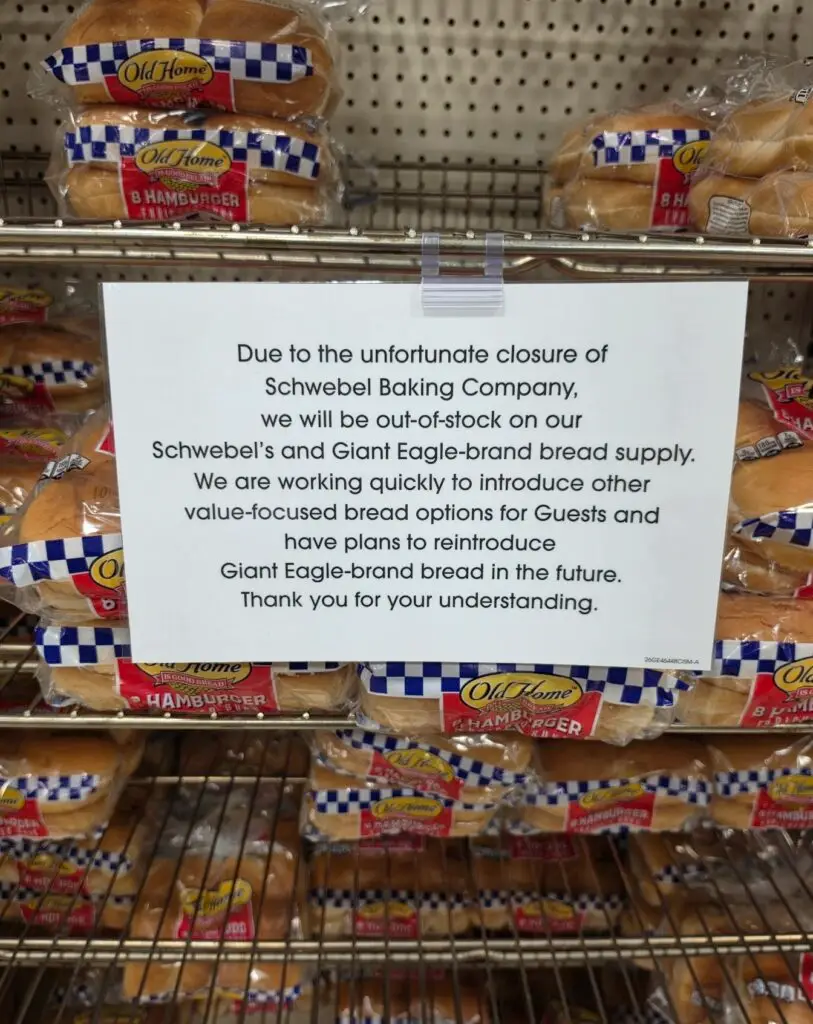
Wow. I went to our local Giant Eagle… oops, I mean Kroger… to pick up some hamburger buns for dinner tonight. I headed toward the bread aisle looking for my favorite brand and was greeted by this sign. Really sad.
Schwebel Baking Company was founded in 1906, when Joseph and Dora Schwebel began baking bread in their kitchen and selling fresh loaves door to door around Youngstown, Ohio. The family-owned company eventually expanded throughout Ohio, Pennsylvania, and New York, becoming a familiar staple in Pittsburgh-area grocery stores and homes for generations.
After more than 120 years in business, the company is winding down operations because of ongoing financial challenges, aging facilities and equipment, rising labor obligations, and declining demand for traditional bread products. It is truly the end of an era.
Schwebel’s bread and buns have been part of cookouts, family dinners, and everyday life around Pittsburgh for as long as many of us can remember.
Sometimes you don’t realize how much a familiar local brand means until you suddenly can’t find it on the shelf anymore. 😢