Leaderless Tablets in YugabyteDB

A leaderless tablet is a tablet that currently has no elected Raft leader. Because all writes and strongly consistent reads are served by the tablet leader, YugabyteDB needs a leader for each active tablet to keep the cluster fully healthy.

Leaderless tablets can appear briefly during normal failure handling. For example, when a node or zone goes offline, YugabyteDB detects the failure in about 3 seconds, triggers a Raft leader election, and promotes one of the remaining followers. Once the election completes, the cluster should return to a state with no leaderless tablets. In an RF=3 deployment across zones, YugabyteDB is designed to tolerate a single zone failure with no data loss, although the cluster may be temporarily under-replicated until the failed zone or node returns.

If a failed node doesn’t return within 15 minutes, YugabyteDB automatically considers it a long-term failure and begins re-replicating data to new followers to restore the Replication Factor

💡 Key Insight

A leaderless tablet is often temporary. When a node or zone goes offline, YugabyteDB detects the failure, triggers a Raft leader election, and promotes a new leader. If the alert persists, focus on why Raft cannot elect a leader: failed nodes, network issues, under-replication, or lost quorum.

How It Happens

When a tablet leader goes offline, the affected tablet is temporarily leaderless until a new leader is elected.

Common causes include:

  • ● A node or zone failure
  • ● Network connectivity issues between YB-TServers and YB-Masters
  • ● Unhealthy or stopped yb-tserver processes
  • ● Tablet placement or under-replication problems
  • ● A temporary leader election window during failover

In a healthy RF=3 cluster with only one failure domain down, this should usually clear automatically after leader election. The YugabyteDB zone failure documentation describes this recovery as about 3 seconds for the cluster to detect the offline node and complete leader election.

Impact on YBA Operations

YugabyteDB Anywhere checks for leaderless tablets before starting many edit or upgrade operations. If YBA detects leaderless tablets, it blocks the operation to avoid making an unhealthy universe worse.

Example error:

				
					There are leaderless tablets: [b8a3e62d6868490abca0aba82e3477d7]
				
			
YBA’s documented options are:
  • 1. Fix the root cause of the tablets having no leaders.
  • 2. If the condition is temporary, increase: yb.checks.leaderless_tablets.timeout
  • 3. If the universe is unhealthy and you accept the risk, temporarily disable: yb.checks.leaderless_tablets.enabled

Disabling the check should be treated as a temporary workaround, not the fix. The YugabyteDB docs explicitly frame this as something to do only when you are comfortable with the risk.

⚠️ YBA Operation Blocked?

YugabyteDB Anywhere blocks upgrade and edit operations when leaderless tablets are detected. The safest fix is to resolve the underlying issue first. Raising yb.checks.leaderless_tablets.timeout or temporarily disabling yb.checks.leaderless_tablets.enabled should be treated as a workaround, not the root-cause fix.

First: Confirm Whether the Alert Is Real

Important nuance: not every YBA leaderless tablet alert means an active tablet has lost its leader.

The Yugabyte Support KB calls out a known false positive scenario where YBA reports leaderless tablets, but the Master Leader UI shows the load balancer as Balanced. In those cases, the listed tablets are often hidden split parent tablets that have not yet been deleted. These are not active tablets serving traffic.

This can happen with:

  • ● PITR enabled: dropped table tablets remain hidden until the PITR retention window expires.
  • ● Tablet split edge cases: a split parent tablet remains hidden longer than expected.

In the Master Leader UI table details, check whether the tablet shows:

				
					Hidden=1


If Hidden=1, it is a hidden tablet. If it is a split parent tablet, the alert may be a false positive rather than an active availability issue.

🔎 Don’t Skip This Check

Before treating a YBA leaderless tablet alert as a real availability problem, confirm whether the tablet is hidden. A split parent tablet marked Hidden=1 may appear leaderless even though it is no longer an active tablet serving traffic.

Identifying Leaderless Tablets

You can identify leaderless tablets in two main way

Option 1: Master-Leader UI

Go to:

				
					Master Leader UI → Utilities → Replica Info


This view lists tablets marked as leaderless. From there, click into the related table details and search for the tablet UUID. If the tablet is marked Hidden=1, it may be a hidden split parent tablet false positive.

Option 2: Yugatool Tablet Report

Generate a tablet report, parse it with tablet-report-parser.pl, and inspect the generated SQLite database.

				
					perl tablet_report_parser.pl tablet-report-HOST.DATE.out

sqlite3 -header -column /path/to/tablet-report.CLUSTERNAME.sqlite


Then query:

				
					SELECT COUNT(*) FROM leaderless;


or:

				
					SELECT * FROM leaderless;


The support KB notes that if this query returns no rows, the reported leaderless tablets may all be false positives. If it returns rows, those tablets should be treated as legitimate leaderless tablets

Fixing Legitimately Leaderless Tablets

For real leaderless tablets, the fix is usually to restore the conditions required for Raft leader election.

1. Verify node health

Check that all expected YB-TServer nodes are online and healthy.

In YBA:

				
					Universe → Nodes


From the command line on each node:

				
					ps -ef | grep yb-tserver


The support KB specifically recommends confirming that all yb-tserver processes are running.

2. Check network connectivity

Verify that YB-TServers and YB-Masters can communicate over the expected ports. A tablet can remain leaderless if its peers cannot communicate well enough to complete Raft election. The support KB explicitly lists network connectivity between YB-TServers and YB-Masters as a key validation step.

3. Check for under-replication or failed nodes

If the tablet lost too many peers, YugabyteDB may not be able to elect a leader. In RF=3, the cluster can tolerate one failure domain, but not loss of quorum for a tablet.

Useful checks:

				
					yb-admin --master_addresses <masters> list_all_tablet_servers


					yb-admin --master_addresses <masters> list_tablets ysql.<database_name> <table_name> 0


Also check:

				
					Master Leader UI → Tablet Servers
Master Leader UI → Tables
Master Leader UI → Utilities → Replica Info
				
			
4. Bring failed nodes back or replace them

If a node is temporarily down, the safest fix is usually to bring it back online.

If the node is permanently lost, use the normal YBA node replacement/removal workflow rather than trying to manually force a leader. Manual low-level Raft configuration changes should generally be reserved for support-guided recovery.

5. Contact Yugabyte Support if it persists

he support KB’s final recommendation for legitimate leaderless tablets is to contact Yugabyte Support if the issue persists after verifying node health and network connectivity.

✅ Practical Rule

Don’t try to “force” a leader first. Restore the conditions required for Raft to elect one. That usually means bringing failed nodes back online, fixing network connectivity, resolving under-replication, or replacing permanently failed nodes through the normal YBA workflow.

Version Note for Hidden Split Parent False Positives

For hidden split parent tablet false positives, the support KB says the issue is resolved in:

  • ● 2.14.17+
  • ● 2.18.8+
  • ● 2.20.4+
  • ● 2024.1.0.0+

On older versions, false positive alerts can clear automatically after the PITR retention window expires.

Key Takeaway

Do not immediately assume every leaderless tablet alert means data is unavailable. First determine whether the tablet is an active tablet or a hidden split parent tablet. If it is hidden, it may be a false positive. If it is legitimate, fix the underlying health issue: failed tservers, network connectivity, placement problems, or lost quorum. YBA’s timeout and disable flags are workarounds for operations, not the root-cause fix.

Have Fun!

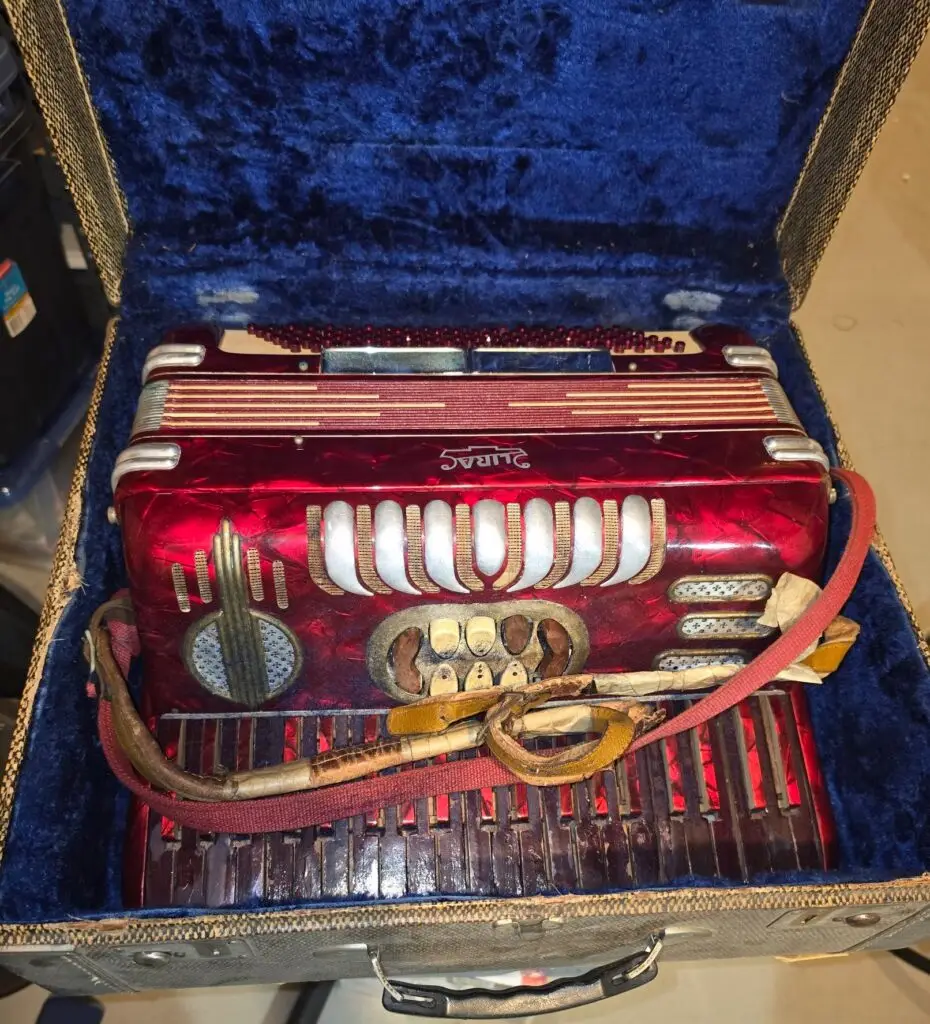
This vintage International Lira Mod. 20 Centro Matic is a stunning piece of 1950s family history, wrapped in a "Red Pearloid" finish that practically screams basement polkas and mid-century charm. It served as my grandfather’s secret weapon, stashed away in the attic only to be unleashed for impromptu concerts that filled the house with music and, much to my grandmother's dismay, tested the absolute limits of her patience. It’s more than just a classic Italian accordion; it’s a shiny, red reminder of Grandpa’s mischievous spirit and his talent for turning any quiet afternoon into a loud, rhythmic celebration that drove Grandma absolutely crazy.