In distributed databases, the fastest query is the one that doesn’t touch disk at all. That’s the philosophy behind YugabyteDB’s DocDB storage engine, and it’s where Bloom filters quietly do their magic.
A Bloom filter is a compact, probabilistic data structure that can instantly tell whether a key definitely doesn’t exist in a file or block.
In YugabyteDB, these filters live deep inside DocDB’s LSM and SST architecture, where they prevent wasteful file opens, block reads, and cache churn, leading to blazing-fast queries at scale.
🌸 What Are Bloom Filters?
A Bloom filter is like a hyper-efficient doorman. It can’t always tell you who’s inside, but it can instantly tell you who’s definitely not.
It works by hashing a key through multiple functions and setting bits in a small in-memory array. When a lookup happens, those bits are checked … if any are missing, the item is guaranteed absent.
They are:
● ✅ Fast and memory-efficient
● ⚡ No false negatives (but possible false positives)
● 🧠 Perfect for “don’t bother checking this file” logic
In databases, this means the engine can avoid unnecessary disk I/O.
In YugabyteDB, these filters are built into the DocDB layer, automatically, per SST file and block … no user action needed.
⚙️ Multi-Layered Bloom Filter Optimizations in DocDB
Unlike vanilla RocksDB, YugabyteDB’s DocDB integrates deep, context-aware filtering that understands distributed, document-style keys. Here’s how it all comes together:
1️⃣ 🗂 File-Level Filtering: Skip Whole SSTs
DocDB’s BloomFilterAwareFileFilter checks whether a queried key’s hashed components exist in each SST’s Bloom filter.
If not …
● 🚫 No SST open
● 🚫 No index block read
● 🚫 No data block scan
This is especially powerful in large clusters where a node may hold thousands of SSTs. It’s safe because DocDB applies it only when queries share the same hashed key prefix.
DocDB uses specialized Bloom filter policies that understand the DocKey schema:
● DocDbAwareHashedComponentsFilterPolicy → Filters on hashed components
● DocDbAwareV2FilterPolicy → For hash-partitioned tables
● DocDbAwareV3FilterPolicy → Supports range components too
These custom policies ensure filters are tight, accurate, and aligned with table partitioning … minimizing false positives and maximizing skip efficiency.
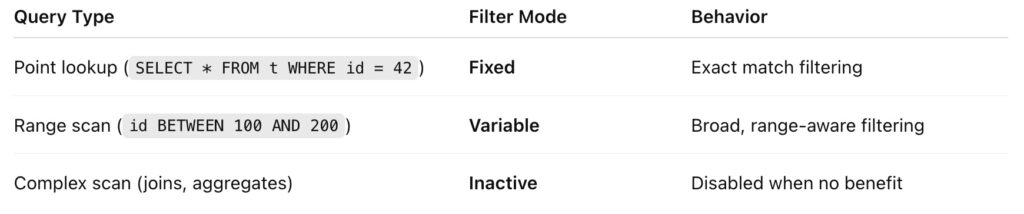
3️⃣ 🎚 Adaptive Filtering: Dynamic Modes per Query
DocDB doesn’t use a one-size-fits-all approach. It dynamically selects the right Bloom filter mode based on query type:
Result: Bloom filters work only when they save time — never when they waste CPU.
Even after an SST is deemed “possibly relevant,” DocDB continues to prune deeper at the block level.
Each SST block has its own Bloom filter that checks if the block might contain the desired key. If not, DocDB simply skips reading that block from disk.
That’s less I/O, less memory, and less CPU overhead — all while maintaining correctness.
5️⃣ 🧩 Filter and Index Splitting: Efficient Caching at Scale
To avoid pulling huge metadata into memory, DocDB splits filter and index data into sub-blocks, each with its own mini-index.
● 📦 Smaller chunks mean faster lookups
● 💾 Reduced cache footprint
● ⚙️ Better scalability for clusters storing terabytes of data
This architectural enhancement keeps Bloom filters lightweight and highly parallelizable — ideal for modern, multi-node workloads.
🔍 Observing Bloom Filters in Action
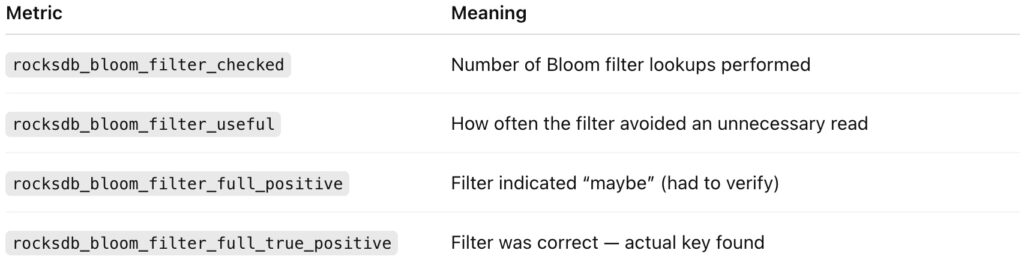
Although you can’t query Bloom filters from SQL, you can verify they’re working by checking DocDB metrics.
🧠 Option 1: Using the Tablet Server Metrics UI
Visit:
http://<tserver-ip>:9000/metrics
Look for these metrics:
🟢 A healthy system shows a high ratio of useful / checked — meaning Bloom filters are actively saving I/O.
YugabyteDB’s DocDB doesn’t just implement Bloom filters … it elevates them into a multi-layered, adaptive performance framework.
From skipping entire SSTs to filtering within blocks and sub-blocks, these internal optimizations eliminate wasted I/O and boost cache efficiency … all transparently, without you lifting a finger.
The result?
A distributed database that gets faster by doing less work — proving that in the world of performance, smart skipping beats brute force every time.
Have Fun!
My buddy works at Live! Casino in Westmoreland, PA, and they threw a big Halloween bash, complete with an award for the best costume. 🎃 This year’s winner? Bumblebee! 🐝💥