How to Diagnose an Invalid YSQL Index in YugabyteDB

When an index appears as INVALID in YugabyteDB, the first question is usually:

  • Why did the index become invalid?

For example, \d might show:

				
					Indexes:
    "orders_customer_idx" lsm (customer_id HASH) INVALID


Or a catalog query might show:

				
					 indisvalid
------------
 f


The key point is that pg_index records the current state of an index, but it does not preserve a historical error message explaining why the index became invalid. indisvalid = false means the index cannot safely be used for queries. indisready and indislive provide additional information about whether it is receiving writes and whether it is still considered live.

In YugabyteDB, an invalid index commonly points to one of several situations:

  • ● An online CREATE INDEX failed.
  • ● A UNIQUE index encountered duplicate data.
  • ● An index backfill timed out or stalled.
  • ● A YB-Master leader change interrupted a long-running backfill.
  • ● A PITR operation restored the database to a point while an index was only partly backfilled.
  • ● A partitioned parent index is intentionally invalid until all required child indexes are attached.

The steps below can help determine which case you are dealing with.

💡 Key Point

An INVALID index tells you the state of the index. It does not, by itself, tell you why the index became invalid. If possible, preserve the original CREATE INDEX error and relevant logs before dropping the index.

1. Find the Invalid Index

Start by identifying the invalid indexes and their catalog state:

				
					SELECT
    ni.nspname AS index_schema,
    ci.relname AS index_name,
    nt.nspname AS table_schema,
    ct.relname AS table_name,
    ci.relkind,
    i.indisunique,
    i.indisvalid,
    i.indisready,
    i.indislive,
    pg_get_indexdef(i.indexrelid) AS index_definition
FROM pg_index i
JOIN pg_class ci
    ON ci.oid = i.indexrelid
JOIN pg_namespace ni
    ON ni.oid = ci.relnamespace
JOIN pg_class ct
    ON ct.oid = i.indrelid
JOIN pg_namespace nt
    ON nt.oid = ct.relnamespace
WHERE NOT i.indisvalid
ORDER BY ni.nspname, ci.relname;


The most useful columns are:

Column Meaning
indisvalid Whether the index can safely be used by queries.
indisready Whether the index is ready to receive changes from INSERT and UPDATE operations.
indislive Whether the index is still considered live rather than being dropped.
relkind i indicates a regular index; I indicates a partitioned index.

The pg_index catalog semantics are important here:

  • An index can be invalid for queries while still being maintained by writes when indisready is true.
🔎 Need an Easy Way to Find Invalid Indexes?

This tip focuses on determining why an index is invalid. If you first need a quick way to identify invalid indexes across a YSQL database, including a reusable view for finding them, see: Check for Invalid Indexes in YSQL.

Before dropping an invalid index, determine why it is invalid. A partitioned parent index may be intentionally invalid while its child indexes are being created and attached.

The companion tip demonstrates \d, catalog queries, and a reusable invalid_indexes_vw for identifying invalid indexes.

2. Check Whether It Is a Partitioned Parent Index

Before assuming something failed, determine whether the invalid index belongs to a partitioned table.

This is important because an invalid index is not always an error.

When building indexes concurrently on a partitioned table, YugabyteDB documents creating the parent index using ONLY:

				
					CREATE INDEX activity_history_lookup_idx
ON ONLY activity_history (
    account_id,
    activity_date,
    activity_id
);


The parent index is deliberately created in an INVALID state.

Corresponding indexes are then created on the individual partitions:

				
					CREATE INDEX CONCURRENTLY activity_history_2026_01_idx
ON activity_history_2026_01 (
    account_id,
    activity_date,
    activity_id
);

CREATE INDEX CONCURRENTLY activity_history_2026_02_idx
ON activity_history_2026_02 (
    account_id,
    activity_date,
    activity_id
);


Then attach them:

				
					ALTER INDEX activity_history_lookup_idx
ATTACH PARTITION activity_history_2026_01_idx;

ALTER INDEX activity_history_lookup_idx
ATTACH PARTITION activity_history_2026_02_idx;


Once all required partition indexes have been attached, YugabyteDB promotes the parent index out of the invalid state.

You can see which child indexes are attached to a parent index with:

				
					SELECT
    parent.relname AS parent_index,
    child.relname AS attached_child_index
FROM pg_inherits i
JOIN pg_class parent
    ON parent.oid = i.inhparent
JOIN pg_class child
    ON child.oid = i.inhrelid
WHERE parent.oid = 'public.activity_history_lookup_idx'::regclass
ORDER BY child.relname;
				
			
⚠️ Don’t Automatically Drop Every Invalid Index

A partitioned parent index created with CREATE INDEX ... ON ONLY is expected to remain INVALID until the required partition indexes are attached. In this case, complete the child-index creation and attachment process rather than treating the parent index as a failed backfill.

3. Look for the Original CREATE INDEX Error

If the index is not an intentionally invalid partitioned parent, the next place to look is the error returned by the original CREATE INDEX.

Current YugabyteDB documentation specifically identifies duplicate-key errors, server-side backfill timeouts, and client-side backfill timeouts as common causes of failed online index creation.

Duplicate Values in a UNIQUE Index

A UNIQUE index might fail with an error such as:

				
					ERROR: duplicate key value violates unique constraint "orders_customer_idx"


That means the backfill encountered rows that violate the index’s uniqueness requirement. YugabyteDB documents this as a cause of an invalid index.

For a simple single-column index:

				
					SELECT customer_id, COUNT(*)
FROM orders
GROUP BY customer_id
HAVING COUNT(*) > 1;


For a multi-column unique index:

				
					SELECT column1, column2, COUNT(*)
FROM table_name
GROUP BY column1, column2
HAVING COUNT(*) > 1;


If the index is partial or expression-based, make sure your duplicate check reproduces the same predicate or expression.

You can retrieve the complete definition with:

				
					SELECT pg_get_indexdef('public.orders_customer_idx'::regclass);


Resolve the duplicate data before recreating the index.

4. Look for a Server-Side Backfill Timeout

Another common failure looks similar to:

				
					ERROR: Backfilling indexes { orders_customer_idx }
       for tablet ...
       from key ''
       in state kFailed


YugabyteDB identifies this pattern as a repeatedly hit server-side backfill timeout.

One of the important flags involved is: ysql_index_backfill_rpc_timeout_ms

The current YB-Master flag reference lists its default as: 300000 ms (5 minutes)

The current YB-TServer documentation lists backfill_index_timeout_grace_margin_ms = -1 as the default, allowing YugabyteDB to calculate the margin automatically. For YSQL, the baseline automatic margin is at least three minutes.

A timeout does not necessarily mean that simply increasing a flag is the correct fix. Large batches, insufficient tablet parallelism, cluster load, catalog-version stalls, or other environmental conditions can all contribute.

🚀 Is the Problem an Index Backfill Timeout?

If the invalid index was caused by a backfill timeout, first determine whether the issue is timeout protection, insufficient backfill throughput, limited tablet-level parallelism, catalog-version lag, or cluster load.

Those companion tips cover normal tuning, low-tablet-count scenarios, catalog-version stalls, partitioned-table strategies, and command-line monitoring.

5. Distinguish a Client-Side Backfill Timeout

A different error looks like:

				
					ERROR: BackfillIndex RPC ...
       timed out after 86400.000s


That indicates the client-side backfill timeout was reached. YugabyteDB’s current YB-TServer documentation lists:

				
					backfill_index_client_rpc_timeout_ms = 86400000


which is one day.

This is different from the shorter server-side timeout that controls an individual backfill operation.

YugabyteDB’s CREATE INDEX troubleshooting documentation also notes that a YB-Master leader change during the backfill may result in this type of failure and recommends retrying the index creation while watching the master leader.

💡 Server-Side vs. Client-Side Timeout

Don’t treat every backfill timeout as the same problem. ysql_index_backfill_rpc_timeout_ms protects individual server-side backfill operations, while backfill_index_client_rpc_timeout_ms limits the overall concurrent index backfill stage.

6. Check the YB-Master Tasks Page

If the original SQL error is no longer available, inspect the YB-Master background tasks around the time the index was created.

Open:

				
					http://<yb-master-ip>:7000/tasks


Look for tasks related to index creation or backfill.

For long-running builds, the task page can also help determine whether backfill is still active rather than actually failed.

You can inspect the page from the command line as well:

				
					lynx http://<yb-master-ip>:7000/tasks -dump | grep -A 2 -i Backfill


For additional examples, see: Monitor Index Backfill from the Command Line

7. Search the YB-Master and YB-TServer Logs

If the index build happened earlier and the original SQL error is gone, correlate the approximate creation time with the YugabyteDB logs.

Start with the YB-Master leader (change to use your index name):

				
					grep -i "orders_customer_idx" yb-master.INFO


Then search more broadly:

				
					grep -iE "backfill|BackfillIndex|kFailed|timed out|duplicate key" \
  yb-master.INFO


Useful patterns include:

				
					Backfilling indexes
BackfillIndex
kFailed
timed out
duplicate key


Depending on the failure, corresponding YB-TServer/PostgreSQL logs from the same time period may contain additional detail.

8. Check for a Catalog-Version Stall

Some index backfills do not fail because data movement itself is too slow.

You may instead see:

				
					ERROR: timed out waiting for postgres backends to catch up
DETAIL: 1 backends on database 13515 are still behind catalog version 2.


In that case, a PostgreSQL backend is still operating against an older catalog version and can prevent the schema-change process from advancing.

Possible contributors include:

  • ● Long-running transactions
  • ● Idle-in-transaction sessions
  • ● Long-running queries
  • ● Abandoned connections
  • ● Application connection pools holding transactions open

The companion tip below goes much deeper into this specific condition:

That tip specifically covers identifying the backend preventing catalog-version progress.

9. Consider Point-in-Time Recovery

PITR introduces another less obvious possibility.

If a YSQL database is restored to a point in time while an index backfill was still underway, the restored database can contain a partly backfilled index. YugabyteDB ignores these partly backfilled indexes during reads and currently documents dropping and recreating them to restart the backfill.

The documentation recommends finding them with:

				
					SELECT pg_class.relname
FROM pg_index
JOIN pg_class
    ON pg_index.indexrelid = pg_class.oid
WHERE NOT indisvalid;


If unexpected invalid indexes appear immediately following PITR, check whether their original creation time overlaps the restore point.

Quick Diagnosis Guide

Possible Cause Diagnostic Clue Next Step
Duplicate values in a UNIQUE index duplicate key value violates unique constraint Resolve the duplicate data, then recreate the index.
Server-side backfill timeout Backfilling indexes ... kFailed Investigate batch size, RPC timeout, tablet parallelism, and cluster load.
Client-side backfill timeout BackfillIndex RPC ... timed out Check total backfill duration, master leadership, and actual backfill progress.
Catalog-version stall timed out waiting for postgres backends to catch up Identify the backend preventing catalog-version advancement.
Partitioned parent index relkind = 'I' and child indexes are not all attached Create and attach the remaining child indexes.
PITR during index backfill Index is invalid after restoring to a point during its creation Drop and recreate the partly backfilled index.

10. Drop and Recreate a Failed Index

Once you have confirmed that the index is genuinely the result of a failed online index build… rather than an intentionally invalid partitioned parent… correct the underlying cause and drop the invalid index.

For example:

				
					DROP INDEX orders_customer_idx;


Then recreate it.

YugabyteDB’s current CREATE INDEX documentation states that failed online index creation can leave an invalid index behind. Such an index is not usable by queries and continues to cause internal operations, so failed indexes should be dropped.

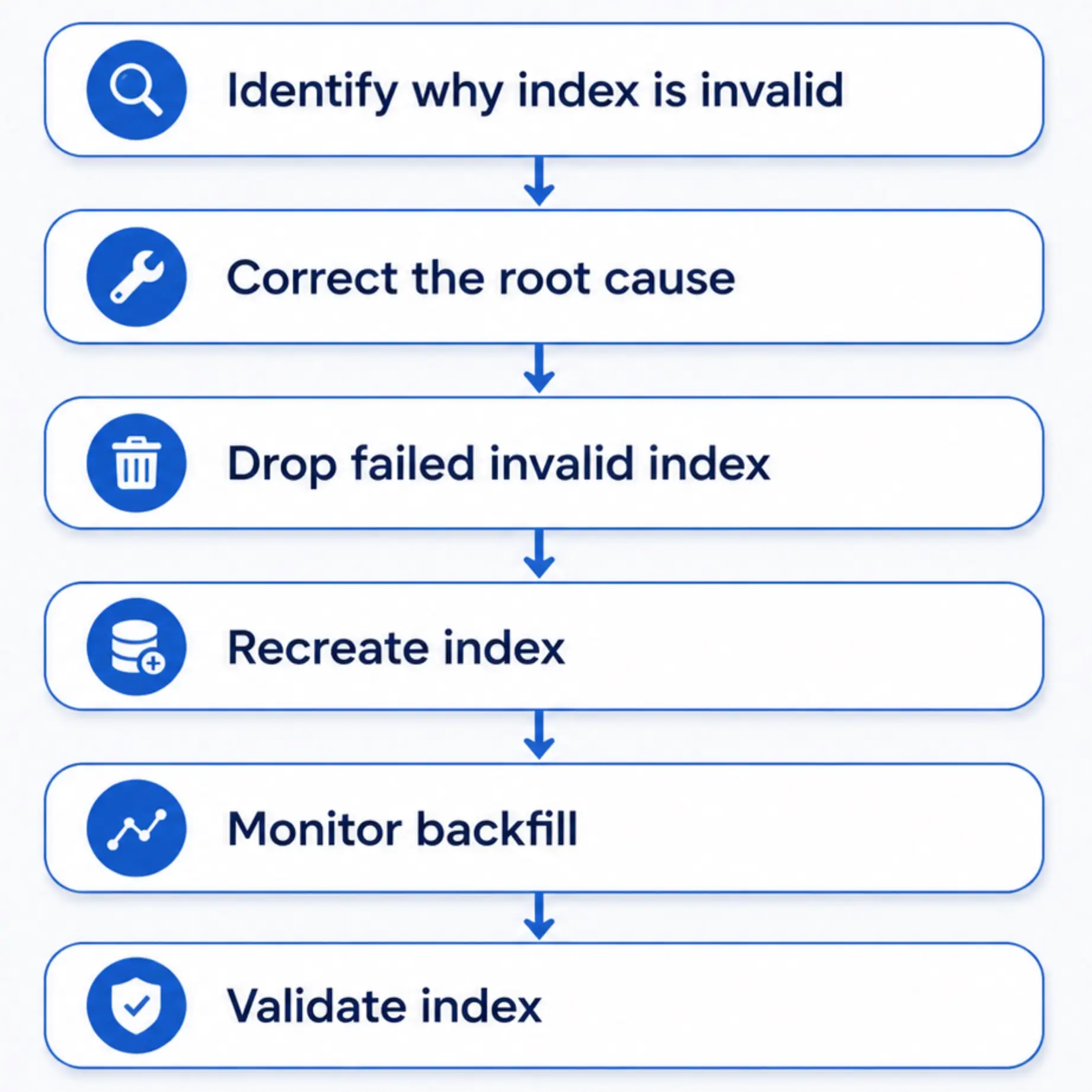
The important sequence is:

11. Validate the Recreated Index

After recreating the index, confirm its catalog state (change to use your index name):

				
					SELECT
    c.relname,
    i.indisvalid,
    i.indisready,
    i.indislive
FROM pg_index i
JOIN pg_class c
    ON c.oid = i.indexrelid
WHERE c.oid = 'public.orders_customer_idx'::regclass;


A completed normal index should look like:

				
					.       relname       | indisvalid | indisready | indislive
----------------------+------------+------------+-----------
 orders_customer_idx  | t          | t          | t


You can then use yb_index_check() to verify that the index contents are consistent with the base table:

yb_index_check() detects missing, spurious, and inconsistent index rows and also validates uniqueness for unique indexes. It can recursively validate child indexes when called on a partitioned index.

✅ Index Validity vs. Index Consistency

These are related but different checks. An indisvalid = false index cannot safely be used for queries. An index can also be marked valid while you still want to verify that its contents match the base table.

For additional consistency-check techniques, see: How to Do a Simple Index Consistency Check .

The existing consistency-check tip demonstrates a simple table-versus-index validation approach and discusses yb_index_check().

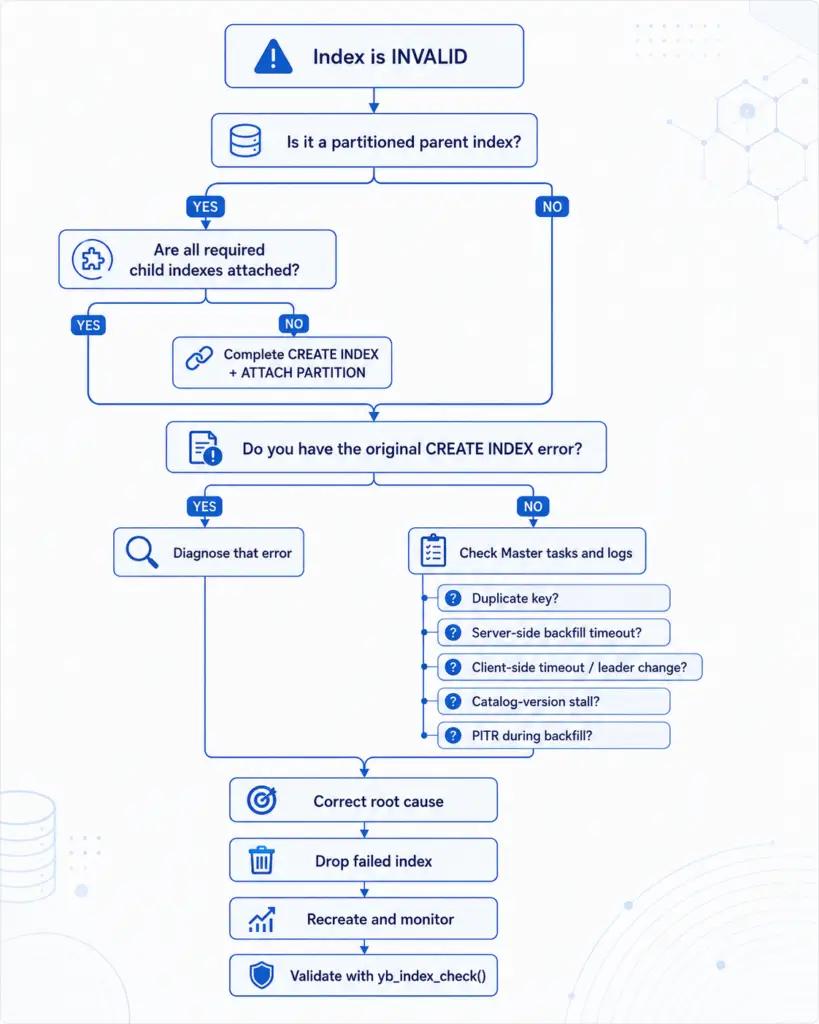
A Practical Troubleshooting Flow

Final Takeaway

An INVALID YSQL index tells you the current state of the index, not the historical reason it became invalid.

A good troubleshooting sequence is:

  • ● Find indexes where indisvalid = false.
  • ● Determine whether the index is an intentionally invalid partitioned parent.
  • ● Find the original CREATE INDEX error whenever possible.
  • ● Check for duplicate-key violations.
  • ● Distinguish server-side and client-side backfill timeouts.
  • ● Check YB-Master tasks and logs.
  • ● Investigate catalog-version stalls.
  • ● Consider whether PITR restored the database during an active backfill.
  • ● Correct the underlying problem before recreating the index.
  • ● Monitor the new backfill.
  • ● Validate the completed index with yb_index_check().

Most importantly, don’t assume every invalid index should immediately be dropped. A failed backfill and an intentionally incomplete partitioned parent can both show INVALID, but they require very different remediation.

References

ReferenceDescription
YugabyteDB CREATE INDEXOnline index backfill, partitioned indexes, invalid indexes, and common backfill errors.
yb_index_check()Built-in YSQL index consistency verification.
Point-in-Time RecoveryDocuments partly backfilled YSQL indexes after PITR.
Check for Invalid Indexes in YSQLFind invalid indexes using \d, YSQL catalogs, or a reusable view.
How to Speed Up YSQL Index BackfillIndex-backfill performance and timeout tuning.
Advanced YSQL Index Backfill TuningLow-tablet-count, partitioned-table, and advanced backfill tuning.
How to Diagnose and Fix Stalled Index BackfillsDiagnose catalog-version lag and stalled index creation.
Monitor Index Backfill from the Command LineMonitor YB-Master index-backfill activity without a browser.
How to Do a Simple Index Consistency CheckAdditional techniques for verifying that an index matches its base table.

Have Fun!