Build an External Field-Level Audit Trail with YugabyteDB CDC

Three-Part Series: Tracking Data Changes in YugabyteDB

  1. Keep the Current and Previous Values in the Same YugabyteDB Row
  2. Build a Reusable Field-Level Audit Log with JSONB in YugabyteDB
  3. Build an External Field-Level Audit Trail with YugabyteDB CDC

This tip is Part 3 of a three-part series exploring different ways to track data changes in YugabyteDB.

In Part 1, we retained the current and immediately preceding values in the same row. In Part 2, we created a synchronous, transactionally consistent field-level audit history inside YugabyteDB.

In this final tip, we will move the audit processing outside the original database transaction by using YugabyteDB Change Data Capture.

For the demonstration, we will use YugabyteDB’s bundled pg_recvlogical command-line utility to read committed changes directly from a YSQL logical replication slot and display them in the terminal. No Debezium, Kafka, or Kafka Connect installation is required for the demo.

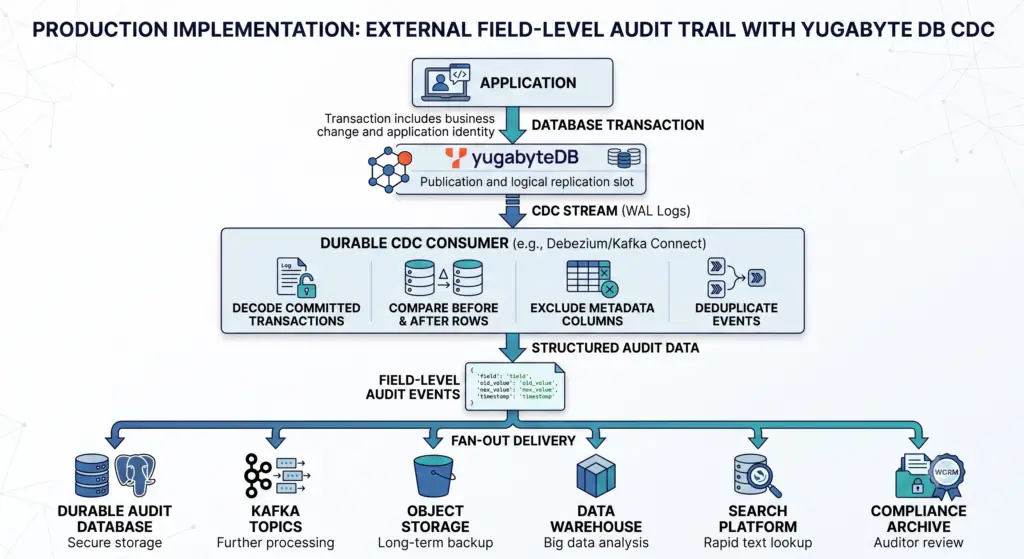
We will also explain how the same approach fits into a production workflow using a durable, monitored CDC consumer that transforms row changes into field-level audit events and writes them to external storage.

Version and compatibility note: YugabyteDB supports CDC through the PostgreSQL logical replication protocol starting with YugabyteDB 2024.1.1. The feature is currently documented as Early Access, so review the behavior, limitations, and technical advisories for the exact YugabyteDB release being deployed before using it for a production audit requirement.

YugabyteDB includes a compatible pg_recvlogical binary in the <yugabyte-db-directory>/postgres/bin/ directory. Use the binary bundled with your YugabyteDB installation rather than one from a separate PostgreSQL installation to avoid potential compatibility issues.

When This Pattern Is a Good Fit

A CDC-based audit pipeline is useful when:

  • ● Audit records should be stored outside the operational database.
  • ● Change volume is too high for synchronous field-level trigger inserts.
  • ● Multiple systems need to consume the same changes.
  • ● Audit events must feed object storage, a data lake, search, analytics, or a compliance archive.
  • ● Long-term retention should be managed independently of the source database.
  • ● A small delay between the source transaction and the final audit record is acceptable.

CDC does not automatically produce the final field-level audit file. It provides the committed row-change stream. A downstream processor is still responsible for comparing old and new row values and producing the desired audit format.

How the CDC Audit Pipeline Works

				
					Application
    |
    | INSERT, UPDATE, or DELETE
    v
YugabyteDB
    |
    | Logical replication slot
    v
CDC consumer
    |
    | Compare old and new row images
    v
Field-level audit records
    |
    +--> Audit database
    +--> Object storage
    +--> Data warehouse
    +--> Search platform
    +--> Compliance archive


YugabyteDB logical replication preserves transaction boundaries. Changes are emitted after the transaction commits, and the records between a BEGIN and COMMIT message belong to the same transaction.

Demo Versus Production

This tip deliberately starts with a simple command-line demonstration.

Demo Workflow Production Workflow
pg_recvlogical prints changes to a terminal. A managed connector or long-running replication client consumes the slot continuously.
test_decoding produces human-readable text. A structured output plugin and consumer produce validated change events.
Output is inspected manually. Events are transformed, deduplicated, monitored, and written to durable storage.
Restart behavior is tested interactively. Checkpointing, retries, reconnects, and duplicate handling are automated.
The stream is observed for a short demonstration. Consumer lag, retained history, failures, and end-to-end delivery are continuously monitored.

Step 1: Create a Generic Source Table

Create a schema for the demo:

				
					CREATE SCHEMA audit_demo;


Create a generic source table:

				
					CREATE TABLE audit_demo.sample_record (
    record_id      BIGINT PRIMARY KEY,
    record_label   TEXT NOT NULL,
    record_status  TEXT NOT NULL,
    priority_level INTEGER NOT NULL,
    changed_by     TEXT NOT NULL,
    changed_at     TIMESTAMPTZ NOT NULL
);


The changed_by and changed_at columns contain application-level audit metadata.

Insert an initial row:

				
					INSERT INTO audit_demo.sample_record (
    record_id,
    record_label,
    record_status,
    priority_level,
    changed_by,
    changed_at
)
VALUES (
    1001,
    'Example Record',
    'pending',
    1,
    'system_seed',
    clock_timestamp()
);


Verify the row:

				
					SELECT *
FROM audit_demo.sample_record
WHERE record_id = 1001;


Expected output:

				
					.record_id |  record_label  | record_status | priority_level | changed_by |          changed_at
-----------+----------------+---------------+----------------+------------+-------------------------------
      1001 | Example Record | pending       |              1 | system_seed| 2026-07-18 14:15:12.487921+00
(1 row)


Step 2: Enable Complete Before Images

A field-level audit processor needs both:

  • ● The row values before the update
  • ● The row values after the update

Set the table’s replica identity to FULL:

				
					ALTER TABLE audit_demo.sample_record
REPLICA IDENTITY FULL;


YugabyteDB’s default replica identity is CHANGE, which is optimized to emit only the changed columns and key information. FULL preserves the previous values of all columns for UPDATE and DELETE events.

Set replica identity before creating the slot: YugabyteDB records each table’s effective replica identity when the replication slot is created. Changing a table to REPLICA IDENTITY FULL after slot creation does not change the behavior of that existing slot. Drop and recreate the slot if the replica identity must be changed.

Without a complete before image, the downstream processor cannot reliably produce a field-level record containing both the old and new values.

Step 3: Create a Logical Replication Slot

Create a logical replication slot using the test_decoding output plugin:

				
					SELECT *
FROM pg_create_logical_replication_slot(
    'field_audit_slot',
    'test_decoding'
);


Example output:

				
					.    slot_name     | lsn
-------------------+-----
 field_audit_slot  | 0/2
(1 row)


A replication slot represents an ordered stream of committed changes from one database. The slot maintains progress so that a consumer can disconnect and resume. YugabyteDB supports the yboutput, pgoutput, test_decoding, and wal2json output plugins, all of which are packaged with YugabyteDB.

The test_decoding plugin is appropriate for this demonstration because it converts logical changes into readable text. PostgreSQL describes it as an example and testing plugin rather than a complete production integration format.

Step 4: Start the Command-Line CDC Consumer

Open another terminal.

Use the pg_recvlogical binary included with YugabyteDB:

				
					PGPASSWORD='your_password' \
<yugabyte-db-directory>/postgres/bin/pg_recvlogical \
  --dbname="host=127.0.0.1 port=5433 dbname=yugabyte user=cdc_user sslmode=disable" \
  --slot=field_audit_slot \
  --start \
  --file=-


The --file=- option sends the decoded changes to standard output.

The YugabyteDB documentation uses this same pattern to consume a logical replication slot and print changes directly to a terminal.

For an encrypted production connection, replace sslmode=disable with the appropriate TLS configuration.

Use the bundled utility: Run the pg_recvlogical executable from the YugabyteDB installation rather than an unrelated PostgreSQL client installation. This avoids protocol and compatibility differences.

Step 5: Perform an Audited Update

From ysqlsh, update two business fields:

				
					UPDATE audit_demo.sample_record
SET record_status  = 'active',
    priority_level = 2,
    changed_by     = 'demo_user_101',
    changed_at     = clock_timestamp()
WHERE record_id = 1001;


Verify the updated row:

				
					SELECT *
FROM audit_demo.sample_record
WHERE record_id = 1001;


Output:

				
					.record_id |  record_label  | record_status | priority_level |  changed_by  |          changed_at
-----------+----------------+---------------+----------------+--------------+-------------------------------
      1001 | Example Record | active        |              2 | demo_user_101| 2026-07-18 14:22:41.418279+00
(1 row)


The application identity is stored in the source row because CDC streams table changes and source metadata—it does not automatically include transaction-local application settings.

For example, this value can be read by a trigger inside the transaction:

				
					SET LOCAL app.audit_user = 'demo_user_101';


However, the setting itself is not a column in the changed row and should not be expected to appear in the CDC event.

Step 6: Observe the CDC Output

The terminal running pg_recvlogical displays output similar to:

				
					BEGIN 42

table audit_demo.sample_record: UPDATE:
old-key:
    record_id[bigint]:1001
    record_label[text]:'Example Record'
    record_status[text]:'pending'
    priority_level[integer]:1
    changed_by[text]:'system_seed'
    changed_at[timestamp with time zone]:'2026-07-18 14:15:12.487921+00'
new-tuple:
    record_id[bigint]:1001
    record_label[text]:'Example Record'
    record_status[text]:'active'
    priority_level[integer]:2
    changed_by[text]:'demo_user_101'
    changed_at[timestamp with time zone]:'2026-07-18 14:22:41.418279+00'

COMMIT 42


The actual test_decoding output normally appears as a single line for each row change. It is formatted across multiple lines here for readability.

The important sections are:

  • old-key contains the previous row values because replica identity was set to FULL.
  • new-tuple contains the row values after the update.
  • BEGIN and COMMIT identify the transaction boundary.

The test_decoding implementation labels the previous tuple as old-key, even when REPLICA IDENTITY FULL causes the complete old row to be included.

Step 7: Produce Field-Level Audit Records

The downstream processor compares matching fields in the old and new row images.

The business fields that changed are:

				
					record_status:
    pending -> active

priority_level:
    1 -> 2


The resulting field-level audit records could look like this:

User Field Changed Old Value New Value Date Timestamp
demo_user_101 record_status pending active 2026-07-18 14:22:41+00
demo_user_101 priority_level 1 2 2026-07-18 14:22:41+00

The processor uses:

  • changed_by as the audit user
  • changed_at as the application change timestamp
  • record_id as the source-row identifier

The processor would normally exclude those metadata fields from the list of business fields reported as changed.

Example External Audit Event

A field-level event written to a JSON Lines file, object store, or event stream might look like:

				
					{
  "actor_user": "demo_user_101",
  "table_schema": "audit_demo",
  "table_name": "sample_record",
  "row_identifier": {
    "record_id": 1001
  },
  "field_changed": "record_status",
  "old_value": "pending",
  "new_value": "active",
  "changed_at": "2026-07-18T14:22:41.418279Z"
}


A second event would capture the priority change:

				
					{
  "actor_user": "demo_user_101",
  "table_schema": "audit_demo",
  "table_name": "sample_record",
  "row_identifier": {
    "record_id": 1001
  },
  "field_changed": "priority_level",
  "old_value": 1,
  "new_value": 2,
  "changed_at": "2026-07-18T14:22:41.418279Z"
}


Do Not Build a Production Parser Around test_decoding

The text emitted by test_decoding is helpful for:

  • ● Demonstrations
  • ● Troubleshooting
  • ● Confirming that the slot is working
  • ● Inspecting replica-identity behavior
  • ● Verifying which values are present
  • ● Small proofs of concept

It is not an ideal production event contract.

A production consumer should use a structured output plugin and a client designed to understand its replication protocol. YugabyteDB packages four logical-decoding output plugins.

Output Plugin Typical Use
test_decoding Human-readable testing, demonstrations, and troubleshooting
yboutput YugabyteDB-specific structured logical replication and the YugabyteDB Connector
pgoutput PostgreSQL-compatible structured logical replication using publications
wal2json JSON-oriented decoding for a compatible custom replication consumer

yboutput is YugabyteDB-specific and supports YugabyteDB’s default CHANGE replica identity. pgoutput follows PostgreSQL’s standard format but does not support replica identity CHANGE in YugabyteDB. For this audit pattern, the table uses FULL because complete old values are required.

A Real Production Workflow

A production implementation would look more like this:

The durable consumer might be:

  • ● The YugabyteDB Connector running through Kafka Connect
  • ● A custom service using the PostgreSQL logical replication protocol
  • ● A supported integration using yboutput or pgoutput
  • ● A custom replication client using wal2json

The YugabyteDB Connector performs an initial consistent snapshot and then continuously streams committed row changes. It records its progress using LSN values so it can resume after a restart.

Capturing the Application User

The database role connected through a shared pool may be something generic, such as:

				
					application_service


That does not identify the person or service that initiated a particular business change.

A production design needs an explicit application-identity strategy.

Identity Pattern Description
Audit columns in the source row Store values such as changed_by, changed_at, and a request identifier in each audited row.
Transactional outbox Write a separate application event containing the user and business context in the same transaction as the source change.
Stream the trigger audit table Use the JSONB trigger from Tip #2 to capture the identity synchronously, and use CDC to move those audit rows to external storage.
Correlation identifier Store a request ID in the row and join it downstream with authenticated application logs.

The source-row approach is simple, but the outbox or trigger-plus-CDC patterns may be better when audit context should not be added to every operational table.

Production Consumer Responsibilities

The CDC consumer is more than a row-comparison script.

A production implementation should handle:

● Transaction Boundaries

Process all row events between BEGIN and COMMIT as one committed transaction.

Do not permanently publish part of a transaction and then lose the rest.

● Field Comparison

For an update:

  • 1. Read the complete old row.
    2. Read the complete new row.
    3. Match columns by name.
    4. Compare each old and new value.
    5. Exclude primary-key and audit-metadata fields as appropriate.
    6. Produce one audit event for each changed business field.

● Deterministic Event Identifiers

Use source metadata such as:

				
					replication slot
 + LSN
 + table
 + row identifier
 + field name


to construct a deterministic audit-event key.

Do not generate only a new random identifier every time an event is received. A retransmitted CDC event would then appear to be a new audit event.

● Duplicate Handling

YugabyteDB logical replication provides at-least-once delivery. If a consumer or server fails before progress is fully acknowledged, an entire transaction can be transmitted again. Consumers must therefore tolerate duplicates. LSN values remain deterministic for the lifetime of a slot and can be used as part of client-side duplicate detection.

● Durable Checkpointing

Persist the last successfully processed transaction position only after the audit destination confirms that all corresponding records were stored.

● Initial Snapshot

A production destination may need both:

  • ● Existing source data as a baseline
  • ● Changes that occur after streaming begins

The initial snapshot and replication starting point must be coordinated so that rows are neither lost nor applied twice. The YugabyteDB Connector can perform an initial consistent snapshot before continuing with the live change stream.

● Table Selection

Use publications and include/exclude rules to limit CDC to the tables that actually require auditing.

A command-line test_decoding demonstration is intentionally broad. A production pipeline should avoid decoding unrelated tables when only a defined set of business tables is required.

● Schema Evolution

The consumer must handle:

  • ● Columns being added
  • ● Columns being removed
  • ● Columns being renamed
  • ● Data types changing
  • ● Tables being added to or removed from a publication

Starting with YugabyteDB 2026.1, publication changes can be reflected in logical replication at the correct commit point when implicit publication handling is enabled, which is the default. YugabyteDB 2026.1 also adds support for selected DDL operations that rewrite non-colocated tables, although restrictions still apply.

● Security

Use:

  • ● A dedicated replication role
  • ● Only the required table and replication permissions
  • ● TLS for database connections
  • ● Managed secrets rather than hard-coded passwords
  • ● Restricted access to the audit destination
  • ● Encryption and retention policies appropriate for the captured data

YugabyteDB logical replication uses standard replication connections and supports the corresponding authentication, authorization, SSL, and connection configuration.

CDC Is Asynchronous

The source transaction does not wait for the final audit event to be written to external storage.

The sequence is:

  • 1. The source transaction commits.
    2. YugabyteDB makes the committed change available to CDC.
    3. The consumer receives the transaction.
    4. The consumer creates field-level events.
    5. The destination stores the audit records.

This means there may be a delay between the database commit and the time the audit record becomes visible in its final repository.

That differs from the JSONB trigger pattern, where the source update and audit inserts commit or roll back together.

JSONB Trigger Versus CDC

Consideration JSONB Trigger CDC Pipeline
Processing model Synchronous Asynchronous
Audit writes in source transaction Yes No
Immediately queryable inside YugabyteDB Yes Only when a consumer writes it back
Additional infrastructure Audit table and trigger Consumer, monitoring, and external destination
External long-term retention Requires export or archival Natural fit
Multiple downstream uses Additional integration required Designed for external consumers

Performance and Retention Considerations

CDC avoids inserting one audit row per changed field inside the application transaction, but it is not free.

The CDC pipeline consumes resources for:

  • ● Logical decoding
  • ● Virtual WAL processing
  • ● Network traffic
  • ● Consumer processing
  • ● Checkpoint management
  • ● Audit transformation
  • ● External storage
  • ● Monitoring

YugabyteDB retains CDC resources, including WAL-related information, until the consuming client acknowledges the corresponding transactions or configured retention limits are reached.

REPLICA IDENTITY FULL requires YugabyteDB to preserve previous row versions for updates and deletes. Retention barriers delay cleanup of history until those events have been streamed and acknowledged. An unavailable or severely lagging consumer can therefore increase retained history and may degrade read performance because compaction cannot clean up the required row versions.

Monitor the entire pipeline: Track replication-slot health, consumer lag, the oldest unprocessed transaction, retained history, disk usage, consumer errors, destination failures, and end-to-end delivery latency.

Limitations

Limitation What It Means
Asynchronous visibility The source transaction may commit before the field-level audit record reaches its final destination.
Additional infrastructure A durable consumer, transformation logic, monitoring, and an external audit destination must be operated.
Application identity is not automatic The application user must be stored in the row, an outbox event, a trigger-created audit record, or correlated metadata.
Replica identity must be planned before slot creation Changing replica identity after a slot is created does not alter that slot’s behavior. A new slot is required.
Before-image retention has a cost A lagging consumer can retain old row versions and CDC resources longer, increasing storage pressure and potentially affecting read performance.
Duplicate transactions are possible Logical replication provides at-least-once delivery, so consumers must use idempotent writes or deterministic deduplication.
One consumer per slot A replication slot should be consumed by no more than one active consumer. Create separate slots when independent consumers need their own positions.
DDL and feature limitations vary by release Table rewrites, truncation, colocated tables, read replicas, tablet splitting, same-transaction before images, and other behaviors have version-specific restrictions.
Not a database-administration audit log This pattern captures row-level data changes. DDL, login, privilege, and administrative activity require separate auditing controls.

The current YugabyteDB documentation lists additional release-specific limitations, including DDL restrictions, truncation behavior, read-replica support, tablet splitting, same-transaction before images, xCluster interactions, and PITR recovery requirements.

Stop and Remove the Demo Slot

Stop pg_recvlogical with Ctrl+C.

When the demo is complete, remove the replication slot:

				
					SELECT pg_drop_replication_slot(
    'field_audit_slot'
);


Dropping the slot permanently discards its saved replication position. Do not drop a production slot unless the consumer is being retired or the stream will be deliberately rebuilt.

Remove the demo objects:

				
					DROP SCHEMA audit_demo CASCADE;


Final Takeaway

YugabyteDB’s bundled pg_recvlogical utility provides a simple way to observe CDC directly from the command line without first deploying Debezium, Kafka, or Kafka Connect.

The demonstration shows the core building blocks of a field-level CDC audit pipeline:

  • ● Set REPLICA IDENTITY FULL before creating the slot.
  • ● Create a logical replication slot.
  • ● Read committed changes with pg_recvlogical.
  • ● Compare the old and new row images.
  • ● Extract the application identity from captured data.
  • ● Produce one audit record for each changed business field.

However, pg_recvlogical and test_decoding should be treated as demonstration and troubleshooting tools—not the complete production audit architecture.

Start simple, design for production: Use YugabyteDB’s bundled pg_recvlogical utility to verify the stream and inspect its before-and-after values. For production, use a durable, monitored CDC consumer that preserves transaction boundaries, checkpoints progress, handles duplicates, transforms row changes into field-level events, and writes them to reliable external storage.

This completes the three-part progression:

Resources

ResourceDescription

Explore Change Data Capture
YugabyteDB CDC overview, logical-replication example, bundled
pg_recvlogical location, and supported versions.

Logical Replication Key Concepts
Replication slots, LSNs, publications, replica identity, transaction boundaries, and supported output plugins.

Logical Replication CDC
YugabyteDB logical-replication architecture, delivery guarantees, configuration guidance, and current limitations.

Logical Replication Advanced Configuration
CDC retention, consumer lag, before-image history, WAL retention, and performance considerations.

YugabyteDB Connector
Production connector architecture, initial snapshots, restart behavior, checkpointing, and compatibility guidance.

PostgreSQL pg_recvlogical
Command-line options for starting, stopping, and consuming a PostgreSQL-compatible logical replication stream.

PostgreSQL test_decoding
Reference for the human-readable logical-decoding plugin used in the command-line demonstration.

Have Fun!

Time is flying, but is it really almost Halloween already? I only stopped by Lowe’s today (in July) for some paint and stumbled across this giant pumpkin-headed crew. They’re definitely getting an early start on spooky season this year! 🎃👻